
Independent comparison site · Advertiser Disclosure Medical Alert: (877) 909-4209 | Lifeline: (877) 488-1101
Compare Options

How to Coordinate Care for an Aging Parent When Siblings Disagree

How to Coordinate Care for an Aging Parent When Siblings Disagree

Quick Answer: When siblings disagree about an aging parent’s care, start with your parent’s wishes and a shared understanding of what help is needed. Hold a focused family meeting, divide specific responsibilities, and write down commitments and costs. For unresolved medical, practical, or legal questions, involve the appropriate professional rather than letting an argument decide the outcome.

You may agree that your parent needs support but disagree about almost everything else: who should visit, whether paid help is necessary, or why one person is handling every appointment. The goal is not to settle every family disagreement. It is to build a workable care plan that respects your parent and does not rely on one sibling doing everything.

Why Siblings May See Caregiving Differently

A sibling who visits daily may notice difficulties that someone calling once a week never sees. Old family roles, different financial circumstances, and fears about a parent’s changing health can also shape the discussion. Family Caregiver Alliance describes how these dynamics can complicate caregiving with siblings. Before assuming someone does not care, identify whether you disagree about the facts, the workload, the cost, or the decision itself.

1. Start With Your Parent’s Wishes

Ask your parent what matters most: staying at home, keeping familiar routines, maintaining privacy, or receiving help from a particular person. Include them in planning as fully as possible and ask whom they want involved. Needing help with groceries or transportation does not, by itself, mean someone cannot make their own choices.

Keep practical coordination separate from legal decision-making. The person organizing appointments is not automatically authorized to make medical or financial decisions. A health care proxy is a separate role governed by the relevant documents and state rules. The National Institute on Aging explains how a health care proxy can act when a person cannot make their own medical decisions. When authority is unclear, ask the care team and a qualified attorney to clarify it.

2. Compare Specific Observations, Not Accusations

Replace broad statements such as “Dad cannot manage anymore” with details you can discuss: two missed appointments, difficulty carrying groceries, or a request for help with meals. Ask each sibling what they have observed, including what your parent is still managing well.

Create one short list separating confirmed needs from questions. For example: “Transportation is needed on Thursdays” is different from “We need to ask the clinician whether more help is necessary.” When you disagree about health or safety, ask the appropriate professional for an assessment instead of trying to diagnose the situation yourselves.

Respect your parent’s privacy as you share information. Ask the clinician’s office how your parent can identify the people involved in care. HHS explains when providers may share relevant information with family members; being an adult child does not automatically provide unrestricted access to a parent’s records.

3. Hold a Meeting With One Clear Goal

Choose a manageable question, such as covering the next month’s appointments, rather than trying to resolve every concern at once. Include your parent as appropriate, offer a phone or video option, and send the question in advance. Family Caregiver Alliance recommends using an agenda and documenting agreements in its guidance on holding a family meeting.

Try an opening such as: “Mom wants to keep her current routine. I can drive her on Tuesdays, but I cannot cover every appointment. Can we decide who will handle the other visits?” This makes the need and your limits clear without judging anyone’s motives.

Before ending, answer three questions: What have we agreed to do? Who is responsible? When will we review it? Park unrelated disputes for another conversation. For nonurgent choices, a time-limited trial may be more manageable than demanding a permanent agreement immediately.

4. Divide Tasks by Capacity, Not Assumptions

Fair does not always mean identical. One sibling may have more flexibility, another may live nearby, and another may be able to contribute financially. The National Institute on Aging recommends matching caregiving tasks to people’s abilities and revisiting the arrangement as circumstances change.

  • Nearby support: Agree on specific visits, grocery trips, or transportation duties rather than assigning someone to be available all the time.
  • Remote support: A sibling living farther away can research local services, coordinate a calendar, or arrange deliveries with the parent’s agreement.
  • Administrative support: Someone can track agreed expenses, organize appointment questions, or circulate updates without taking over decisions they are not authorized to make.

Assign both a responsible person and a backup for important tasks. A useful entry is: “Thursday appointment: Alex confirms transportation by Tuesday; Jordan is the backup.” Choose one place for routine updates, such as a shared calendar or notebook, while protecting sensitive information.

A coordinator can keep the plan organized, but should not become the automatic substitute whenever another person cancels. Agree on how cancellations will be handled and when outside help is needed.

5. Discuss Costs Before Making Commitments

Separate the care your parent needs from the question of who can pay. Discuss proposed services, the expected cost, each person’s voluntary contribution, and who has authority to approve spending. Do not assume siblings will split every expense equally or that a parent will reimburse purchases that were never discussed.

Keep receipts and a simple record of approved expenses. When someone is formally managing a parent’s money, there are additional responsibilities: the Consumer Financial Protection Bureau explains that a fiduciary must act for the person’s benefit, manage assets carefully, keep funds separate, and maintain records. A family agreement is not a substitute for the required legal authority.

For example, before booking weekly transportation, record the price, who will arrange it, who will pay, and when you will reassess. Put payment expectations in writing before resentment or an unexpected bill becomes the next disagreement.

6. Get Help When Discussions Stop Moving Forward

Match outside help to the problem. A clinician can address medical questions. A social worker or geriatric care manager can help assess needs and identify services. A counselor or mediator may help with difficult conversations; a qualified attorney can clarify disputed legal authority. Family Caregiver Alliance discusses using an objective professional when siblings cannot agree on care.

When a sibling declines to help, make one concrete request and ask what they can realistically commit to. Build the plan around confirmed help rather than repeatedly assigning work that will not happen. The Eldercare Locator can connect families with local aging services. Ask about availability, eligibility, and costs rather than assuming support will be free or immediately available.

Do not wait for a family meeting during a medical emergency. Call 911 when immediate emergency help is needed.

Put the Next Step in Writing

Start with a plan for the next week: one priority your parent has identified, the tasks that support it, the person responsible for each task, and a review date. You do not need perfect agreement about everything to make one useful commitment. The next conversation can begin with what worked, what did not, and what needs to change.

Frequently Asked Questions

What can I do when my siblings will not help care for our parent?

Ask for a specific, manageable commitment rather than general help. Offer an option that fits their circumstances, including a task they can do remotely. When help is still unavailable, state your own limits and explore community or paid services. Do not build the care plan around promises nobody has made.

Should caregiving duties be divided equally among siblings?

Not necessarily. Aim for a sustainable arrangement based on availability, skills, distance, and finances. Count planning, transportation, and administrative work as contributions, not just time spent visiting. Review the arrangement when your parent’s needs or a sibling’s circumstances change.

Does the sibling providing the most care get to make all the decisions?

Providing care does not automatically give someone legal authority over a parent’s medical treatment or finances. Your parent’s ability to decide, any valid decision-making documents, and applicable state law matter. Clarify authority with the appropriate professionals rather than treating caregiving hours or a family vote as the deciding factor.

What if we disagree about whether our parent needs more help?

Compare concrete observations and include your parent’s perspective. Ask the care team which concerns need an assessment, then discuss options that address the identified needs. For a nonurgent decision, agree on what you will try, what you will watch for, and when you will review the plan.
Choose the Right Caregiver Call Button to Ensure Instant In-Home Alerts

Choose the Right Caregiver Call Button to Ensure Instant In-Home Alerts

Choosing a Caregiver Call Button for Home

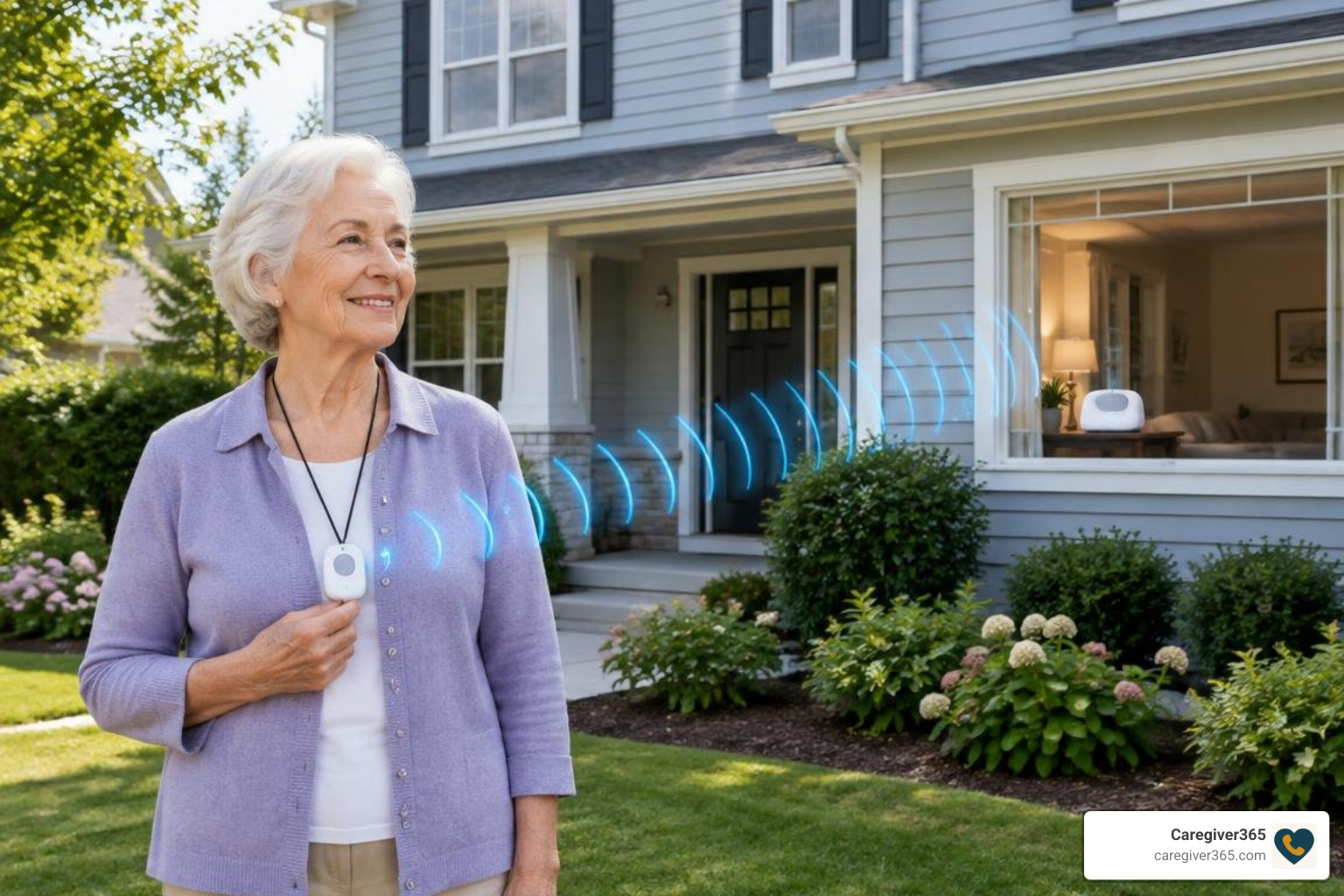
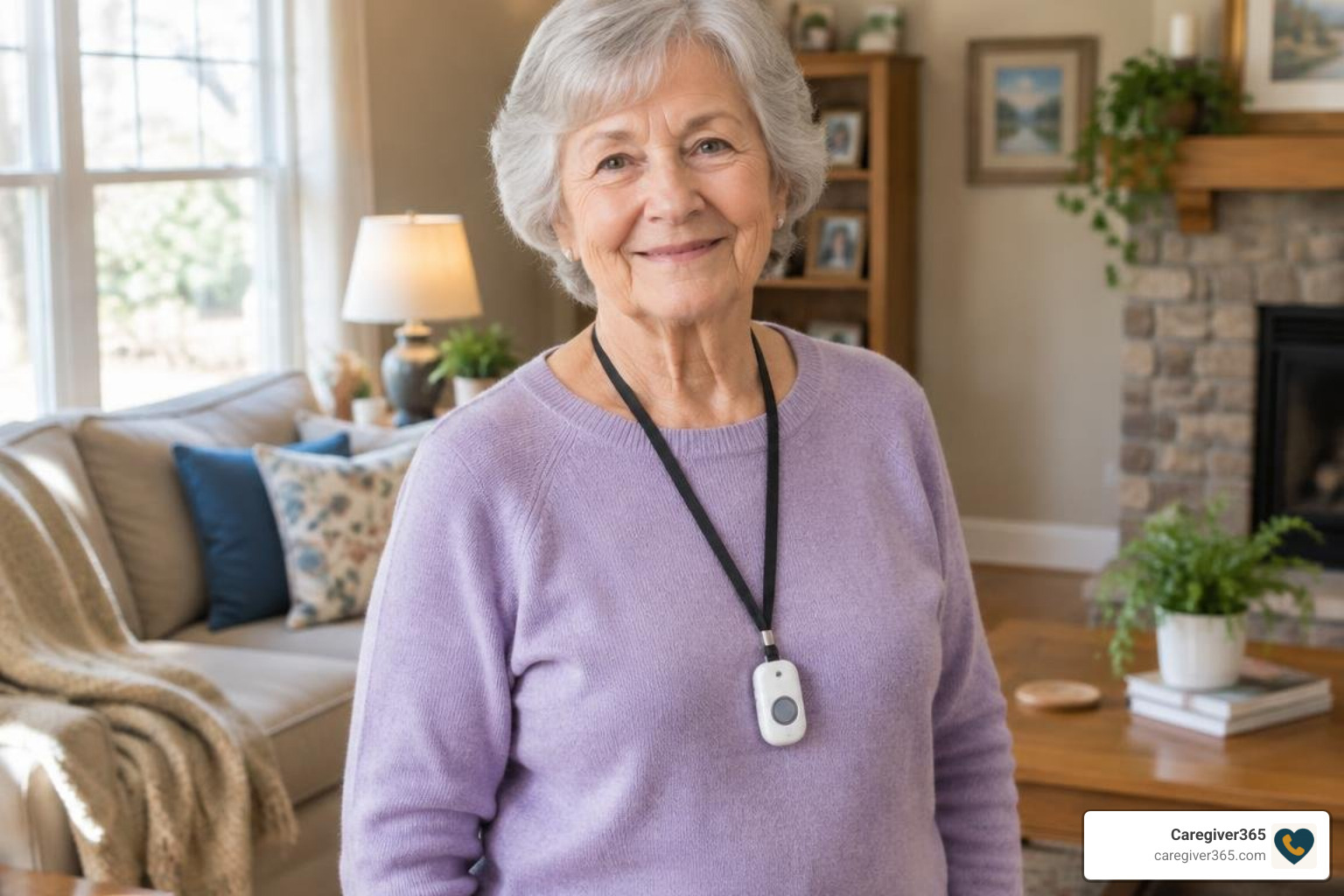
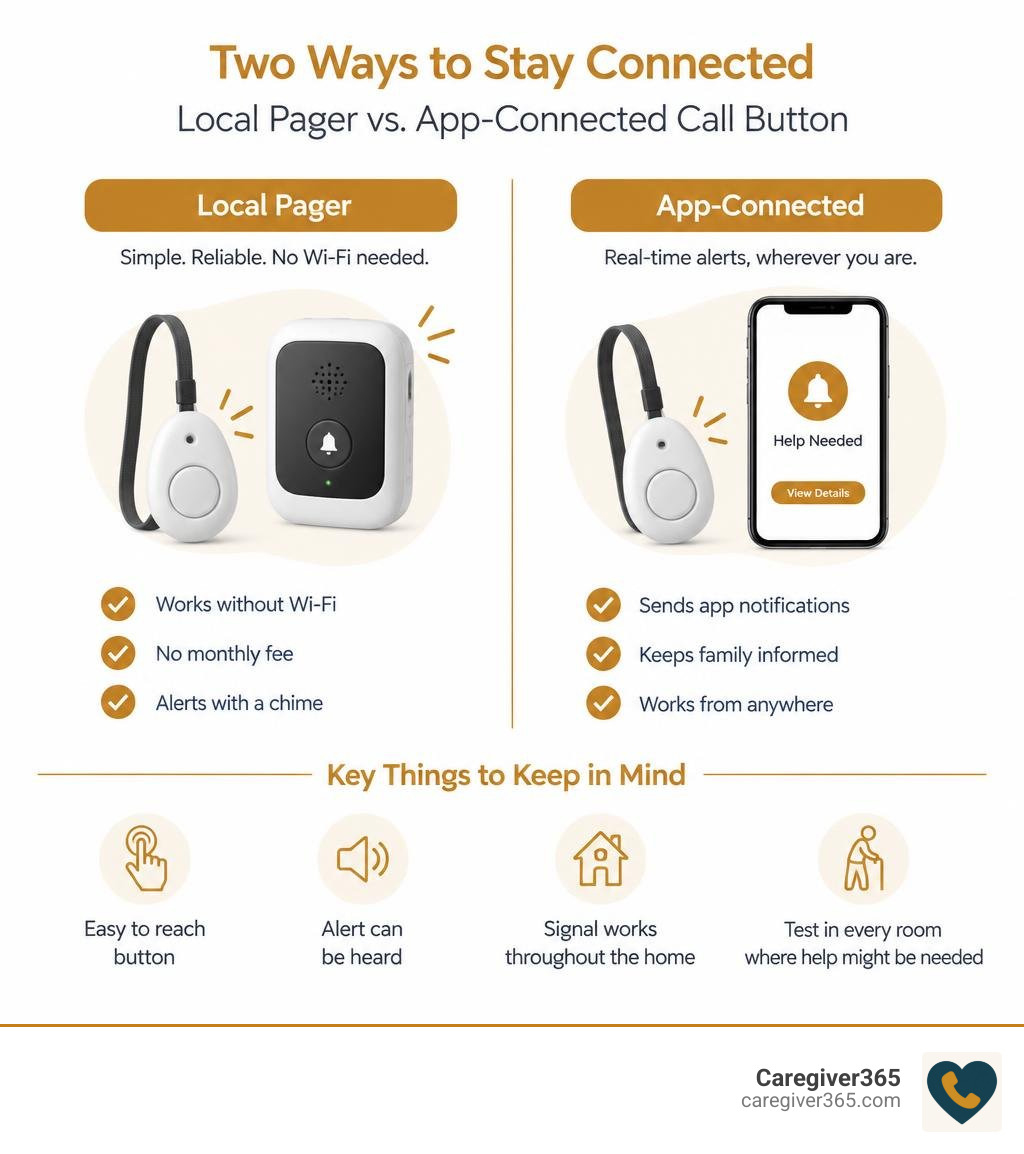
Choose based on who needs to get the alert. If a caregiver is usually at home, a simple button and portable pager can send a chime without Wi-Fi or a monthly fee. If family members need alerts while away, look for a button with app notifications. In either case, make sure the button is easy to reach, the alert can be heard, and the signal works throughout the home.

A wearable button can stay with your parent as they move around. A bedside or bathroom button adds another way to call for help. Before relying on any system, test it in every room where help might be needed.

comparison of local pager and app-connected caregiver call buttons for home use infographic

Key caregiver call button vocabulary:

How a Caregiver Call Button System Works to Protect Seniors at Home

When a loved one experiences a sudden dizzy spell, slips out of bed, or simply needs assistance reaching a glass of water, calling out across the house is exhausting and unreliable. A caregiver alert system provides a direct, wireless lifeline between an elderly adult and someone nearby who can help.

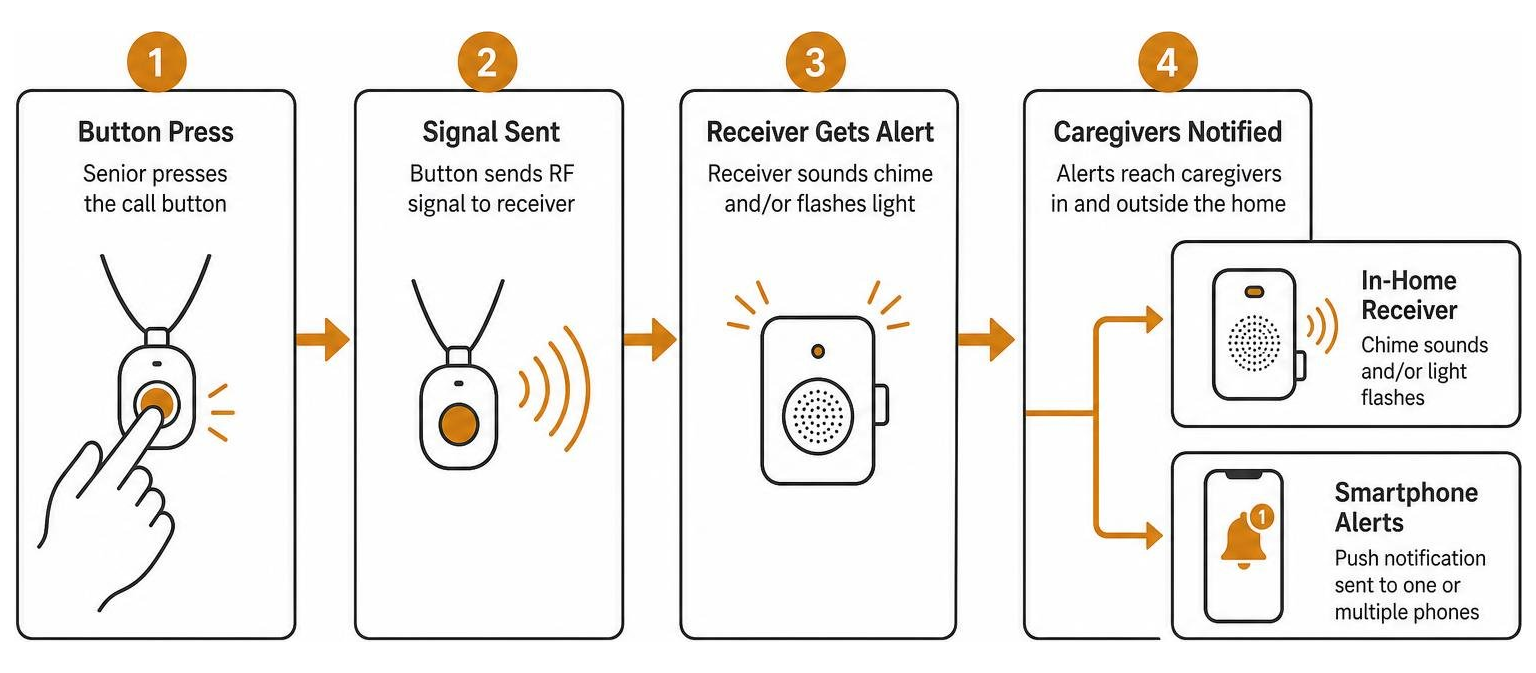
At its core, the system consists of two primary elements: an alert transmitter (the button) and an alert receiver (the pager, plug-in chime, or connected smartphone hub). When the senior presses the button, it transmits a coded radio frequency (RF) signal—or a Wi-Fi-assisted digital trigger—to the receiver. Within fractions of a second, the receiver sounds a chime, flashes an LED light, or sends a push notification to alert family members.

These localized alert tools form a fundamental layer in comprehensive senior safety solutions. By removing the need for a senior to shout or struggle to find a phone, in-home call buttons help maintain dignity while providing rapid response for acute needs.

Feature Category Standalone RF Alert Pagers Wi-Fi Smart Hub Systems
Transmission Method Local Radio Frequency (433 MHz) 2.4 GHz Wi-Fi to Cloud & Mobile App
Alert Range 300 to 600 ft (Open Air Line of Sight) Unlimited (Anywhere with Internet)
Caregiver Alert Location In-home or on property only In-home chime + smartphone app anywhere
Setup Complexity Plug-and-play; zero pairing required Requires home network & smartphone app
Monthly Fees $0 (Hardware only) $0 for basic push alerts
Typical Hardware Cost $20 – $35 $40 – $55
Best Suited For Live-in caregivers & co-housing Remote family monitoring & shared duties

Standalone Local Pagers vs. Wi-Fi Smart Receivers

Choosing between a standalone system and a connected smart receiver comes down to where the caregiver spends their time.

Standalone RF Pagers: These operate on dedicated local radio frequencies without touching your home internet. A popular example is the Call Button & Caregiver Pager System, an economical plug-and-play kit with basic one-to-one transmitters and portable receivers. These systems frequently feature belt clips or battery-operated pocket units that vibrate silently or ring out loud. They are ideal for live-in family members or nighttime monitoring. Detailed product literature, like the Smart Caregiver Call Buttons with Standalone Pager Documentation, shows how these basic systems provide immediate peace of mind without passwords, apps, or pairing menus.

Wi-Fi Smart Receivers: Systems like the CallToU Wi-Fi Caregiver Call Button System and the PILSAMAS WiFi Wireless Call Button System bridge local hardware with modern smartphone alerts. When pressed, the button communicates with a wall-plugged Wi-Fi hub on a 2.4 GHz network. The hub sounds an audible chime inside the house while simultaneously pushing instant notifications to designated smartphones. This setup allows multiple family members to share monitoring duties even when they are running errands or working outside the home.

process flow from button press to caregiver receiver and smartphone alerts

Wearable Pendants, Wall Mounts, and Pull-Cord Options

Emergencies happen in different postures and locations throughout the home. Using a mixture of button form factors ensures your loved one can always trigger an alert without having to crawl or stretch.

  • Lanyard Pendants: Worn comfortably around the neck or clipped to clothing, wearable buttons travel everywhere with the senior. They are especially useful for daytime mobility in the living room, kitchen, and hallway.
  • Wall Mount Brackets: Fixed buttons mounted beside the bed or next to a favorite armchair ensure an alert is always within arm’s reach if someone wakes up disoriented or unable to stand.
  • Bathroom Pull Cords: Wet, slippery tile makes bathrooms a high-risk area. Integrating pull-cord units alongside in-home fall prevention strategies ensures that if someone falls to the floor, they can pull the hanging cord even if they cannot reach a high countertop.

Key Features to Compare When Choosing In-Home Alert Devices

caregiver receiving an alert chime in another room on a portable receiver

When evaluating hardware, focus on practical durability, volume options, and realistic transmission range rather than flashy gimmicks. Exploring home care call button range and reliability shows that physical room layouts significantly impact how signals travel.

Look for these essential specifications:

  1. Audible Decibel Levels: Look for receivers providing at least 90 to 110 dB output to cut through household noise like televisions, vacuum cleaners, and running kitchen water.
  2. Visual Indicators: Flashing LED light rings on the receiver alert caregivers who have mild hearing loss or who are wearing headphones.
  3. Physical Button Feedback: Seniors with arthritis or diminished tactile sensation need a button with an audible click or tactile depression so they know their press was registered.
  4. Hardware Expandability: Certain models allow pairing several buttons to multiple receivers, whereas basic budget kits operate on a fixed one-to-one signal.

Setting Up Your Caregiver Call Button for Maximum Signal Range

Manufacturers often advertise maximum open-air ranges between 300 and 600 feet. However, everyday household obstacles such as drywall, brick fireplaces, metal appliances, and heavy wooden doors absorb radio frequency signals.

To maximize real-world coverage:

  • Position Central Hubs Strategically: Place plug-in receivers in central hallways rather than tucking them behind heavy metal appliances or inside closed cabinets.
  • Account for Multi-Story Layouts: In two-story homes, place at least one receiver on each floor to ensure clear audio coverage from upstairs bedrooms to downstairs laundry areas.
  • Test Realistic Dead Zones: Walk the button into the far corners of the home, the garage, and the back porch to verify the receiver reliably rings before relying on the system for daily care.

Waterproof Protection and Battery Life Requirements

Bathrooms represent the most common area for catastrophic slips. Therefore, buttons must carry sufficient water resistance.

Many modern transmitters feature an IP55 splash-proof rating, meaning they can handle shower spray, accidental sink splashes, and moisture. Look for dedicated pull-cord models or lanyard buttons specifically rated for wet areas.

Battery considerations are equally critical:

  • Transmitters (Buttons): Most standalone buttons run on compact 12V (such as 23A) alkaline batteries or standard CR2032 coin cells. Because the button only draws power when pressed, these batteries typically last between 12 and 18 months.
  • Receivers (Chimes/Pagers): Mobile belt-clip pagers rely on standard AAA batteries, which should be checked every few months. Plug-in chime units draw continuous power from standard AC wall outlets, providing maintenance-free operation.

Comparing Alert Types: Direct Pagers vs. Mobile App Systems

Direct radio pagers provide lightning-fast, zero-latency chimes inside the home. They never suffer from internet outages, app crashes, or phone battery drain. For a live-in caregiver who simply needs an immediate chime down the hall, direct RF pagers deliver foolproof simplicity.

However, modern families often share caregiving duties across multiple households. Learning how caregiver mobile app connectivity works highlights the value of multi-user notifications. Wi-Fi systems like PILSAMAS allow families to name specific buttons inside the app (e.g., “Mom’s Bedside” vs. “Master Bathroom”). When triggered, the exact location pops up on family members’ smartphones, removing all guesswork about where assistance is needed.

Customizing Ringtones and Volume on a Caregiver Call Button

Nobody wants an alarm that induces unnecessary panic or sounds like a smoke detector during routine calls for water. Quality systems offer versatile audio customization:

  • Ringtone Selection: Devices like CallToU provide up to 55 selectable melodies, ranging from gentle door chimes to distinct musical tones. Systems like PILSAMAS offer 18 distinct alerts.
  • Volume Steps: Adjustable volume levels spanning from 0 dB (silent flashing mode for sleeping infants or sensory sensitivities) up to 110 dB ensure alerts match your household environment.
  • Location-Specific Melodies: If your system supports multi-button pairing, assign different chimes to the bathroom and the bedroom so you immediately recognize where your loved one is calling from.

Layering Home Safety: Combining Call Buttons with Daily Check-In Support

older adult on a telephone confirming daily wellness

A physical button is an essential tool for acute in-home emergencies, but it has one fundamental limitation: it requires the senior to be conscious, within reach of the device, and physically able to press it.

If an elderly parent living alone experiences a sudden medical event, faints, or misplaces their lanyard across the room, an unpressed button cannot call for help. This is why well-rounded care plans pair reactive emergency buttons with proactive daily monitoring.

Understanding the balance between check-in calls and medical alert buttons helps families build comprehensive protection. While an in-home button handles immediate calls for help, automated check-in services ensure that if an unexpected issue arises, someone is notified even if no button was ever pressed.

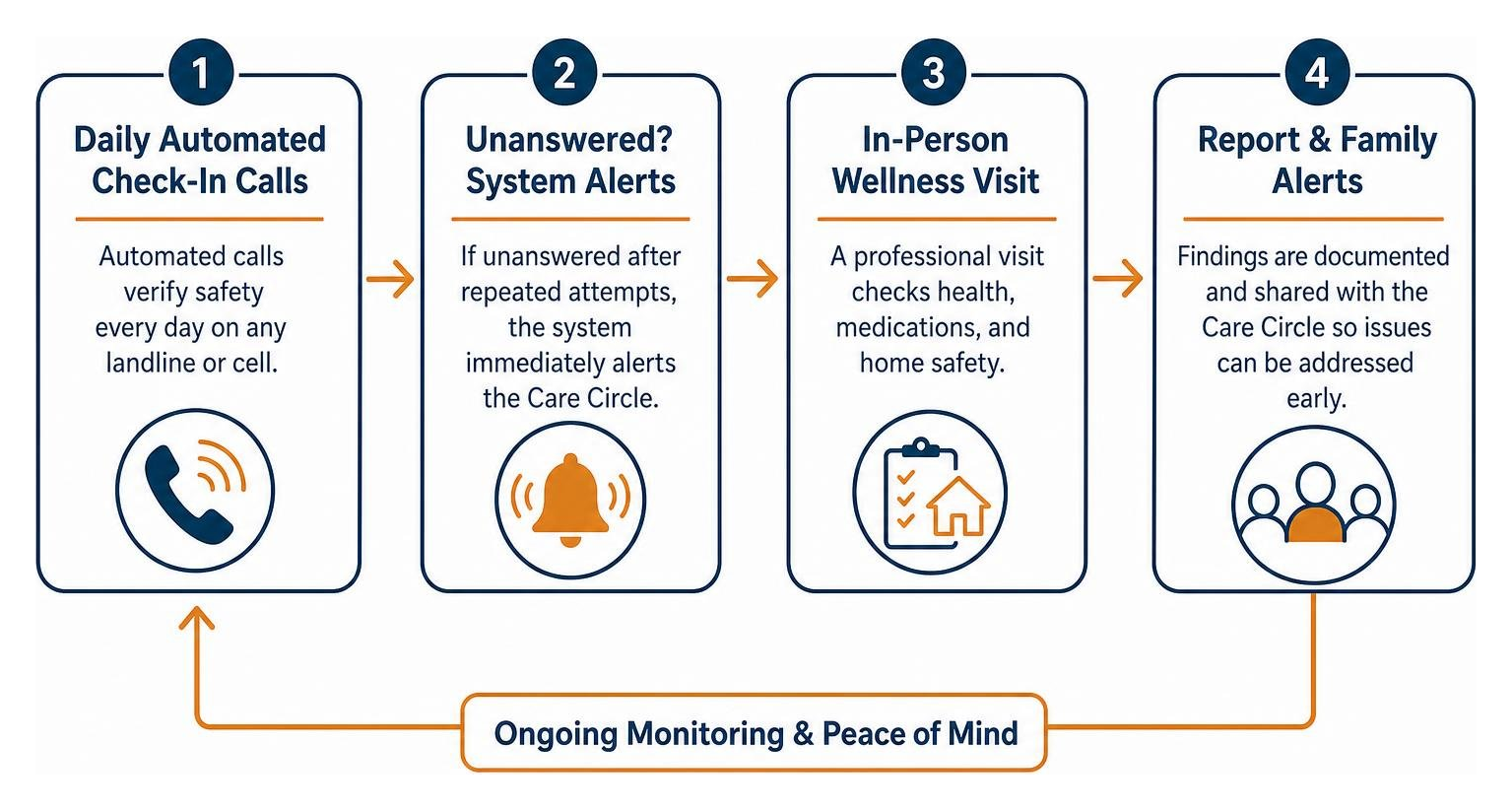
Our team at Caregiver365 provides an automated daily phone-call check-in service tailored specifically for seniors aging in place. Our system calls your loved one’s landline or cell phone at a scheduled time each day. When they answer and confirm their well-being, the system logs the successful check-in. If the call goes unanswered after multiple attempts, our automated platform immediately alerts up to eight members of your designated family “Care Circle” via text message and phone calls. It requires no extra hardware, works across any standard phone, and smoothly integrates with existing home safety routines.

Frequently Asked Questions About Caregiver Alert Systems

Do caregiver call buttons require a monthly subscription fee?

No. Standard RF caregiver call button kits and basic Wi-Fi hub systems do not require ongoing monthly subscription fees. You purchase the hardware once, plug in the receivers, and use the system indefinitely. (Optional advanced cellular emergency services or paid SMS dispatch tiers may charge fees, but standard in-home chime and basic app notification systems are 100% subscription-free.)

Will a wireless caregiver call button work in the shower?

Yes, provided the button carries an IP55 or higher waterproof rating. Many lanyard pendants and pull-cord models are designed to withstand direct shower splashes. However, you should avoid submerging non-marine-rated electronic buttons in standing bathwater. Always verify the manufacturer’s IP rating before mounting a button inside a shower stall.

How far does the wireless alert signal travel through walls?

While manufacturers cite open-air ranges between 300 and 600 feet, indoor signal transmission typically covers 100 to 300 feet depending on wall density. Standard drywall allows easy signal passage, but dense materials like concrete, brick fireplaces, and metal foil insulation reduce transmission distance. Testing the button from every room ensures reliable signal strength.

Conclusion

Choosing the right caregiver alert button brings immediate clarity and security to your daily home care routine. Whether you select a basic, budget-friendly portable RF pager or an app-enabled Wi-Fi hub, ensuring that your loved one has an accessible, waterproof button gives everyone room to breathe easier.

For complete, layered reassurance, complement your in-home hardware with proactive daily monitoring. Explore automated daily check-ins for complete peace of mind and ensure your family Care Circle is always informed, every single day.

Top Missed Call Reminder Apps to Keep You Always Connected

Top Missed Call Reminder Apps to Keep You Always Connected

Find a Missed Call Reminder App That Fits Your Phone

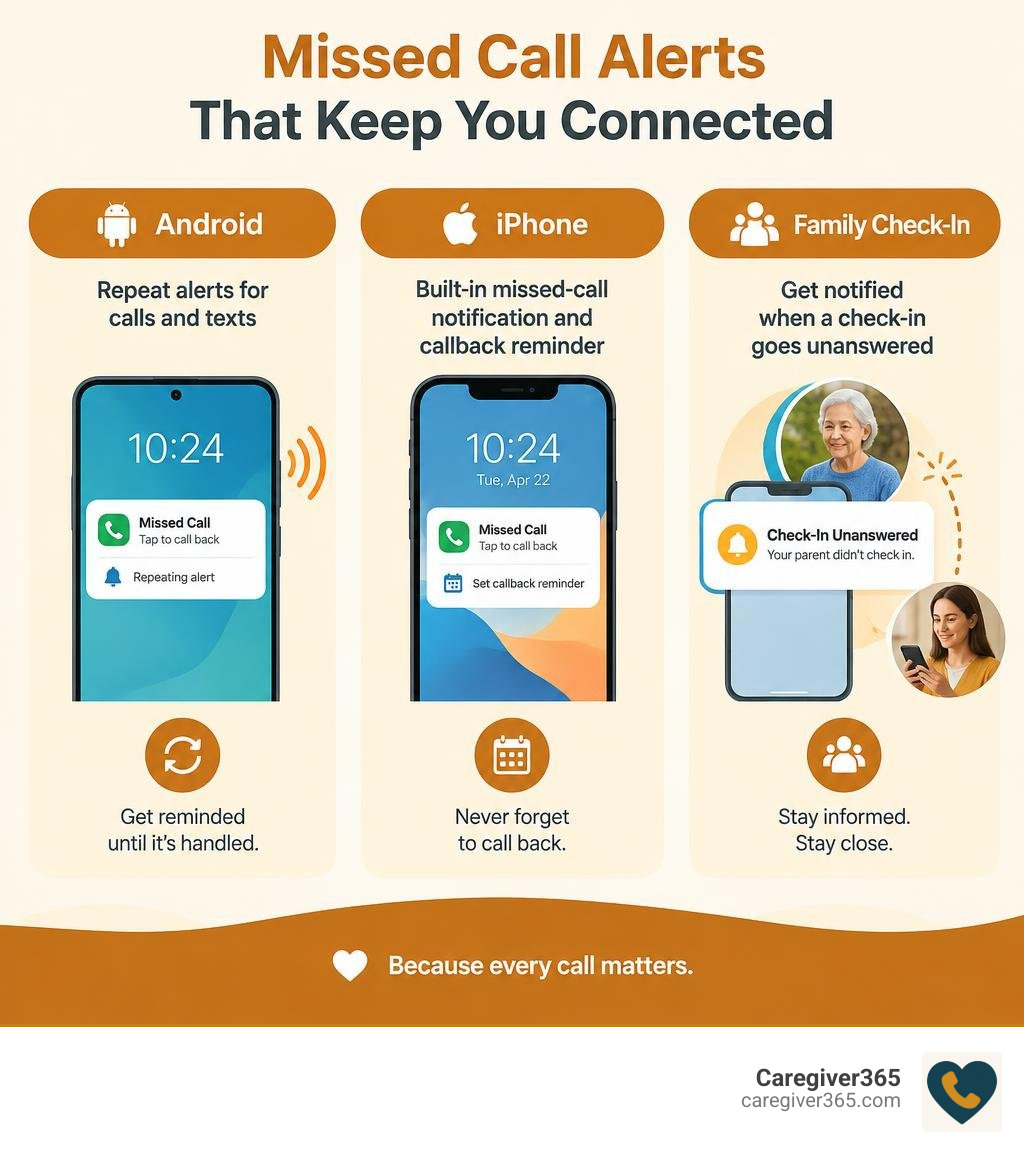
For Android, start with Missed Call & Text Reminders if you want repeat alerts for calls and texts. Try Missed Notifications Reminder if you want to choose which apps trigger repeat sounds. On iPhone, you can use the built-in missed-call notification and set a callback reminder, but the Android apps in this roundup are not iOS options.

For someone caring for a parent who lives alone, repeat alerts can make an overlooked call harder to miss. But an alert on your parent’s phone is not the same as an alert to family. If you need to know when a check-in goes unanswered, look for a service that contacts you directly.

Comparison of Android repeat alerts, iPhone callback reminders, and family check-in alerts infographic

Missed call reminder app basics:

How Missed Call Reminder Applications Work and Core Features

Most smartphones ring once and then remain completely quiet. If you are in another room, washing dishes, or away from your desk, that single ring fades away, leaving behind nothing more than a silent line of text on your screen.

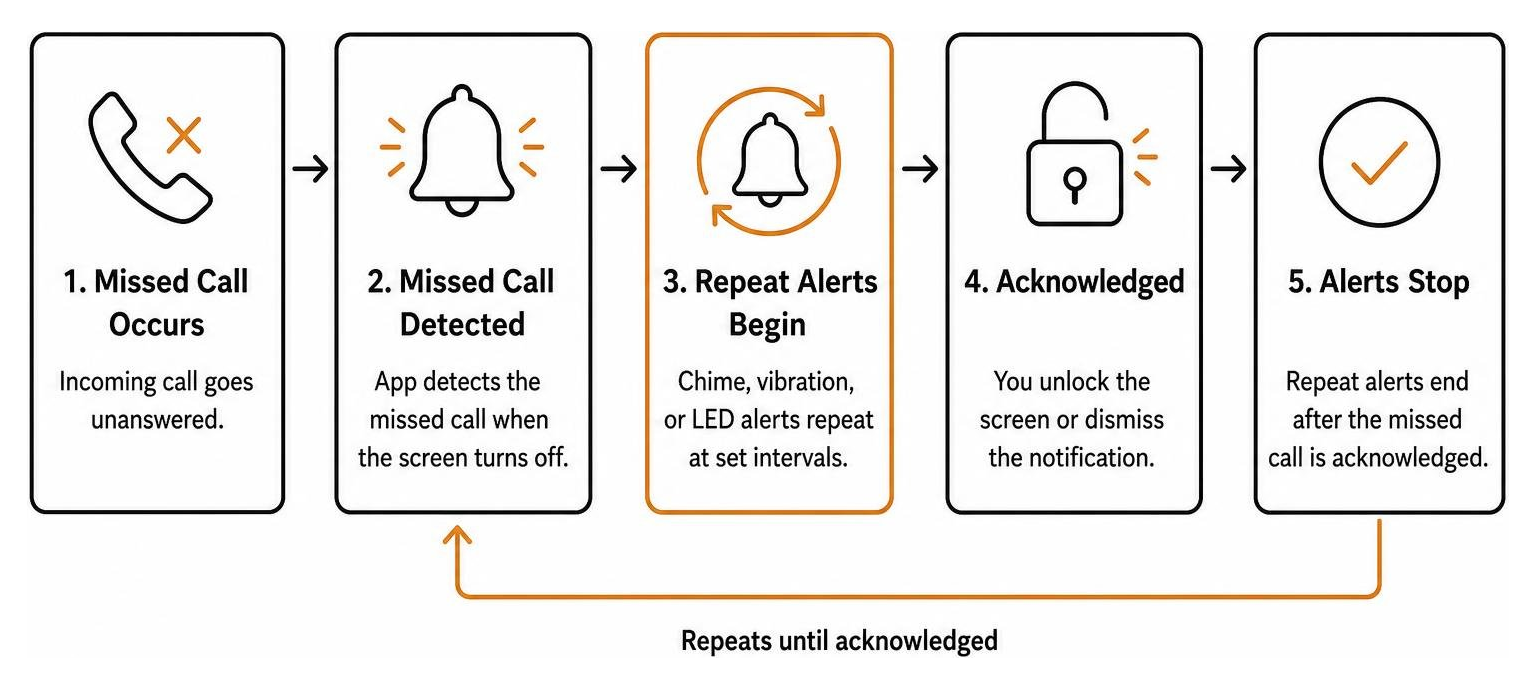
A dedicated missed call alert utility changes this behavior entirely. By using an operating system’s notification listener framework, the application actively monitors your incoming call log. When a call goes unanswered and the screen turns off, the app initiates a repeating cycle of audio chimes, vibration pulses, or camera LED flashes.

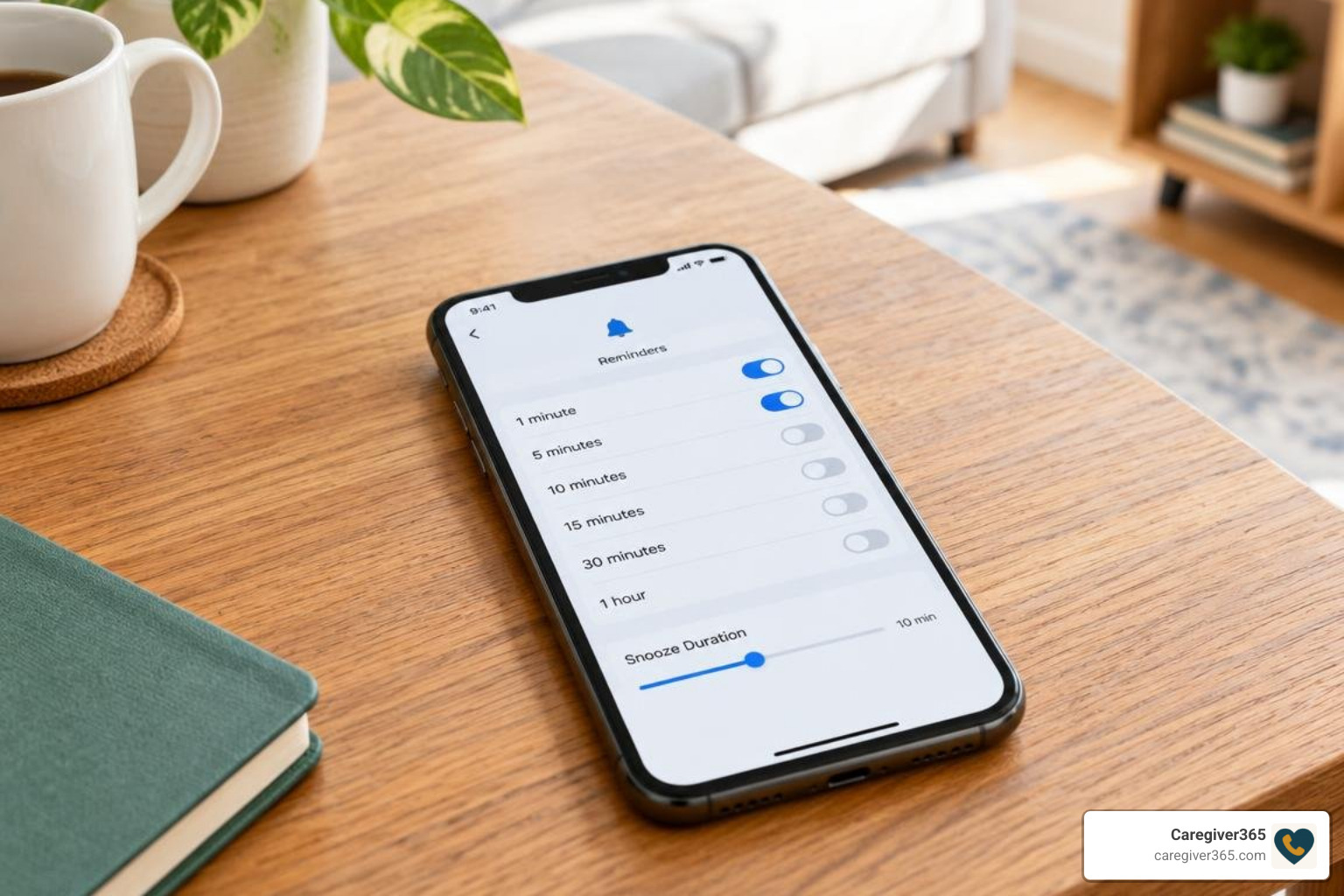
customizable notification intervals

Setting up these tools is straightforward. You can set up instant missed call reminders in under two minutes by selecting your alert sound and deciding how often your device should ping you.

Beyond basic alerts, modern reminder utilities include specific controls to keep alerts helpful rather than intrusive:

  • Periodic Audio & Vibration Intervals: Choose reminder loops ranging from 1 to 120 minutes.
  • Lock Screen Privacy: Hide caller names and sensitive message text behind your device lock while keeping reminder sounds active.
  • Camera LED Strobe Alerts: Provide visual cues for noisy environments or for users with hearing impairments.
  • Sensor-Based Pauses: Temporarily silence audio alerts when your phone is laid face-down on a desk.

Key Features That Distinguish Call Alerts from General Reminders

General task managers and calendar tools require you to manually create an entry before they can remind you of anything. In contrast, specialized call reminder applications react automatically to unread events.

Workflow showing missed call detection triggering recurring chimes until acknowledged

These tools stand apart through several practical capabilities:

  1. Persistent Repeat Chimes: Rather than playing one alert and giving up, the chime repeats at set intervals until you unlock your screen or dismiss the notification.
  2. Whitelist & VIP Filtering: You can restrict loud repeating alarms exclusively to critical contacts, such as family members, healthcare providers, or key business clients.
  3. Automated SMS Responses: Send an instant text message to callers when you cannot pick up, acknowledging their call right away.
  4. Battery Management Exceptions: Dedicated foreground services keep the app running reliably even when the device enters deep sleep mode.

Why Use a Missed Call Reminder App Instead of Standard Alarms?

Standard phone alarms are built for planned schedules, not unexpected communications. If a client reaches out with an urgent question or an elderly parent attempts a daily morning check-in, standard alarms cannot detect the missed connection.

Relying solely on native notification banners often leads to missed opportunities. In business environments, quick response times are critical; you can never lose a lead with automated missed call SMS alerts that keep communication active. In caregiving contexts, a missed notification can cause unnecessary worry and delay timely assistance.

Top Solutions and Standout Features Compared

Choosing the right tool depends on whether you need simple repeating sound alerts, cross-app notification monitoring, or specialized call-forwarding backups.

Application Primary Alert Method Interval Flexibility Standout Feature Platform & Rating
Missed Call & Text Reminders Recurring audio, vibration, LED 1 to 120 minutes Lock screen privacy controls Android (4.0 ★ from 1.02K reviews)
Missed Notifications Reminder Periodic sound & vibration Fully customizable Open-source; monitors any chosen app Android (100K+ downloads)
Missed Call Alert Plus Start-delay chimes, camera LED Adjustable delay Face-down pause & VIP SMS filters Android (2.8 ★)
Missed Call+ (Alarm) Full alarm dialog & quick reply Snooze intervals Whitelist/blacklist & 1-tap SMS Android (8.5/10 on APKFab)
Missed Calls (by Suxsem) Call forwarding & push alert Instant carrier trigger Alerts when line is busy or off Android (3.3 ★, $0.99/year)

Standout Tools for Persistent Notifications and Alarms

For direct notification monitoring on Android, two tools lead the category:

  • Missed Call & Text Reminders on Google Play: This app delivers a clean balance of privacy and reliability. It allows users to set persistent lock screen alerts every few minutes while keeping caller identities concealed behind biometric locks.
  • Missed Notifications Reminder on Google Play: An excellent choice for users who want broader coverage. Its open-source architecture monitors not just native cellular calls, but also third-party messaging and communication applications.

Call-Forwarding and Specialized Alert Options

When standard notification listeners do not fit your workflow, specialized alert systems offer practical alternatives:

  • Missed Call Alert Plus on Google Play: Includes hardware-level sensory options, such as flashing the camera LED and pausing alerts when the phone is flipped face-down.
  • Missed Call+ Alarm via APKFab: Converts missed calls into full-screen interactive alarm dialogs with built-in one-tap callback and SMS reply buttons.
  • Missed calls by Suxsem: Takes a different route by using carrier call-forwarding rules. It routes unanswered calls to an automated system that disconnects the line and delivers a secure push notification—ensuring you are alerted even when your phone has no active cellular signal or is switched off.

The Role of Reminder Systems in Health and Daily Safety

Clear, consistent reminders play an essential role in daily health management and routine safety. Missing an alert is rarely just an inconvenience; for individuals managing chronic conditions, missed prompts can interrupt vital daily regimens.

Clinical research underscores the profound impact structured reminders have on health outcomes. In a comprehensive Cochrane systematic review examining medication adherence across 12 randomized trials with 2,196 participants, reminder systems increased adherence by an average of 11% (Mahtani et al., 2011). This consistent routine support delivered measurable clinical improvements, including a significant reduction in diastolic blood pressure (mean difference of -5.89 mmHg) and a notable decrease in glycated haemoglobin levels (mean difference of -0.72%).

Establishing reliable contact habits is equally vital for independent older adults. Exploring how caregiver apps keep families in the loop shows how simple technological touchpoints provide reassurance without disrupting daily independence.

Customizing Your Missed Call Reminder App for Daily Routines

To ensure your alert system remains helpful without causing notification fatigue, tailor its settings to your personal schedule:

  • Configure Quiet Hours: Set automatic blackout windows during nighttime hours so sleep remains uninterrupted.
  • Adjust Snooze Durations: Balance chime intervals—shorter 5-minute cycles for work hours, and longer 30-minute intervals for leisure time.
  • Assign Distinct Vibration Patterns: Set distinct haptic rhythms for phone calls versus general messages so you can identify the alert type without checking your screen.

Privacy, Security, and Background Battery Considerations

Because notification reminder tools interact with incoming call logs, evaluating data privacy is essential. Look for applications that process data entirely on your local device. Several open-source and privacy-focused utilities protect user records by using local cryptographic hashing (such as SHA-224 algorithms) rather than transmitting phone numbers to remote cloud servers.

To keep these utilities running smoothly, ensure your phone’s battery settings do not quietly disable them:

  • Exempt the application from your operating system’s aggressive battery optimization.
  • Enable persistent foreground service notifications so the app stays active while your screen is off.
  • Enable auto-start permissions on devices with custom Android skins (such as Xiaomi or Huawei).

How to Choose the Right Missed Call Reminder App for Your Needs

Selecting the ideal alert solution comes down to your personal workflow and technical comfort:

  1. Target Operating System: Confirm whether your device supports background notification listeners (Android) or requires native scheduled reminders (iOS).
  2. Alert Persistence: Decide whether you need a gentle repeating sound or an urgent, full-screen alarm dialog.
  3. Privacy Protections: Choose apps that keep call records stored locally on your device rather than uploading them to external servers.
  4. App Monitoring Scope: Determine if you only need cellular call monitoring or alerts across third-party communication apps.
  5. Caregiver & Family Visibility: Consider whether an alert on a single phone is sufficient, or if your family needs an automated system that alerts designated contacts when a daily call is missed.

For families supporting aging parents living independently, comparing the best automated daily check-in systems that connect seniors and families provides a broader safety net than standalone on-device chimes alone.

Frequently Asked Questions about Missed Call Reminder Apps

Can a missed call reminder app work on both Android and iOS?

Dedicated apps that listen for incoming calls and trigger recurring audio alerts operate primarily on Android due to its flexible background listener permissions. iOS restricts third-party apps from monitoring raw system call events. On an iPhone, users can use built-in Siri reminders, customize banner persistence, or use cross-platform messaging tools.

Why do some reminder apps stop alerting after the screen locks?

Modern smartphone operating systems use aggressive battery-saving features that close background processes when the screen turns off. To ensure continuous alerts, exclude the app from battery optimization in your phone’s settings and turn on auto-start and foreground service permissions.

Do call alert apps store personal contacts on cloud servers?

Most dedicated notification reminder utilities process call logs locally on your hardware. Standalone privacy-conscious apps do not maintain external cloud databases of your address book. Always review an application’s data safety declarations on Google Play to verify that contact data is not shared with third parties.

Conclusion

Missing an important call can disrupt your workday, delay urgent business responses, or cause unnecessary worry for family members. Whether you choose an open-source notification utility, an alarm dialog, or a specialized carrier alert tool, adding a dependable reminder system ensures you stay connected when it matters most.

When caring for loved ones who live independently, on-device chimes are only half the equation. Our Caregiver365 daily check-in service brings complete peace of mind by calling your loved one at scheduled times every day. If a call goes unanswered, we immediately notify your designated Care Circle across any landline or mobile phone—no extra apps or hardware required.

Learn how daily check-in calls work to discover how simple, automated reassurance keeps your entire family connected and secure.

How to Create a Family Emergency Contact Plan for an Aging Parent

How to Create a Family Emergency Contact Plan for an Aging Parent

When an aging parent lives alone, an unanswered call, sudden illness, or power outage can leave family members unsure who should respond. Even relatives who speak regularly may discover that no one has the same phone numbers, knows who has a spare key, or understands when to call for emergency help.

A family emergency contact plan puts these decisions in writing before they become urgent. It identifies the people who can help, the information they need, and the steps to take when a parent cannot be reached. The goal is to support an older adult’s independence while making the family’s response clearer and faster.

The best place to start is with your parent. Discuss what they want family members to do, whom they trust to contact, and what information they are comfortable sharing.

What Is a Family Emergency Contact Plan for an Elderly Parent?

A family emergency contact plan is a short, practical document that tells relatives, friends, and caregivers whom to contact and what to do when an older adult may need assistance. It is not the same as a medical care plan or an advance directive, although it can point to those documents when appropriate.

The plan should answer four questions: Who notices a possible problem? Who takes the first step? Who provides backup if that person is unavailable? And when should someone seek immediate help?

The Centers for Disease Control and Prevention (CDC) recommends making an emergency action plan with important phone numbers and several ways to communicate with family and caregivers. See the CDC’s guidance on staying connected during emergencies.

How Do You Create an Emergency Contact Plan for an Aging Parent?

Start with a simple document that everyone involved can understand and access. A shared digital copy can be useful, but your parent and nearby contacts should also have a printed version in case phones or internet service are unavailable.

Choose a Primary Contact and At Least One Backup

Select a primary contact who can reliably answer calls and coordinate the family’s response. This does not have to be the adult child who lives closest; it may be the person best able to communicate with everyone involved.

Then choose at least one backup contact. Consider including a trusted neighbor, nearby relative, or friend who could check on your parent in person. Ask each person for permission before listing them and confirm which responsibilities they are willing to accept.

Assign Specific Responsibilities

Avoid a vague instruction such as “someone should check on Mom.” Instead, identify who will call, who can visit, and who will update other family members. A practical division might look like this:

  • Primary contact: Makes the first follow-up call and coordinates next steps.
  • Local contact: Checks on the parent in person when it is safe and appropriate.
  • Backup contact: Takes over when the primary contact cannot respond.
  • Family communicator: Updates other relatives after the situation has been assessed.

One person can fill more than one role, but every important role should have a backup. If a local contact has a key or building access, document how that access will work without circulating sensitive entry codes unnecessarily.

Keep Essential Information in One Place

Your family’s contact list should be short enough to use quickly. Include:

  • Your parent’s full name, preferred name, home address, and primary telephone number.
  • Primary and backup contact names, phone numbers, and relationships.
  • A nearby friend or neighbor who has agreed to help.
  • Relevant doctors, pharmacy, and other care-provider contact information.
  • A note about mobility, communication, or accessibility needs that responders should know.
  • The location of the parent’s current medication list, allergies, insurance details, and important documents.

Keep sensitive medical information in a secure location and share it only with people who need it. The CDC also recommends keeping a current care plan with medications, providers, and emergency contacts. Review its care-planning guidance.

Set a Clear Response Plan for Missed Calls or Other Concerns

A list of names is useful only if family members know what happens next. Agree on a response sequence that fits your parent’s health, routine, and preferences. For example:

  • First, call your parent using their preferred phone number. Try an agreed-upon alternative contact method if available.
  • If there is no response, contact the primary family member and check whether someone has already spoken with your parent.
  • If concern remains, ask an agreed-upon local contact to check in, without entering the home unsafely or without permission.
  • If there are signs of immediate danger, such as a reported medical emergency, suspected serious injury, or other urgent threat, call 911 or the appropriate local emergency number right away. Do not wait through routine follow-up steps.

Families should decide in advance how quickly to escalate concerns, rather than assume every missed call means an emergency. The right response depends on the circumstances: a missed scheduled check-in is different from an active report of distress.

Make a Plan for Power Outages and Unavailable Caregivers

Emergencies may interrupt electricity, cellular service, transportation, or a caregiver’s availability. Include at least two ways to reach key contacts and one alternative arrangement if your parent needs to leave home.

For a parent who uses powered medical equipment, depends on refrigerated medications, or requires help with mobility, ask their clinician or equipment provider what specific preparations are needed. Know how to contact local emergency services and where your parent could go if remaining at home is unsafe.

The CDC advises people to plan around individual communication, equipment, medication, and transportation needs. See its emergency planning guidance.

How Can Daily Check-In Calls Support a Family Contact Plan?

A scheduled check-in can provide a routine signal that an older adult has responded on a given day. It can also help a family identify when a follow-up may be needed. However, check-in services do not replace an agreed-upon response plan: relatives still need to know who will act on a missed-call notification.

Caregiver365 compares daily check-in services for seniors, including options that call at a chosen time and notify designated family members after unsuccessful retries. Its featured comparison describes a Care Circle with up to eight contacts for certain services. Actual features and terms depend on the provider and plan. Learn how daily check-in calls work.

A daily check-in is a reassurance tool, not an emergency response or dispatch service. Families should not rely on it instead of calling 911 for an immediate emergency. A medical alert device may offer a separate way to request help when an urgent incident occurs. Read Caregiver365’s comparison of check-in calls and medical alert buttons.

How Often Should You Review the Emergency Contact Plan?

Review the plan whenever contact details, health needs, living arrangements, or caregiver availability change. A regular family check-in every few months can also help keep responsibilities current.

Ask your parent and the listed contacts to practice a simple scenario: Who responds if a scheduled call is missed while the primary contact is traveling? Who can check in if the local neighbor is away? A brief practice run often exposes gaps before an actual concern arises.

Finally, make sure everyone knows where to find the current version. Remove outdated copies when the plan changes so relatives do not act on conflicting information.

What Should Be on an Emergency Contact Plan Checklist?

Before considering the plan complete, confirm the following:

  • The parent has participated in the discussion and agrees with the plan where possible.
  • A primary contact and backup have accepted their responsibilities.
  • At least one trusted nearby contact can provide in-person assistance when appropriate.
  • Phone numbers, the home address, and essential provider details are accurate.
  • The response steps distinguish routine missed contact from immediate emergencies.
  • The family has an outage or evacuation communication backup.
  • Everyone can find the current plan, and a date for reviewing it is set.

Frequently Asked Questions About Family Emergency Contact Plans

Who Should Be Listed as an Emergency Contact for an Elderly Parent?

List at least one reliable primary contact and one backup who have agreed to help. A nearby neighbor or friend can be useful for situations when relatives live far away.

Does an Aging Parent Need to Share All Medical Information With Family?

No. The plan should respect their preferences and privacy. Include information that is necessary for appropriate assistance and note where more complete medical records are stored securely.

What If Family Members Live in Different States?

Assign one person to coordinate calls and another trusted person nearby to provide local help when appropriate. Confirm who will update the rest of the family and how quickly.

Can a Daily Check-In Service Replace an Emergency Contact Plan?

No. A missed-call notification can alert family members that they should follow up, but the family still needs clear responsibilities and escalation steps. These services are not substitutes for emergency medical response.

When Should You Update an Emergency Contact Plan?

Update it when a phone number, medical need, caregiver, residence, or emergency access arrangement changes. Periodically confirm that contacts remain willing and available.

Compare Daily Check-In Services With Caregiver365

An emergency contact plan helps the right people respond when an aging parent may need assistance. Scheduled check-in calls can complement that plan by establishing a regular contact routine and notifying selected family members when a check-in is missed.

Caregiver365 is an independent comparison resource that helps families evaluate daily check-in options, including phone-based services available through Lifeline and Medical Alert. Compare features such as family notifications, phone compatibility, contact-circle size, and the option to add a medical alert device.

Compare daily check-in services on Caregiver365.

Finding the Best Daily Check-In Service for Seniors to Ensure Independent Safety

Finding the Best Daily Check-In Service for Seniors Living Alone

For a senior who prefers a familiar phone, an automated daily call is often the best place to start. Look for a service that works on a landline or mobile phone, asks for a simple response, and alerts family when a check-in is missed. Medical alert devices serve a complementary need: letting someone call for help right away during an active emergency.

Before choosing, compare call schedules, how long the service waits for a response, who gets alerted, and what it costs. Most important, make sure someone in the family knows what to do when an alert arrives. A well-designed check-in routine also helps reduce social isolation, because the senior knows a familiar voice prompt will arrive at the same time each day and that a family member will notice if something seems wrong.

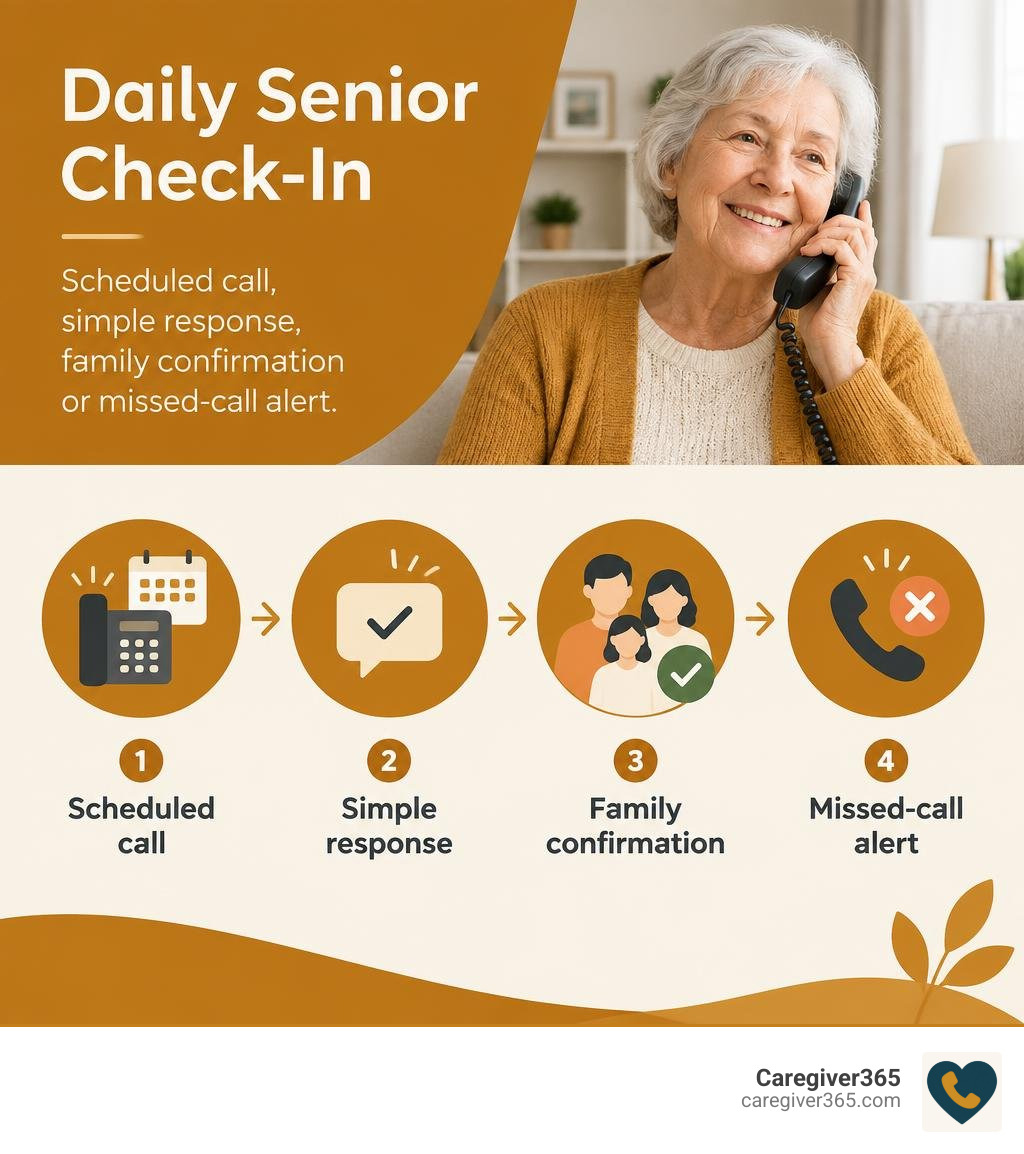
Daily senior check-in: scheduled call, simple response, family confirmation or missed-call alert infographic

Best daily check-in service for seniors vocabulary:

How Modern Check-In Systems Protect Seniors Living Independently

Daughter receiving a safety confirmation message on her smartphone

Aging in place allows older adults to remain in familiar surroundings while maintaining their daily independence. However, living alone can create lingering concerns for family members who balance work, children, and long-distance caregiving. If an unexpected fall or sudden health change occurs, hours or even days might pass before anyone notices.

A structured check-in system bridges this gap. Integrating daily check-in routines into a loved one’s morning schedule creates an unobtrusive safety net. When families establish predictable touchpoints, they mitigate the risk of prolonged distress after an accident while respecting the senior’s autonomy. Understanding these layers of protection is a foundational step in exploring the definitive guide to senior safety solutions.

Why Automated Calls Deliver the Best Daily Check-In Service for Seniors

While wearable gadgets and sensor networks exist, technology is only effective if an older adult actually uses it. Wearable pendants often get left on nightstands, and smart apps frequently run into forgotten passwords or uncharged batteries.

Automated phone calls solve this problem by leveraging existing household routines. Whether your loved one uses a classic corded landline or a modern mobile phone, answering a ringing telephone requires no new digital learning. By delivering a clear voice prompt at a scheduled time every day, the best automated daily check-in systems that connect seniors and families confirm safety within seconds—without installing bulky hardware or changing internet providers.

Integrating Check-In Calls With Existing Safety Plans

Daily check-in calls are not meant to replace emergency alert systems; rather, they serve as a proactive verification system. Understanding check-in calls vs a medical alert button clarifies the difference: an emergency pendant requires a senior to be conscious and capable of pushing a button during a crisis, whereas a scheduled check-in asks, “Are you up and doing well today?”

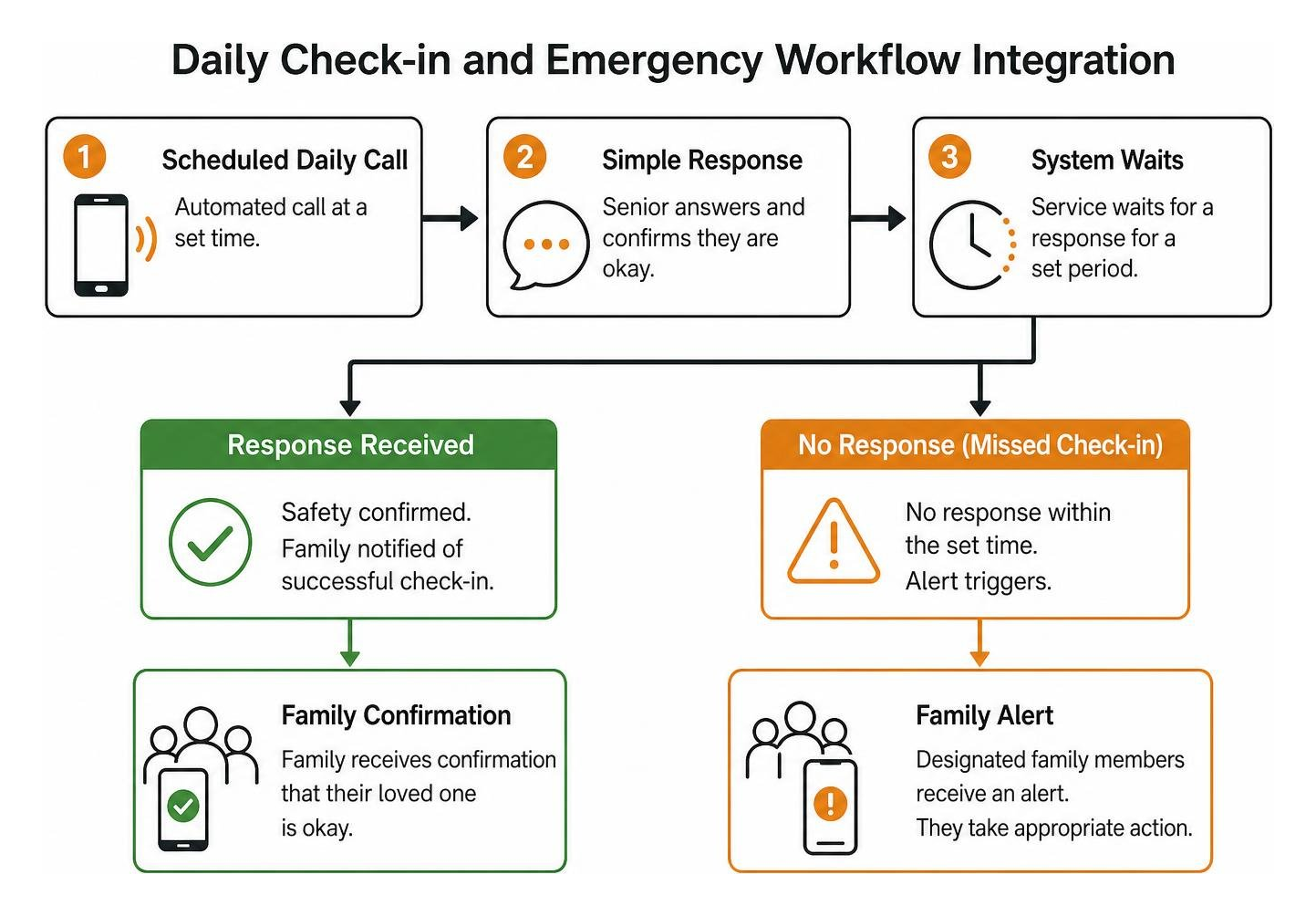
Daily Check-in and Emergency Workflow Integration

When paired with existing medical alert devices, automated calls create a complete safety loop. To see how these components interact smoothly, you can explore how daily check-in calls work to coordinate voice prompts with immediate caregiver notifications.

Key Features to Look for in the Best Daily Check-In Service for Seniors

Finding the right service requires looking at operational reliability, flexibility, and how notifications reach family members. The table below outlines the core features to evaluate when comparing solutions:

Feature Category Basic Check-In Tools Purpose-Built Senior Services
Device Compatibility Smartphones / Apps only Any Landline or Mobile Phone
Response Method Complex app navigation Single-button press (e.g., Press ‘1’)
Escalation Path Single contact notification Multi-tiered Care Circle (up to 8 contacts)
Hardware Required Base stations, internet hubs None
Setup Time Days (shipping & setup) Under 5 minutes

Multi-Caregiver Escalation and Family Circles

A check-in service is only as reliable as its notification network. If an alert goes to a single family member who happens to be in a meeting, driving, or out of cell range, critical response time is lost.

Purpose-built platforms utilize a “Care Circle” model that notifies multiple caregivers simultaneously via automated calls, text messages, or emails. Families can also set up instant missed call reminders in under two minutes to ensure that repeated unanswered calls trigger an immediate escalation sequence across siblings, neighbors, or designated primary responders. According to the National Institute on Aging, aging in place requires planning for exactly this kind of coordinated support, so that no single caregiver becomes a bottleneck.

Privacy, Security, and Administrative Efficiency

Maintaining personal privacy and data security is paramount when coordinating care for older adults. Reputable check-in platforms avoid complex invasive monitoring, focus strictly on wellness confirmations, and use encrypted channels to manage contact information. This streamlined approach keeps the administrative burden low for families while ensuring contact details and schedules remain protected.

How Purpose-Built Daily Check-In Workflows Support Senior Safety

Family caregiver reviewing daily check-in status on a tablet

Generic software—such as medical clinic patient portals or community event check-ins—focuses on processing walk-ins, badge printing, and co-pay collection. In contrast, senior-specific workflows focus on cognitive simplicity, zero hardware barriers, and intelligent retry logic to avoid false alarms.

Overcoming Technology Barriers for Older Adults

Many seniors feel frustrated by touchscreen menus, unexpected operating system updates, or small fonts. Purpose-built check-in services eliminate these pain points:

  • No App Downloads: The system functions entirely over standard voice networks.
  • Simple Keypad Prompts: Answering the call and pressing a single key (such as “1”) confirms safety.
  • Hearing-Friendly Audio: Clear, unhurried voice prompts provide an easy-to-understand experience.
  • Familiar Routines: Receiving a call at 9:00 AM matches existing morning routines like having coffee or reading the news.

Purpose-Built Senior Safety Workflows

When a check-in call is missed, smart workflow logic prevents unnecessary panic. If a senior is simply in the garden or taking a shower, the system automatically waits a pre-set window (such as 10 to 15 minutes) and calls again. Only after multiple unsuccessful attempts does the platform trigger an escalation alert to the Care Circle. This intelligent retry protocol minimizes false alarms while ensuring real emergencies receive immediate family attention. The result is a daily safety routine that feels less like surveillance and more like a standing morning hello, which is why many families describe it as a natural extension of their existing caregiving rhythm.

How to Choose the Right Daily Check-In Solution for Your Loved One

Every family dynamic is unique, and selecting the right setup involves balancing schedule needs, loved one mobility, and caregiver availability.

Evaluating the Best Daily Check-In Service for Seniors for Independent Living

When reviewing options, consider the following checklist:

  1. Customizable Call Windows: Can you set the call for a specific time that aligns with your loved one’s wake-up schedule?
  2. Caregiver Capacity: Does the service allow you to add multiple emergency contacts without extra fees?
  3. Standalone Simplicity: Can the service operate without home Wi-Fi or expensive proprietary hardware?

Families can directly compare different service plans and features to identify the configuration that best matches their loved one’s daily routine.

Planning for Consistent Daily Check-Ins

Consistency builds peace of mind. Choose a time window when your loved one is reliably near their phone. Discuss the plan with them so they know what the automated prompt sounds like and feel confident responding. Once established, this brief daily interaction becomes a seamless, reassuring part of their morning.

Frequently Asked Questions About Daily Senior Check-Ins

How does an automated daily check-in call confirm a senior is safe?

The service places an automated call at the selected time. When the senior answers, a friendly voice prompt asks them to confirm they are okay by pressing a button on their phone keypad (such as “Press 1”). Once pressed, the system logs the successful check-in and immediately sends a confirmation to the family.

What happens if a senior misses their daily check-in call?

If the phone is not answered or the keypad prompt is not completed, the system initiates a retry sequence shortly after. If the call remains unanswered after scheduled retries, the platform alerts the entire Care Circle via SMS, phone call, or email so family members can follow up directly.

Can check-in services work on standard landlines without internet?

Yes. Purpose-built check-in services operate over standard telecommunication networks. They work reliably on traditional landlines, VoIP lines, and basic cell phones without requiring home Wi-Fi, broadband connections, or smartphone applications.

Conclusion

At Caregiver365, we believe maintaining independent living should never come at the expense of family peace of mind. Our automated daily phone check-in service connects seniors to a multi-caregiver Care Circle using the standard phones they already know and trust. With zero hardware to install and support for up to eight caregivers, staying connected has never been easier. Discover how daily check-in calls work and give your family the confidence that your loved one is safe every single morning.

Set Up Missed Call Alerts to Track Unreachable Callers Easily

Understanding Missed Call Alerts: Carrier SMS vs. Device Reminders

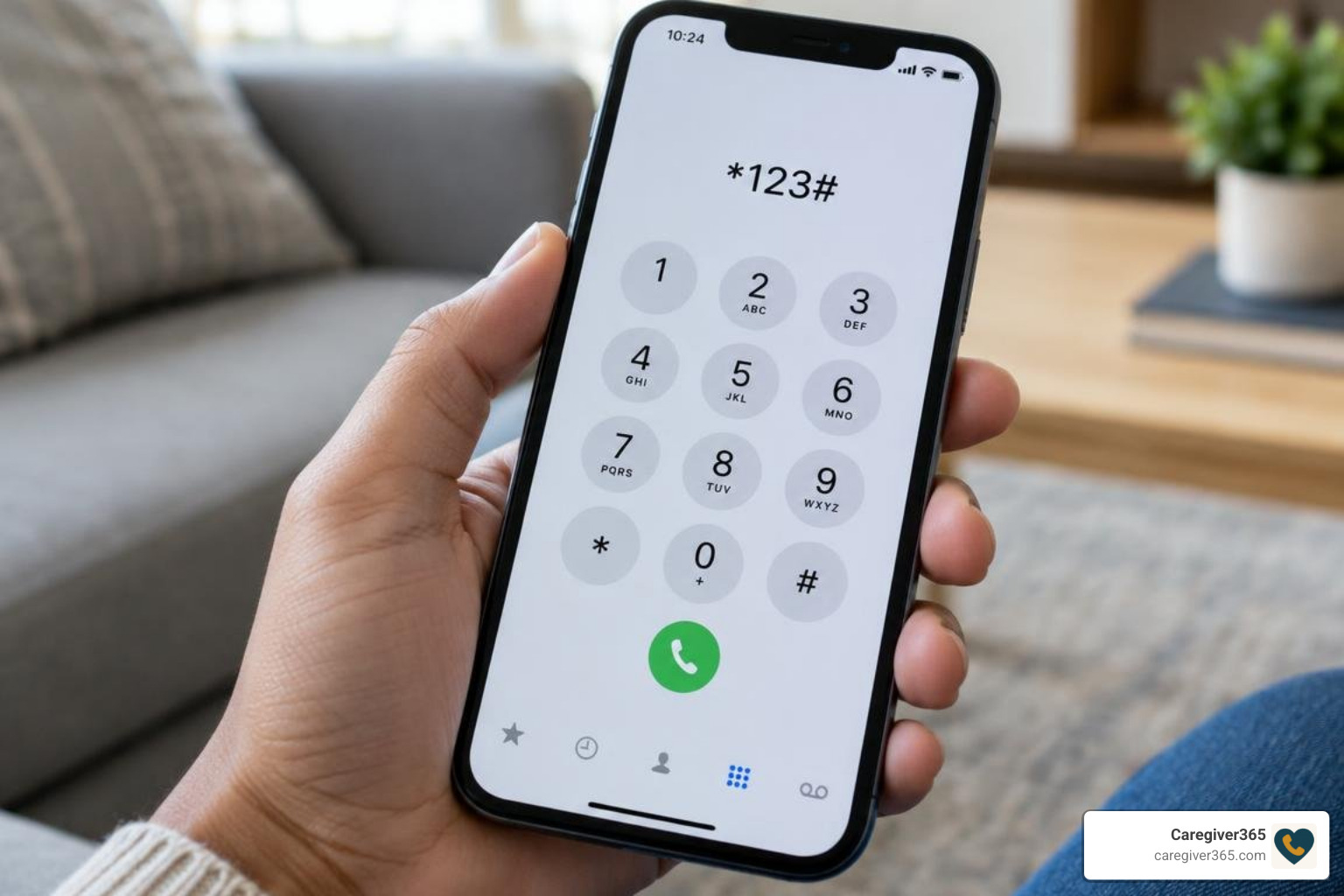
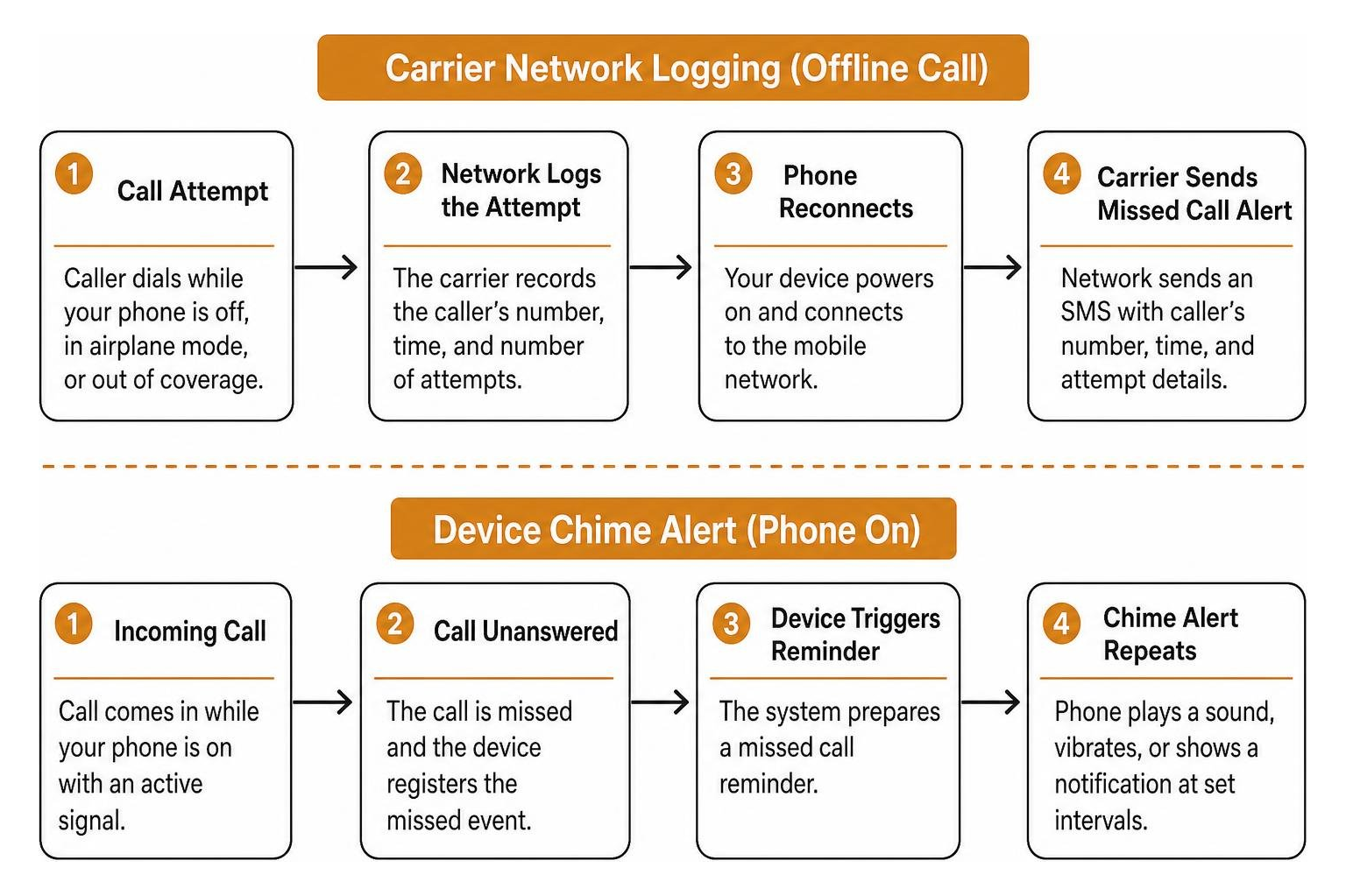
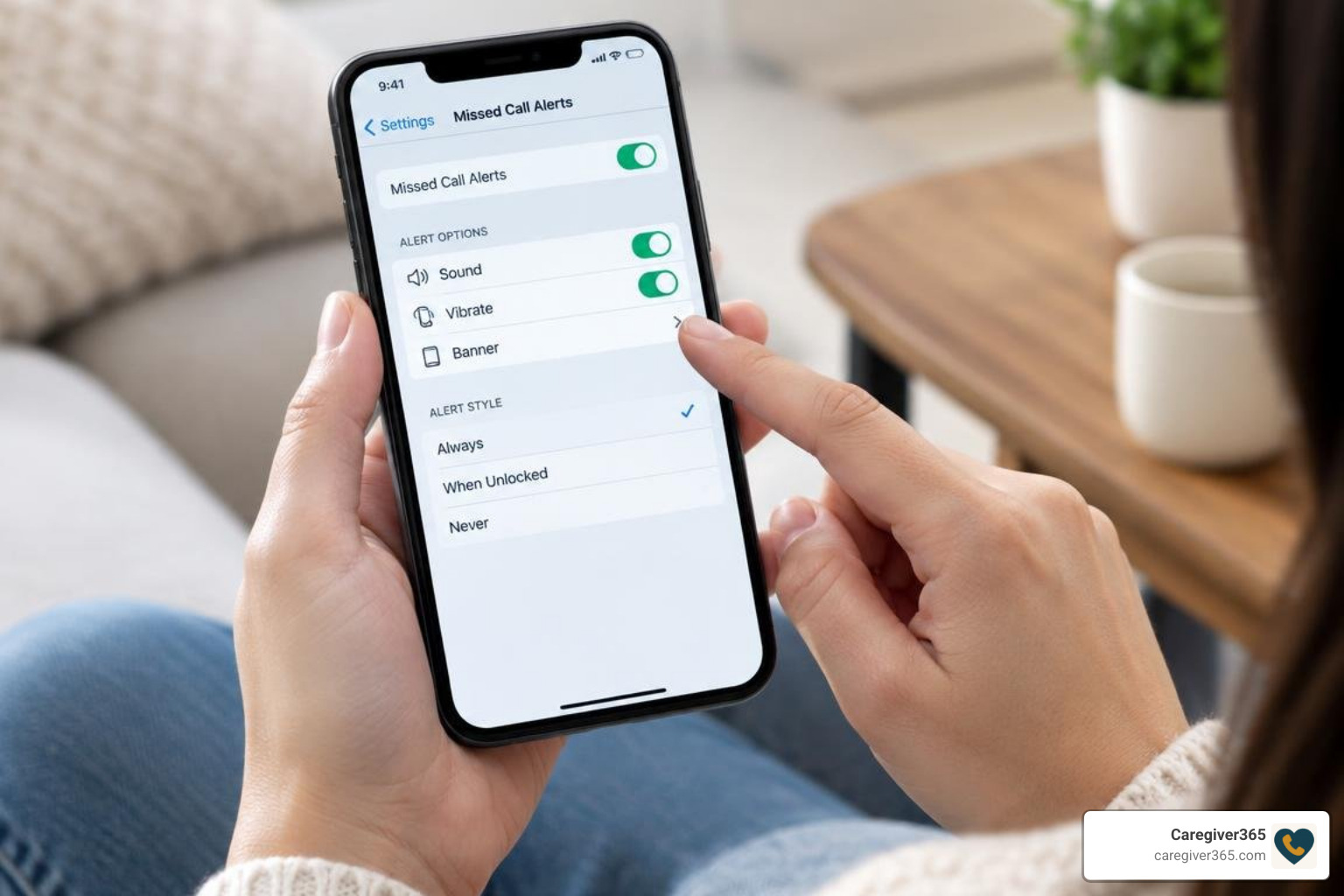
Activating missed call alerts depends on whether you need a network-level carrier notification or an on-device reminder. You can activate carrier alerts by dialing a USSD code such as *62#, sending an SMS command such as ACT MCI to 54300, or enabling the service in your carrier’s app. For device reminders, open your phone app, go to Settings > Calling accounts > Advanced settings > Missed call reminders, and choose how often the alert repeats. These steps work even when your phone was off, out of coverage, or simply left in another room.

Staying reachable is vital, especially when keeping tabs on family members, coordinating busy workdays, or managing health check-ins. When a call does not connect, two distinct mechanisms handle notifications: network-level carrier alerts and on-device operating system reminders.

Carrier-level missed call alerts operate entirely on the mobile network’s infrastructure. When your phone is powered down, stuck in airplane mode, or out of cell reception, the cellular network logs incoming connection attempts. Once your device reconnects to a cell tower, the network sends an automated SMS detailing the caller’s number, timestamp, and number of attempts.

Native device reminders, by contrast, function only when your phone is turned on and receives an incoming call that goes unanswered. The phone registers the missed event and replays a sound, vibration, or visual alert at set intervals so the notification is not forgotten on a crowded lock screen.

Feature Carrier-Level Missed Call Alert Device-Level Missed Call Reminder
Operational State Works when phone is off, busy, or out of coverage Requires phone to be powered on with active signal
Delivery Method Network SMS or audio MMS System push notification, sound, or banner
Network Dependency Carrier core switching network Local mobile operating system (Android / iOS)
Escalation Support Single text summary upon reconnecting Repeating alert chime (e.g., every 5 minutes)
Configuration USSD dial codes, SMS shortcodes, or carrier apps Device Settings app under Calling Accounts

Understanding this distinction helps you avoid missing critical reach-outs. If you want to configure your smartphone hardware so it periodically chimes after an unanswered ring, you can easily set up instant missed call reminders in under two minutes on supported devices.

flowchart illustrating carrier network logging offline call vs device chime alert

How Do I Activate Missed Call Alert Services Across Major Carriers?

When setting up a new line or troubleshooting unreachable numbers, many subscribers ask how do I activate missed call alert settings for their specific network. The process depends on the specific telecom provider and region. Most network operators provide shortcodes, USSD strings, or dedicated account menus to enable these value-added services. The activation method you choose will determine whether you receive a plain SMS summary, a repeating device notification, or an audio MMS message when a call goes unanswered.

How Do I Activate Missed Call Alert via USSD and SMS Codes?

Major mobile carriers utilize direct text commands or short dial strings to activate offline call logging. These methods are usually the fastest way to enable missed call alerts because they work directly from your phone dialer or messaging app without requiring a separate account login.

  • Vi (Vodafone Idea): Subscribers can enable the Missed Call Information (MCI) service via SMS. Send an SMS containing ACT MCI to 54300. You will receive an automated confirmation text verifying that offline alerts are active. Review the official Vi consumer missed call alerts guide for regional terms and service details.
  • Jazz: Users can activate network call alerts directly through standard USSD string sequences. Dial *62# from your phone dialer and press call to activate missed call tracking when unreachable or powered off. To deactivate, dial #*62#. You can find detailed network instructions in the Jazz missed call alert activation steps.
  • Jio and Other Global Carriers: Many 4G and 5G networks enable basic missed call SMS alerts by default through their native VoLTE network architecture, with additional preferences accessible via their respective customer account apps. If you are unsure whether your carrier has already activated the service, check your account settings or contact customer support.

Activating Carrier Voicemail Alternatives and Audio MMS Alerts

Some telecommunications providers deliver missed call messages as rich media instead of standard plain text. For example, Optus provides a Missed Call Service that acts as a lightweight alternative to traditional voicemail by recording a short audio snippet from the caller and delivering it as an audio MMS (around 92 KB, capped at 1 minute).

To manage this style of audio alert:

  1. Activation: Dial 159 from your handset and follow the voice prompts.
  2. Deactivation: Text the word OFF to 159.
  3. Adjusting Ring Duration: You can adjust how long your phone rings before diverting to the service by dialing **004*0411000160**XX# (replacing XX with your preferred ring timeout in 5-second intervals, up to 30 seconds).

For comprehensive setup steps and overseas data considerations, consult the Optus missed call service instructions. Receiving audio MMS notifications while traveling internationally requires active data roaming.

Setting Up Missed Call Notifications on Android, iOS, and Cloud Apps

In addition to cellular network alerts, you can configure your smartphone operating system and virtual calling platforms to deliver prompt notifications whenever an unanswered call occurs. These device-level and cloud-based options are especially useful when your carrier does not offer a native missed call alert service, or when you want more granular control over how and when you are notified.

phone settings screen configuring missed call alerts

How Do I Activate Missed Call Alert on Android and Xiaomi Devices?

Android handsets running custom manufacturer interfaces (such as Xiaomi’s HyperOS or MIUI) include native settings to repeat missed call alerts so you do not overlook important calls. The exact menu path may vary slightly depending on your device model and Android version, but the general steps are consistent across most modern handsets.

  1. Open the default Phone app.
  2. Tap the three-dot menu icon in the upper-right corner and select Settings.
  3. Select Calling accounts.
  4. Tap Advanced settings.
  5. Select Missed call reminders.
  6. Choose how many times the reminder should repeat (from 1 up to 10 times at 5-minute intervals).

For model-specific menu layouts and troubleshooting missing options on regional carrier builds, refer to the Xiaomi missed call reminders guide and the official documentation on turning on missed call reminders.

Configuring Missed Call Alerts in Google Voice and VoIP Apps

Cloud telephony platforms and VoIP applications offer cross-device notifications across mobile apps and desktop email inboxes. These services are particularly helpful if you manage multiple phone numbers or want a backup notification channel in addition to your carrier’s native alerts.

To configure alerts in Google Voice:

  1. Open the Google Voice app on your device.
  2. Tap the top-left menu icon and open Settings.
  3. Under the Calls heading, select Missed call notifications and toggle it On.
  4. Adjust sound, vibration, and lock screen visibility preferences.
  5. Enable Get email alerts for missed calls under call settings to receive instant email notifications containing caller ID data and timestamps.

For complete notification priority rules and overriding Do Not Disturb, review the official Google Voice notification settings guide.

Troubleshooting and Managing Missed Call Alert Services

If your missed call alerts stop delivering, several common issues may be interfering. Working through these troubleshooting steps in order can help you identify whether the problem is on your device, your carrier account, or a third-party app.

  • Do Not Disturb (DND) Restrictions: Check that your handset’s DND mode does not silence call notifications completely. Configure exceptions for priority contacts so that important missed call alerts still come through even when other notifications are muted.
  • Email Spam Filters: If using cloud telephony or email forwarding, whitelist the provider’s domain to ensure alert summaries bypass junk folders. Missed call email notifications often end up in spam because they are sent from automated addresses.
  • Call Forwarding Conflicts: Active unconditional call divert rules (such as *21*) route calls to another destination before the network can register a missed attempt on your primary line. Disable any unnecessary forwarding rules and test again.
  • Carrier Feature Deactivation: If you change SIM cards, switch mobile operators, or migrate from prepaid to postpaid billing, re-verify your subscription using the carrier’s activation shortcode. Some carriers automatically remove value-added services when your plan changes.
  • Network Coverage Gaps: If you frequently travel through areas with poor reception, your carrier may not be able to deliver the SMS alert immediately. The alert should arrive once you reconnect to a stable network, but repeated coverage gaps can delay delivery.

While carrier alerts keep individual phone users informed about missed contacts, family caregiving often requires a more proactive approach. Understanding how automated call check-ins operate ensures that when a vulnerable loved one does not answer the phone, the missed connection is immediately detected and escalated across a shared support network.

Frequently Asked Questions About Missed Call Alerts

Can I receive missed call alerts when my phone is switched off?

Yes, provided you have activated carrier-level missed call alerts. The carrier network logs the incoming attempt while your device is disconnected and dispatches an SMS notification once your phone powers on and re-establishes a cellular connection. This works because the alert is generated by the network infrastructure rather than your phone’s operating system, so it does not require your device to be active at the time of the missed call.

Are there extra charges for activating missed call alert services?

Pricing varies by carrier and subscription tier. While many modern postpaid plans include missed call text alerts at no extra charge, certain prepaid networks or international roaming services may apply recurring monthly fees or standard messaging charges. Check your carrier’s value-added service terms or contact customer support to confirm whether your plan includes missed call alerts without additional cost.

How do I deactivate or unsubscribe from missed call alerts?

You can deactivate carrier services by sending an opt-out keyword (such as “STOP” or “OFF”) to your carrier’s service shortcode, dialing network cancellation codes (such as ##002# or *#62#), or managing add-ons within your network’s official customer mobile app. For device-level reminders, simply return to the missed call reminder settings in your phone app and turn the feature off.

Conclusion

Setting up missed call alerts ensures you stay informed about unreachable callers, whether your phone was out of signal range, turned off, or ringing while you were away from the room. By combining carrier-level SMS alerts with repeating device reminders, you can maintain reliable visibility over incoming communications across any mobile network. The activation process is straightforward: dial a USSD code, send an SMS shortcode, or toggle a setting in your phone app, and you will have a dependable safety net for every missed connection.

For families managing the safety of an aging parent or relative, automated check-ins provide an added layer of security. We invite you to explore how daily check-in calls work with Caregiver365 to keep your entire family circle connected and informed every day.

Traditional Landline Alert Devices: No Cellular Signals Required

How Landline Medical Alert Systems Work for In-Home Safety


Understanding how a wired system protects a household is straightforward. While modern cellular gadgets rely on cellular towers and data plans, traditional units use the physical telephone infrastructure already wired into the residence. This setup creates a dedicated emergency lifeline that does not depend on broadband routers, Wi-Fi passwords, or cellular tower reception.

To build a truly secure environment, families often explore comprehensive senior safety solutions that combine physical hardware with clear emergency protocols. When evaluating wired options, the communication chain relies on simple, proven hardware engineered to connect with professional help in seconds.

Core Hardware in Landline Medical Alert Systems

Every traditional home system consists of two primary hardware components:

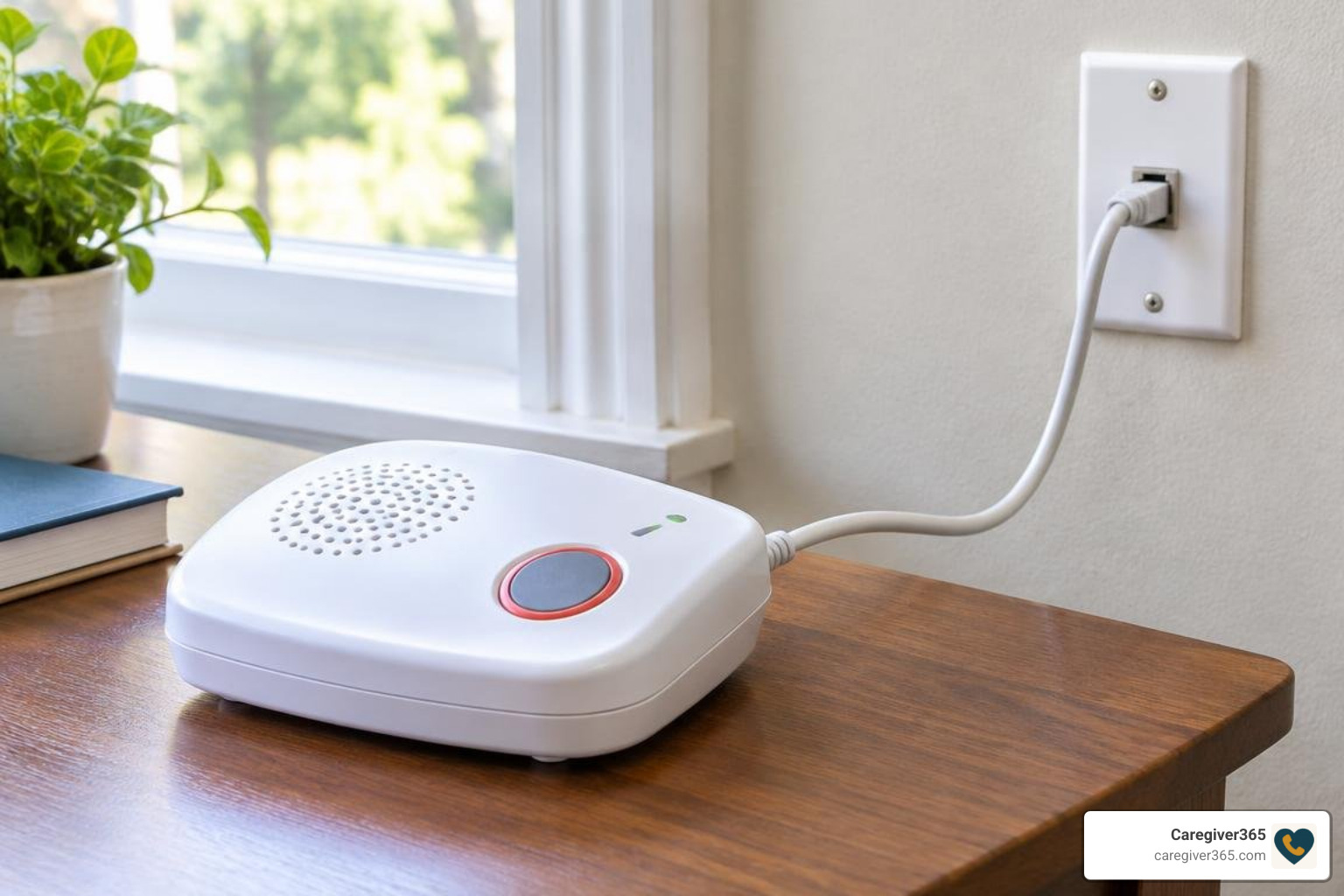
  1. The Base Station Console: This unit plugs directly into an existing telephone wall jack and a standard electrical outlet. It houses a powerful microphone, a high-output two-way loudspeaker, the primary dialing processor, and an internal rechargeable backup battery.
  2. Wearable Help Transmitters: Users carry an ultra-lightweight, wireless radio frequency (RF) button worn as a necklace pendant, a wristband, or placed on high-risk surfaces as wall-mounted buttons.

These wearable transmitters use low-frequency radio waves to communicate directly with the base receiver. Because the button only needs to transmit an RF pulse rather than stream heavy voice data, its internal battery lasts between two and three years without needing nightly recharging. Comparing the durability and reach of these transmitters is essential when reviewing top home care call buttons comparing range and reliability.

Signal Transmission and Emergency Dispatch Protocol

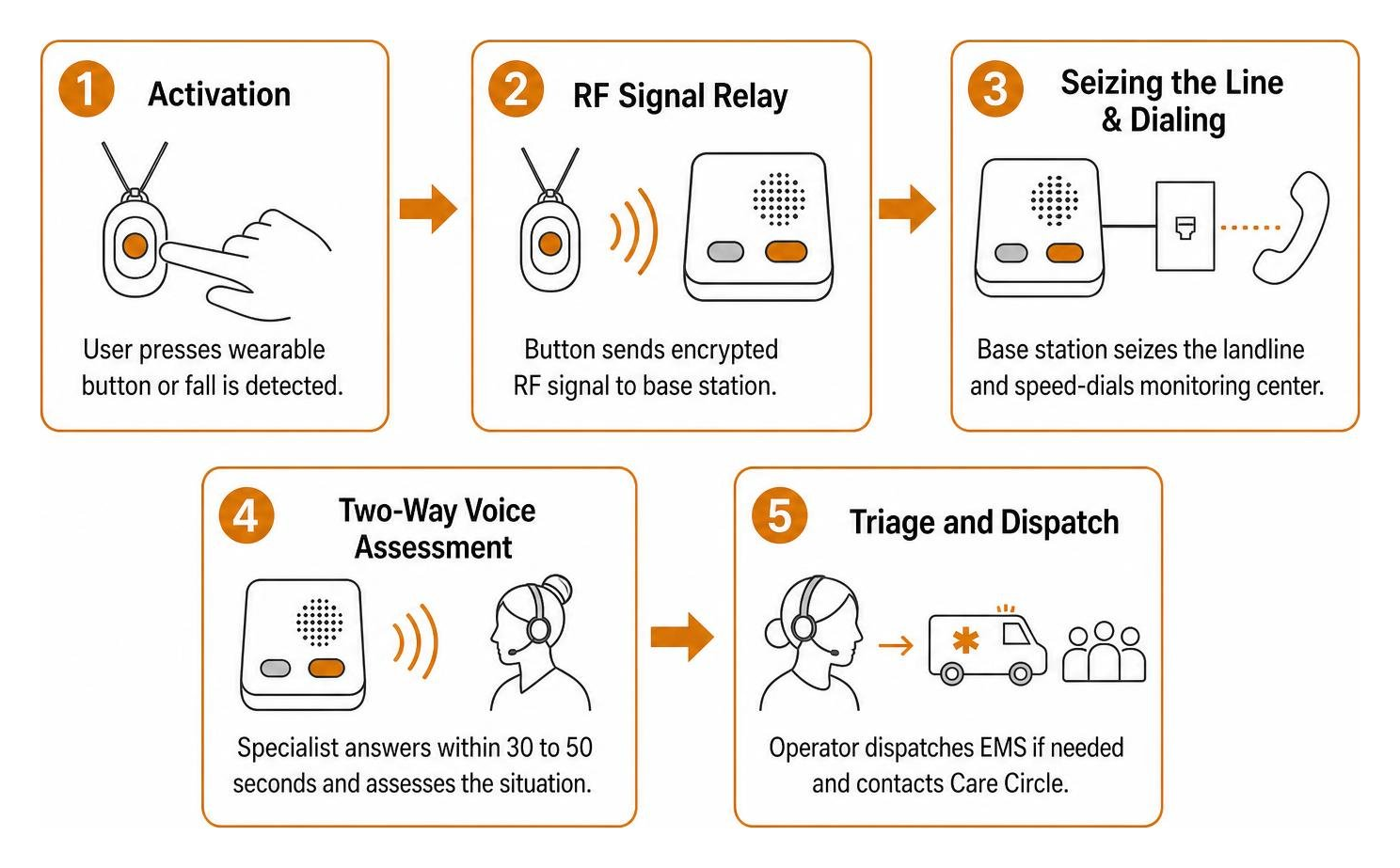
When an emergency happens, the alert process follows a precise sequence designed to get assistance on site immediately:

emergency response call sequence from button press to dispatch

  • Step 1: Activation. The user presses their wearable transmitter or a built-in accelerometer registers a hard fall.
  • Step 2: RF Signal Relay. The button broadcasts an encrypted radio frequency signal to the base station console.
  • Step 3: Seizing the Line & Dialing. The base station automatically seizes the landline—disconnecting any ongoing phone conversation—and speed-dials the 24/7 monitoring center.
  • Step 4: Two-Way Voice Assessment. A trained emergency response specialist answers within 30 to 50 seconds through the base console’s loudspeaker, assessing the user’s situation and condition.
  • Step 5: Triage and Dispatch. If the user requests help, cannot respond, or confirms an injury, the operator immediately dispatches local emergency services (EMS) and contacts the pre-designated family Care Circle.

For more information on how these systems compare to other options, see medical alert systems.

Key Features to Evaluate in Traditional In-Home Units

Not all wired consoles are created equal. When reviewing options, evaluating core technical specifications ensures the chosen hardware fits the specific floor plan and daily habits of the user. For a broader overview of home safety criteria, our senior care resource guides cover additional environmental modifications and planning strategies.

Coverage Range for Landline Medical Alert Systems

wearable help button communicating with base station across home perimeter

The transmission distance between the wearable button and the base receiver determines how freely an older adult can move around their property while remaining protected.

  • Standard Coverage (600 to 800 Feet): Ideal for single-story apartments, condominiums, and smaller ranch-style homes. An 800-foot radius covers approximately two and a half football fields, which comfortably spans interior living spaces, attached garages, and small patios.
  • Extended Coverage (1,300 to 1,400 Feet): Designed for multi-story residences, properties with dense construction materials (such as brick, stone, or metal framing), and homes with expansive yards or detached workshops. A 1,300-foot range covers roughly three football fields, ensuring that stepping out to check the mailbox or tend to a garden does not leave someone stranded outside signal reach.

Power Outage Protection and Battery Redundancy

Severe storms and electrical grid failures are precisely when slip-and-fall accidents are most likely to occur. Traditional alert systems address this risk through dual-layer power redundancy:

  • 32-Hour Base Battery Backup: When municipal power fails, the base console automatically switches to an internal rechargeable backup battery, maintaining continuous monitoring for up to 30 to 32 hours.
  • Constant Telephone Line Voltage: Traditional copper landlines carry their own low-voltage electrical current independent of the electric grid. As long as the physical phone line remains intact, the system can dial out during a blackout without relying on household electrical outlets.
  • Supervised Wearable Batteries: The transmitter buttons use sealed, long-life lithium batteries that operate for several years. The base console periodically runs automated diagnostic checks, alerting the monitoring center when a button’s power runs low so a replacement can be mailed out proactively.

Comparing In-Home Landline Options vs. Modern Alternatives

Selecting the right safety solution requires balancing physical living conditions, local telecom infrastructure, and budget requirements.

Feature / Metric Traditional Landline Systems Cellular In-Home Systems Proactive Automated Check-In Services
Primary Connection Physical telephone line (POTS/DSL) Built-in 4G/5G cellular module Any existing landline or mobile phone
Hardware Required Base console + wearable button Base console + wearable button None (uses existing home phone)
Average Monthly Cost $24.95 – $29.95 / month $32.95 – $39.95 / month Starting under $15.00 / month
Upfront / Activation Fees $0 – $99.95 (varies by provider) $0 – $50.00 $0
Power Outage Resilience 30–32 hour backup + phone line voltage 24–30 hour backup battery 100% cloud-based (unaffected by home outages)
Coverage Area In and around the home perimeter In-home or nationwide (mobile units) Anywhere phone service exists
Fall Detection Option Yes (approx. $5 – $10 / month add-on) Yes (approx. $10 / month add-on) N/A (proactive wellness verification)
Best Suited For Rural areas, poor cellular coverage, low tech Suburban homes with strong cellular reception Daily routine confirmation & isolation prevention

Explore our comprehensive side-by-side safety comparison for detailed feature breakdowns across modern safety technologies.

Landline Reliability vs Cellular Coverage Gaps

While cellular consoles offer mobility, they depend entirely on local tower density. In rural, mountainous, or heavily wooded regions, cellular signals can drop unpredictably inside homes with thick plaster, concrete foundations, or metal roofs. A wired home phone line provides stable, hardwired communication that does not fluctuate with regional network congestion or weather-related signal attenuation.

Emergency Response Buttons vs Scheduled Verification

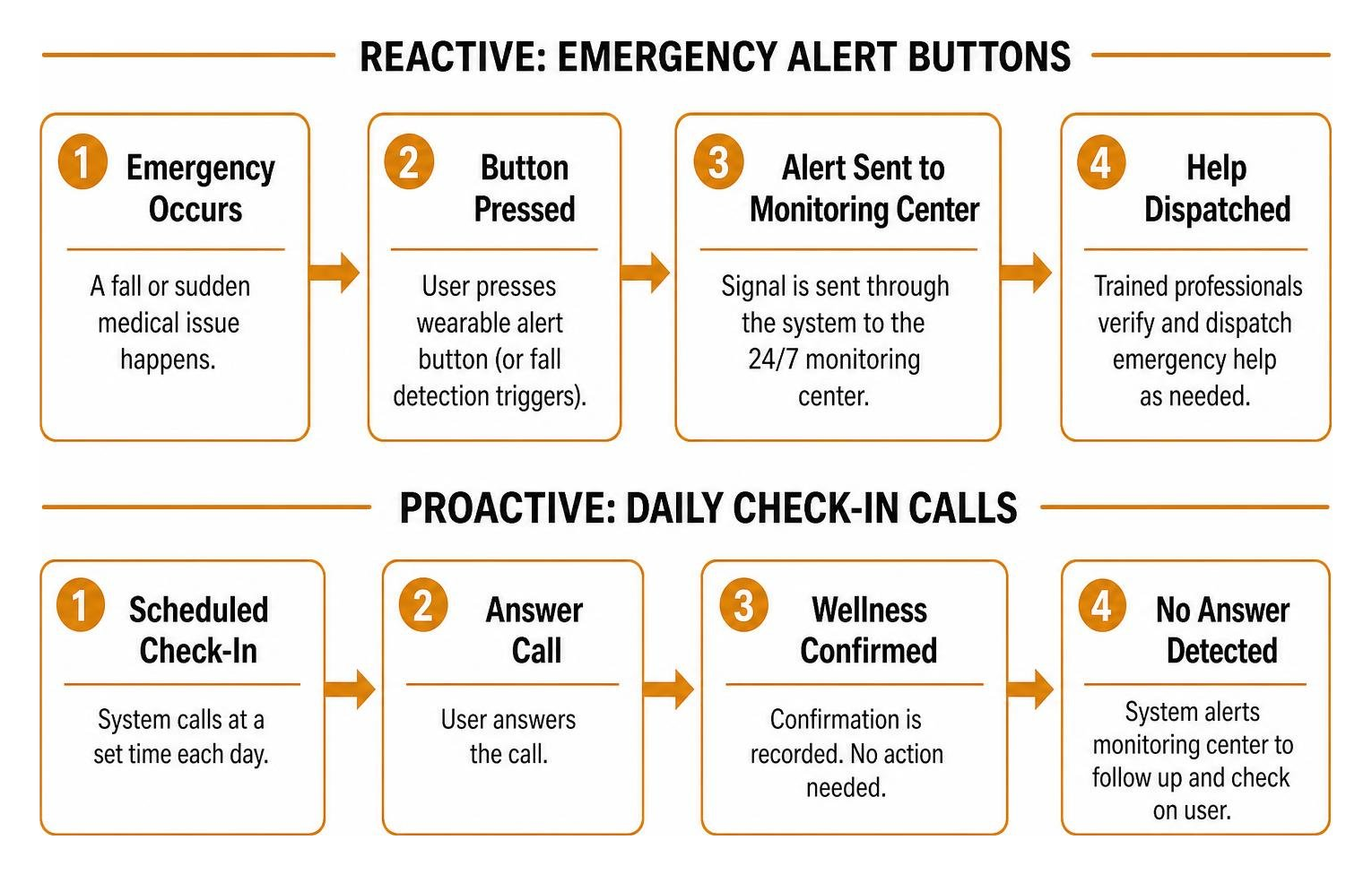
Wearable alert hardware serves as a reactive safety net: it works only if the senior is wearing the button, is conscious, and can activate it (or triggers an automated fall sensor).

comparison of reactive emergency alert buttons versus proactive daily check-in calls

By contrast, proactive wellness verification solves a completely different challenge. Many families choose to balance reactive hardware with automated wellness calls. Our breakdown of scheduled check-in calls vs wearable medical buttons details how combining both creates a comprehensive safety net: the button handles sudden emergencies, while daily check-ins ensure that a parent who is unable to reach their device is never left unattended for days.

Frequently Asked Questions About Landline Alert Devices

Do landline medical alert systems work during a power failure?

Yes. Quality home consoles feature an integrated backup battery providing between 30 and 32 hours of continuous operation during a blackout. Because landline telephone connections operate on independent low-voltage line power supplied by the telecom provider, the base unit can continue to place emergency calls even when the home’s main circuit breakers have tripped.

Can wearable alert buttons be used in the shower?

Yes. The wearable pendants and wristbands included with landline systems carry water-resistant or waterproof IPX7 ratings. They are fully safe to wear in the shower, bath, or outdoors in heavy rain. Because a significant percentage of senior falls occur on wet bathroom tiles, keeping the button on while bathing is strongly recommended.

Can multiple people share a single landline base console?

Yes. Most wired base stations can pair with multiple transmitters simultaneously. Spouses or roommates living in the same home can each wear their own pendant or wristband linked to a single central base console, often for a nominal one-time button fee or a small monthly add-on.

Conclusion

Traditional wired alert devices continue to deliver unmatched dependability for seniors aging in place in rural settings, older homes, or neighborhoods with poor cellular reception. With robust 32-hour battery backups, broad signal ranges up to 1,300 feet, and no cellular dead zones to worry about, they offer dependable peace of mind at an affordable monthly rate.

True peace of mind, however, works best in layers. While a wearable button provides immediate access to emergency personnel during a sudden fall, proactive daily communication ensures ongoing safety, routine monitoring, and emotional connection. Learn how Caregiver365 home safety support provides automated daily check-ins that work seamlessly across any landline or mobile phone, keeping families connected and seniors thriving independently.

Why It’s Important to Check in on Seniors

Checking In on Seniors: Why Daily Contact Matters

Quick answer: Checking in on seniors reduces isolation, helps catch health problems early, and gives families peace of mind. Daily contact does not have to mean daily phone calls from a busy adult child. Automated senior check-in services, like Caregiver365’s daily call, confirm a loved one is safe without requiring new devices, apps, or a change in routine.

For families with aging parents, a daily hello can mean the difference between catching a problem early and finding out too late. Yet many caregivers already juggle jobs, kids, and their own households, making a daily phone call harder to keep up than it sounds.

This is where Caregiver365’s automated check-in solutions come in. They offer a consistent way to confirm a senior is okay, without asking anyone to learn new technology or change their phone.

Why Regular Check-Ins Matter for Senior Wellness

Consistent contact with family does more than offer comfort. It plays a real role in a senior’s health and happiness.

  • Reduced isolation. Frequent contact helps seniors feel less alone, which supports better mental health.
  • Early detection. A missed check-in can be the first sign that something is wrong, giving family a chance to respond quickly.
  • Better quality of life. Seniors who feel connected to their families tend to report a stronger sense of well-being.

Senior check-ins are not just a courtesy. They are a proactive way to catch small problems before they become emergencies.

Why Is It Hard to Stay Connected With Aging Parents?

Adult children want to check in on their parents every day, but life gets in the way.

  • Work schedules, childcare, and daily responsibilities leave little room for a consistent call.
  • Seniors themselves may forget to reach out, especially if memory or routine has started to slip.
  • Manual check-in systems, like a family calendar of who calls when, are hard to maintain and easy to let slide.

The result is a gap between the intention to check in on seniors regularly and the reality of a busy household.

How Do Automated Daily Check-In Calls Work?

Caregiver365’s daily check-in service closes that gap without adding complexity.

  1. A call arrives at a time the family chooses.
  2. The senior answers and presses 1 to confirm they are okay.
  3. If the call goes unanswered, the service retries several times over the following hour.
  4. If there is still no response, the senior’s Care Circle is notified by phone, text, or email.

No smartphone, app, or extra device is required. The service works on any landline or cell phone the senior already uses.

What Are the Benefits of Automated Check-In Services?

  • Consistency. A daily confirmation replaces the guesswork of “did anyone hear from Mom today?”
  • Less caregiver stress. Families gain reassurance without needing to make the call themselves.
  • Independence for seniors. A senior can continue living on their own terms while staying connected.
  • Faster alerts. If something seems wrong, family members are notified right away instead of finding out hours or days later.

How Do You Get Started With a Check-In Service?

Setting up senior check-ins through Caregiver365 involves a few simple choices:

  1. Pick a time of day that fits the senior’s routine.
  2. Add up to eight family members or friends to the Care Circle.
  3. Add optional reminders, such as medication alerts, to the daily call.
  4. Use the existing phone line at home. No new devices are needed.

Frequently Asked Questions

What is a senior check-in service?

A senior check-in service places an automated daily call to confirm an older adult is safe. If the call is missed, the service retries and then alerts a designated Care Circle.

Does a check-in service require a smartphone?

No. Caregiver365’s daily check-in call works on any landline or cell phone. No app or additional device is required.

What happens if my loved one misses the check-in call?

The service calls back several times over the following hour. If there is still no answer, family members in the Care Circle are notified by phone, text, or email.

How is a check-in call different from a medical alert button?

A check-in call is proactive, confirming a senior is okay each day. A medical alert button is reactive, used the moment an emergency happens. Many families use both together.

How many people can be added to a Care Circle?

Up to eight family members or friends can be added to receive alerts if a check-in is missed.

Make Checking In on Seniors Part of the Routine

Checking in on seniors is one of the simplest, most meaningful things a family can do. It will not prevent every problem, but it builds a daily habit of connection and catches issues before they grow.

Automated check-in services take the pressure off busy schedules while keeping that daily thread of contact intact. Caregiver365’s daily check-in call gives families a reliable way to confirm a loved one is safe, without adding another task to an already full day.

Ready to make senior check-ins easier for your family? Visit Caregiver365 to learn how the daily check-in call works and start protecting the people you care about most.

A Practical Guide to In-Person Welfare Checks for Aging Loved Ones

Senior Well-Being Checks: A Simple Way to Stay Ahead of Problems

A senior well being check is a planned visit that confirms an older adult is safe, comfortable, and managing well at home. A trained visitor looks for changes in physical condition, mood, daily routine, and home safety, then shares concerns with the family or care circle.

For an adult child caring from a distance, these visits can provide practical reassurance without requiring your parent to learn new technology or wear another device. They can also spot small concerns – such as a trip hazard, missed medication routine, low food supplies, or unusual confusion – before they become a larger emergency.

Unlike a medical appointment, a non-medical well-being visit does not diagnose or treat illness. It adds a regular set of caring eyes and ears to support an aging loved one’s independence, especially when family cannot be there in person. According to the National Institute on Aging, regular social contact and home safety monitoring can help older adults remain independent longer.

How routine in-person wellness visits check safety, routine, mood, and family alerts infographic

Core Components of a Comprehensive Senior Well Being Check

When an older adult wishes to age in place, maintaining that independence requires proactive support. A comprehensive welfare visit evaluates several dimensions of daily living to build a clear, holistic picture of how a senior is managing.

Living room safety assessment for seniors

A thorough assessment typically includes:

  • Visual and Physical Observations: Visitors observe mobility, balance, personal grooming, and general physical vitality. Subtle changes—such as moving with hesitation, favoring one side, or wearing unwashed clothing—can indicate emerging physical limitations or fatigue.
  • Living Environment and Fall Hazards: The visitor scans living areas for clear walkways, loose throw rugs, poor lighting, or cluttered hallways. As the adage goes, changing a burned-out lightbulb can be a truly heroic act when it keeps someone safely on their feet.
  • Emotional and Mental Status: Engaging in genuine conversation allows the visitor to assess mood, signs of withdrawal, emotional distress, or memory lapses. Sometimes a friendly chat about the morning weather reveals more about cognitive clarity than a rigid questionnaire.
  • Nutrition and Hydration Review: Checking the kitchen helps confirm that fresh food is available, expiration dates are current, and meals are being prepared consistently rather than skipped.
  • Medication and Routine Awareness: While non-medical personnel do not administer drugs, they can observe whether pillboxes are organized, prescriptions are being refilled, and daily routines are being followed smoothly.

Non-Medical Senior Well Being Check vs. Automated Check-Ins

Both in-person visits and automated monitoring tools play critical roles in modern senior care, yet they serve distinctly different needs.

In-person visits provide rich, qualitative context. A visitor can detect subtle odors, notice a stack of unopened mail, or see that a pet’s food bowl has sat empty. However, scheduling visits every single day can be cost-prohibitive and intrusive for seniors who cherish their privacy.

Automated daily check-ins bridge this gap by providing consistent safety verification. A quick, scheduled daily call verifies that a senior is awake, active, and responsive every morning, immediately alerting family members if something goes unanswered.

Feature / Dimension In-Person Well-Being Check Daily Automated Check-In Call
Frequency Weekly, bi-weekly, or monthly Daily (or multiple times per day)
Primary Focus Environmental safety, social contact, deep visual assessment Immediate safety confirmation, routine verification
Intrusiveness Requires scheduled home entry Non-intrusive phone call (works on any landline or mobile phone)
Early Warning Scope Physical decline, clutter, nutrition gaps, hygiene changes Immediate response failure, missed morning routine
Emergency Escalation Direct on-site intervention during the visit Immediate alert notifications sent to a multi-member Care Circle
Relative Cost Moderate to high (hourly rates) Very low and budget-friendly

Integrating Home Safety Observations

A critical advantage of an in-person visit is the ability to conduct direct home safety observations. Visitors can spot minor hazards that seniors often overlook after years of living in the same space:

  1. Fall Prevention: Identifying trailing electrical cords, slippery bath surfaces, missing handrails, or uneven floorboards.
  2. Pet Safety Observations: Ensuring companion animals are healthy, well-fed, and not creating tripping hazards underfoot.
  3. Basic Home Functionality: Confirming smoke detectors are working, heating and cooling settings are appropriate, and essential appliances operate safely.

Following the visit, documented observations are compiled into a clear report for the family, allowing minor issues to be resolved long before they lead to an emergency room visit.

In-Person Visits vs. Family Check-Ins

Relying solely on family members for routine check-ins can unintentionally strain relationships and lead to caregiver burnout. Long-distance caregivers often struggle to balance demanding work schedules with the emotional burden of remote monitoring.

Furthermore, aging parents often mask difficulties when speaking with their children, insisting that “everything is fine” to avoid feeling like a burden. An objective third party brings fresh eyes and trained observation skills to spot hazards that family members might miss or that loved ones might downplay.

Senior reviewing daily notes with a caregiver

Understanding how to balance personal visits, professional services, and automated tools is vital. When evaluating your family’s overall safety net, exploring check-in calls and emergency response options can help determine the right combination of daily monitoring and hands-on care.

When to Schedule a Routine Senior Well Being Check

While regular monitoring is ideal for any senior living independently, specific life transitions create an urgent need for an in-person assessment:

  • Post-Hospital Discharge: Returning home after a hospital stay or rehabilitation requires verification that the home is set up for recovery and prescriptions are in order.
  • Following a Recent Fall or Near-Miss: Even minor stumbles warrant a home safety review to eliminate physical hazards.
  • Significant Medication Adjustments: Complex new dosing schedules increase the risk of confusion or missed doses.
  • Observed Mobility Reduction: When walking, standing, or climbing stairs becomes noticeably more difficult.
  • Noticeable Social Isolation: When a loved one stops attending community activities or withdraws from regular conversations.

If you are unsure how to coordinate official community or local resources during an urgent situation, review this practical guide to requesting a senior welfare check online or by phone for step-by-step instructions.

Balancing In-Person Visits with Daily Automated Monitoring

The most effective, reliable approach to senior safety is a hybrid model. Combining periodic in-person wellness visits with automated daily phone check-ins creates an affordable, layered safety net that preserves independence while ensuring daily peace of mind.

Diagram showing the multi-tier senior care cycle from daily automated calls to in-person visits and family alerts

At Caregiver365, we provide automated daily check-in calls designed to verify safety every single day without requiring wearable pendants or complex new hardware. Because our system works seamlessly on any existing landline or cell phone, your loved one simply answers a friendly, automated call at a pre-set time.

If a call goes unanswered after repeated attempts, our system immediately alerts your designated Care Circle—notifying up to eight family members, neighbors, or caregivers via phone call, text, or email.

To learn more about how this safety net operates seamlessly in your daily routine, see how daily check-in calls work and explore the core mechanics of how it works. For additional planning tools and caregiver guides, browse our curated senior support resources.

Frequently Asked Questions About Senior Welfare Checks

How much do non-medical senior wellness visits cost?

Non-medical in-person wellness visits typically range from $30 to $75 per hour, depending on your geographic region and the level of assistance provided. Visits can be scheduled weekly, bi-weekly, or monthly. Families often use automated daily phone check-ins for day-to-day safety to keep overall costs manageable, reserving in-person visits for comprehensive periodic evaluations.

How quickly can an in-person wellness check be arranged?

Routine non-medical visits through local home care agencies or companion services generally require several days of advance notice for an initial intake. If there is an urgent concern about an individual’s immediate safety and family cannot reach them, local non-emergency dispatch or municipal services can perform an urgent welfare check within hours.

What happens if a safety hazard or medical concern is found?

When a visitor identifies an immediate medical emergency, standard protocols dictate calling 911 immediately. For non-emergency concerns—such as expired medication, tripping hazards, or minor home repairs—the visitor logs the findings in a post-visit summary report and directly contacts the primary family caregiver to coordinate necessary modifications.

Conclusion

Supporting an aging loved one’s desire to live independently requires a thoughtful combination of safety, companionship, and proactive communication. In-person visits provide an essential set of caring eyes to spot environmental risks, monitor cognitive wellness, and prevent accidents before they happen.

By pairing periodic home visits with automated daily check-ins, families gain total confidence that their loved ones are safe every single day. Explore our comprehensive senior check-in services today to establish an effortless, dependable safety routine for the people who matter most.

How Caregiver Apps Keep Families in the Loop

How Caregiver Apps Keep Families in the Loop

Quick answer: Caregiver apps keep families connected by centralizing updates, medications, and schedules in one place. Instead of repeating the same news to five different relatives, a caregiver for the elderly can post once and reach everyone instantly. Paired with daily check-in calls, these tools reduce stress, prevent missed medications, and give families real-time peace of mind.

Caring for an aging parent or relative often means juggling phone calls, texts, and group chats just to keep everyone informed. One sibling wants a health update, another needs to know about an upcoming doctor’s appointment, and somewhere in the shuffle, an important detail gets lost. This fragmented communication adds unnecessary stress to an already demanding role.

Caregiver apps solve this problem by creating a single hub where every family member can see the same information at the same time. Combined with daily check-in services, these tools give families a reliable way to stay connected and catch problems early, without constant phone calls or guesswork.

What Are Caregiver Apps and Why Do They Matter?

Caregiver apps are digital platforms built to organize and simplify communication among the people involved in caring for a loved one. They typically include shared updates, medication tracking, and calendars, all in one place.

As more families take on the role of caregiver for the elderly, these apps have become increasingly important. Caregiver apps are designed to streamline communication and coordination among family members involved in caregiving, reducing the burden of repeating the same updates to multiple people.

Rather than sending five separate texts about a doctor’s visit, a primary caregiver can post one update that reaches the entire family circle. This saves time and reduces the mental load that so often falls on a single person.

What Features Keep Families Connected Through Caregiver Apps?

Most caregiver apps share a core set of tools designed to reduce miscommunication and confusion.

1. Single Update Posting

Apps like those recommended by Caregiver365 let caregivers post one update that reaches the whole family. No more retelling the same story five times over the phone.

2. Shared Timelines

A shared timeline gives family, friends, and care professionals visibility into what is happening, when it happened, and who responded. Everyone stays on the same page without needing a separate group chat.

3. Medication Management Tools

Apps such as Medisafe track medication schedules and send alerts for missed doses. This helps ensure a caregiver for the elderly, and everyone else involved, knows immediately if a dose was skipped.

4. Shared Calendars

Shared calendars keep appointments, errands, and caregiving tasks organized in one visible place, so nothing slips through the cracks.

5. Role-Based Permissions

Families can assign specific roles and responsibilities to different members and professionals. This clarifies who handles what, reducing overlap and confusion.

How Do Daily Check-In Services Complement Caregiver Apps?

While caregiver apps handle communication and coordination, daily check-in calls add another layer of protection between updates. Here is how the process typically works:

  1. Choose a time. Families select a time of day for the check-in call and add up to eight people to the Care Circle.
  2. Answer and confirm. The call comes through, and the loved one presses 1 to confirm they are okay.
  3. Missed calls trigger a retry. If the call goes unanswered, the service calls back several times over the following hour.
  4. Family gets alerted. If there is still no response, the Care Circle is notified by phone, text, or email.

This system fills the gaps between app updates, offering reassurance on the days when nothing is posted and everything seems quiet.

What Are the Real-World Benefits of Using Caregiver Apps?

Families who use caregiver apps alongside check-in services often notice meaningful improvements in daily life:

  • Less anxiety. Knowing a loved one is being monitored reduces the constant worry that comes with distance caregiving.
  • Better medication adherence. Alerts and tracking help ensure doses are not missed.
  • Fewer missed appointments. Shared calendars keep everyone aligned on what is coming up.
  • Improved coordination. Clear roles and shared timelines prevent tasks from falling through the cracks.
  • A lasting record. Update histories create a reference point for future care decisions.

Frequently Asked Questions

What is a caregiver app used for?

A caregiver app centralizes communication, medication tracking, and scheduling for families managing care for a loved one, reducing the need for repetitive updates.

Who benefits most from caregiver apps?

Families acting as caregivers for the elderly, especially those coordinating care across multiple relatives or long distances, benefit most from the centralized communication these apps provide.

Do caregiver apps replace daily check-in calls?

No. Caregiver apps handle communication and coordination, while daily check-in calls add a real-time safety layer between updates, alerting families quickly if something seems wrong.

What happens if a loved one misses a check-in call?

The service retries the call several times over the next hour. If there is still no answer, the Care Circle is notified by phone, text, or email.

Take the Next Step Toward Peace of Mind

Caregiving becomes easier when families have the right tools in place. If you have a loved one who is losing independence due to age or health, consider pairing a caregiver app with a daily check-in service recommended by Caregiver365. Together, these tools offer a simple, reliable way to stay connected and catch problems before they become emergencies.