
Automated Peace of Mind for Caregivers and Seniors
Free Daily Check-In Apps: Where to Start
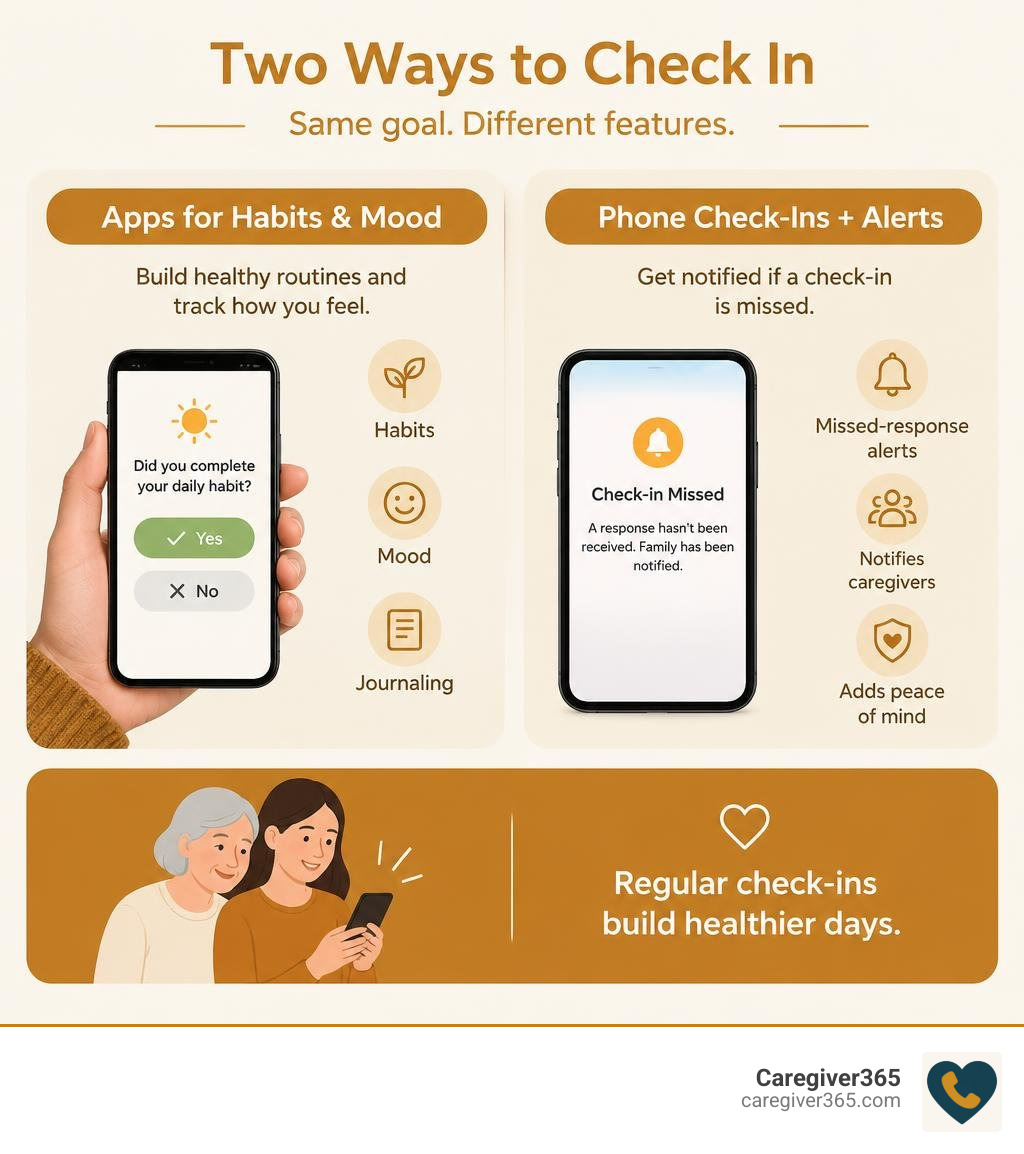
Looking for a free daily check-in option? Many families discover that a daily check-in app free of charge can log habits or moods, but it does not always notify loved ones when a senior misses a response. If your goal is caregiver safety, start by clarifying whether you need personal accountability or an automated call that can alert family after a missed check-in.
For a parent living alone, a completed check-in and a missed check-in are different needs. A mood or habit log can help build a routine, but it does not always alert family when someone fails to respond. If that alert is what you need, choose a tool that clearly explains how it contacts caregivers after a missed check-in.
Daily check-in app free terms to know:
- choosing the best daily check-in app for seniors aging in place
- best automated daily check-in systems that connect seniors and families
- wellness checks for seniors
For a broader look at how routine check-ins support independent living, the National Institute on Aging explains aging in place and home safety.
Free Check-In Tools for Senior Safety
Building consistent daily routines is one of the most effective ways to preserve independence while protecting health. When older adults maintain structured schedules—waking, taking medication, hydrating, and checking in—it provides a clear window into their overall well-being. Understanding why it is important to check in on seniors daily helps families detect gradual declines in physical health or cognitive sharpness long before a crisis occurs.

Mobile check-in utilities serve different purposes. Habit-tracking applications focus on personal accountability, encouraging users to log routines and journal reflections. Meanwhile, safety-focused check-in platforms establish reliable contact between seniors and their loved ones. Integrating a simple morning confirmation into a daily routine provides peace of mind without intruding on an individual’s privacy or autonomy.
Automated Phone Check-Ins for Aging in Place
Most older adults want to remain in their own homes as they grow older. However, successful aging in place requires safety nets that operate without constant friction. While smartphone apps work well for tech-savvy individuals, they often fall short for seniors who find touchscreens frustrating, forget to charge their devices, or misplace their phones around the house.
This is where automated check-in systems step in. Instead of requiring a senior to unlock an app and navigate menus, automated calling services place an outbound phone call at a scheduled time each day. The senior simply picks up any standard landline or mobile phone and presses a single button to confirm they are safe.
If the call goes unanswered, the system escalates the notification. Exploring how caregiver apps keep families in the loop shows the value of multi-contact notifications: when a check-in is missed, multiple family members or neighbors receive immediate alerts, enabling quick intervention.
What to Expect from a Daily Check-In Service
Many families begin with a daily check-in app free of charge, only to realize it does not replace caregiver alerts. Some app-based tools focus on personal habit or mood tracking, while safety-focused services actively check on a person and alert caregivers when no response arrives. Reviewing what each option delivers helps you pick the right tool for personal wellness or family safety.
| Feature | Automated Phone Check-In Services |
|---|---|
| Primary Platform | Any Landline or Mobile Phone |
| Cost Structure | Low-cost automated safety plans |
| Caregiver Escalation | Automated calls and SMS to a Care Circle |
| Hardware Required | Any phone (no apps, Wi-Fi, or charging needed) |
| Streak & Habit Tracking | Focuses on safety verification and routine logs |
| Crisis Intervention | Escalates unanswered calls directly to family |
For families exploring budget-friendly safety options, learning about free daily check-in calls for seniors and how families can access them helps clarify the distinction between self-guided mobile apps and community-backed call systems.
Why a Free App Tier May Not Be Enough
A daily check-in app free tier may track a habit or mood, but it usually does not verify an older adult’s physical safety or automatically notify a family care circle. Automated phone check-in services call at a scheduled time and require only a one-button confirmation. If the call goes unanswered, the system retries and then escalates to designated family members.
Before choosing any service, review what is included without a paid upgrade. A reliable check-in service should offer scheduled outreach, retries after a missed call, and direct notifications to family members—not just an activity log.
Data Privacy, Security, and Offline Reliability
When logging daily habits, emotional states, or physical well-being, data privacy is paramount. Free applications handle user information in diverse ways, ranging from zero-telemetry local storage to encrypted cloud synchronization.

Local Storage and Offline Logging
Many users prioritize tools that operate entirely offline without requiring account creation. Apps designed with an offline-first architecture store all responses, streak counters, and logs directly on the smartphone’s internal memory.
This approach offers distinct advantages:
- Zero Account Requirements: You never have to hand over an email address, phone number, or name.
- Offline Functionality: The app works flawlessly in airplane mode, during internet outages, or in rural areas with poor cellular reception.
- No Third-Party Data Sharing: Because no data is sent to external cloud servers, your daily habits remain confidential.
How to Evaluate a Daily Check-In App Free of Data Privacy Risks
Before installing any wellness or check-in tool, take a few minutes to review its privacy practices:
- Check Data Safety Disclosures: Review the App Store or Google Play data safety sections to verify whether information is linked to your identity or shared with third-party advertisers.
- Look for End-to-End Encryption: If the tool features cloud synchronization or AI-assisted coaching, confirm that your logs are encrypted per user.
- Examine Contact Permissions: Safety-focused tools that send crisis alerts should only access designated emergency contacts rather than copying your entire address book.
- Demand Medical Disclaimers: Legitimate mental health and wellness applications clearly state that automated check-ins do not replace professional medical care or 911 emergency services.
Consistency and Emergency Escalation
Building a habit requires balancing daily momentum with grace for missed days. Traditional habit trackers often punish users by wiping out weeks of progress after a single missed day. Modern tools take a healthier approach:
- Forgiving Streaks: Some platforms allow users to slip up without losing overall progress, treating consistency as a long-term journey rather than an all-or-nothing game.
- Cooldown Windows: Some apps use a 16-hour cooldown cycle rather than a rigid midnight reset, accommodating early risers and night owls alike.
However, when tracking senior safety, a missed check-in cannot simply be treated as a broken habit streak. It must trigger a responsive safety sequence.
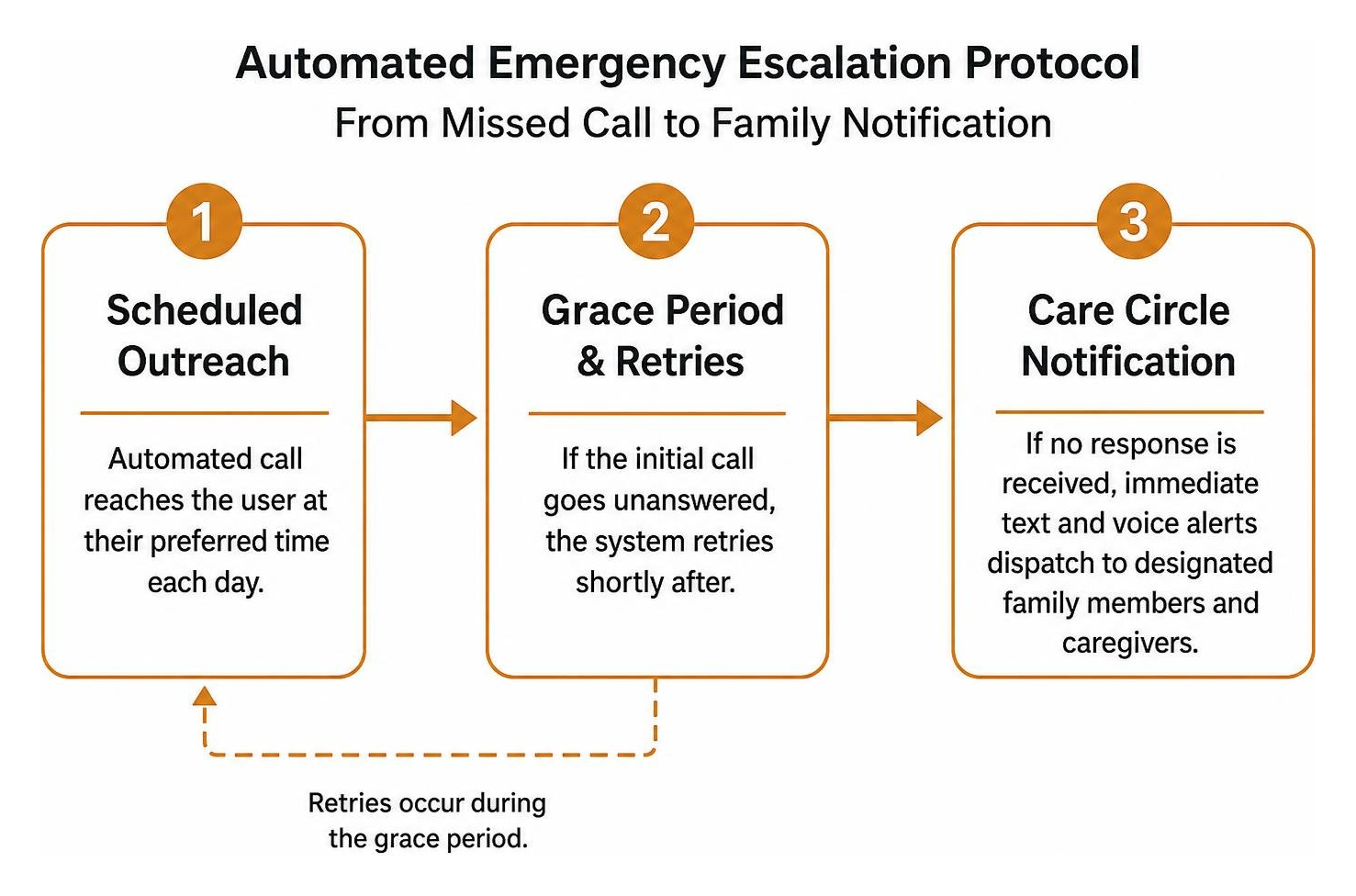
When evaluating automated check-in safety workflows, look for these critical steps:
- Scheduled Outreach: An automated call reaches the user at their preferred time each day.
- Grace Period & Retries: If the initial call goes unanswered, the system retries shortly after to rule out temporary distractions.
- Care Circle Notification: If no response is received, immediate text and voice alerts dispatch to designated family members and caregivers.
- Direct Verification: Family members check in directly or dispatch local assistance to verify safety.
Missed Check-In Escalation and Medical Alert Integration
Families frequently ask how daily check-in services work alongside medical alert systems. Understanding the trade-offs between check-in calls vs a medical alert button helps clarify why proactive outreach is essential.
A medical alert device is one part of a safety plan, but it is often reactive. Caregiver365 complements medical alert systems by adding a proactive daily check-in call. If a senior falls, suffers a stroke, or leaves the device on the nightstand, the missed call still triggers an alert. Automated daily check-in calls require an active response every morning, so they can uncover emergencies even if the individual cannot reach a phone.
Frequently Asked Questions About Daily Check-In Tools
Can check-in tools operate entirely offline without internet?
Some mobile check-in tools can store logs locally without an internet connection, but they usually cannot alert caregivers when no response arrives. Safety-focused services that notify family members require active cellular or Wi-Fi connectivity to transmit alerts.
How do check-in tools notify family members if an update is missed?
Mobile apps may rely on device-level push notifications or automated SMS triggers sent to pre-selected contacts. Dedicated safety services run automated server-side calling workflows. If an outbound check-in call is not acknowledged, the platform automatically calls and texts a multi-member Care Circle until someone confirms the senior’s safety.
What are the main limitations of smartphone check-in apps for older adults?
Smartphone check-in apps require regular device charging, reliable Wi-Fi or data plans, screen navigation skills, and remembering to open the app each day. For seniors with arthritis, vision loss, or mild cognitive impairment, smartphone apps can introduce confusion. Automated phone-call check-in services solve this problem by working on any existing landline or basic mobile phone with zero app downloads or touchscreen use required.
Conclusion
Daily check-ins build consistency and peace of mind, especially when an older parent lives alone. Rather than relying on a self-guided mobile habit log, families can use phone-based check-in systems that actively verify safety.
Caregiver365 delivers automated daily phone calls to seniors on any landline or cellular device—no apps, wearable pendants, or Wi-Fi setup needed. With support for up to eight Care Circle contacts and seamless medical alert integration, families stay informed every single morning. Discover how daily check-in calls work to ensure your loved ones remain safe, connected, and independent at home.