
Choose a Daily Check-In App That Is Simple, Reliable, and Easy to Reach
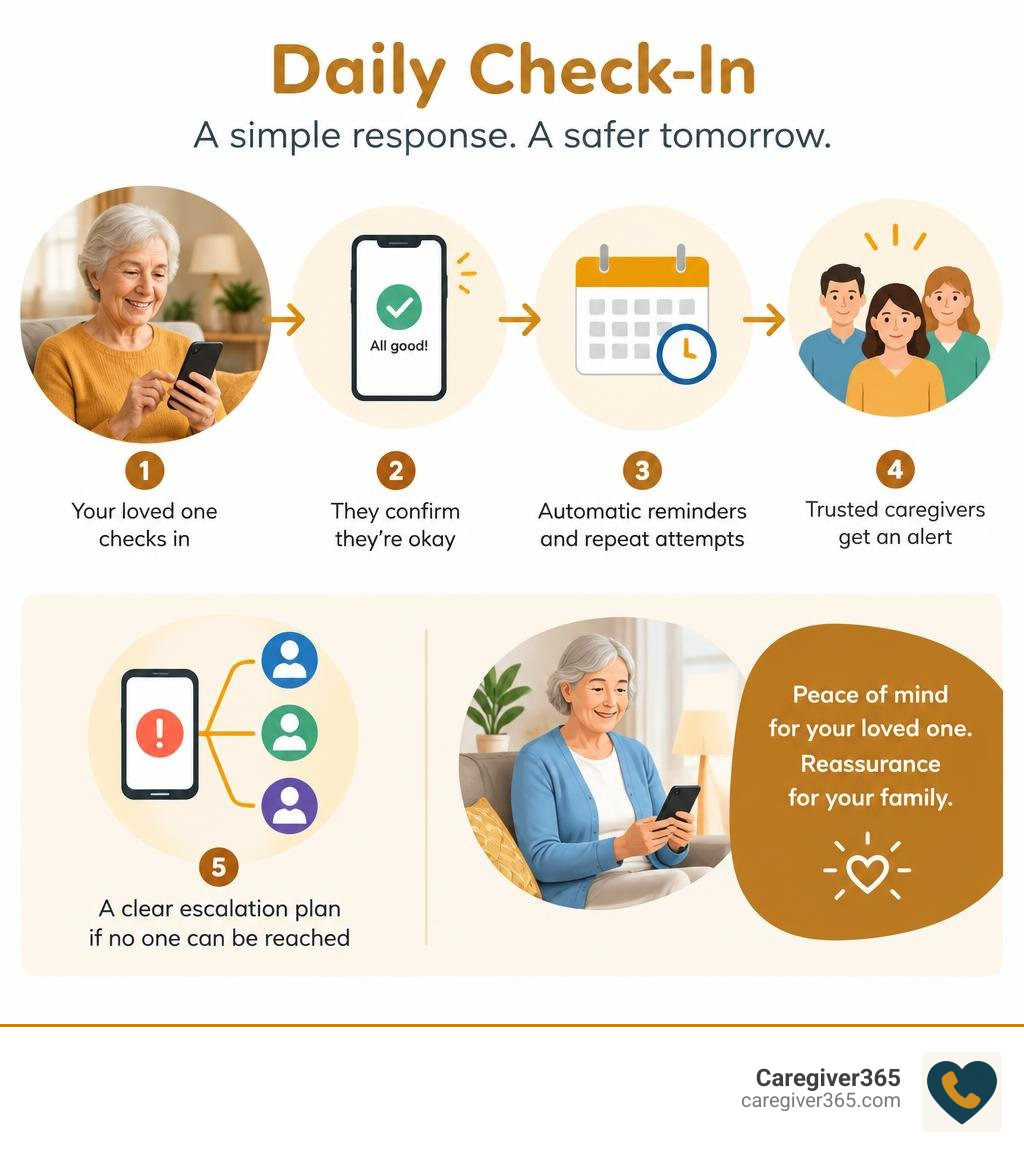
The best daily check-in app for seniors makes one task easy: your parent confirms they are okay at a set time, and the right family members get an alert if they do not respond. Look for a service with:
- A simple check-in method, such as a phone call, text, app tap, or voice prompt.
- Automatic reminders and repeat attempts after a missed check-in.
- Alerts that notify more than one trusted caregiver.
- A clear escalation plan for when no one can reach your loved one.
- Little or no extra hardware, especially if your parent prefers familiar technology.
For an older adult aging in place, daily check-ins can provide a safety net without turning every day into a series of worried phone calls. For family caregivers, they offer quick reassurance and a clear next step when something seems wrong.
The right option is not necessarily the app with the most features. It is the one your parent can and will use consistently, whether that means a smartphone check-in or an automated call to a landline. According to the National Institute on Aging, staying connected through regular contact can support older adults who live alone.
Quick look at daily check-in app for seniors:
- elderly check in for families
- wellness checks for seniors
- how to do a welfare check on someone
Key Features to Look for in a Daily Check-In Service for Seniors
When selecting a monitoring system, it is easy to get distracted by flashy features you will never use. The core mission of any daily check-in setup is straightforward: verifying daily wellness and mobilizing help when an expected response fails to arrive. Recognizing why it is important to check in on seniors helps us prioritize practical reliability over unnecessary technical complexity.
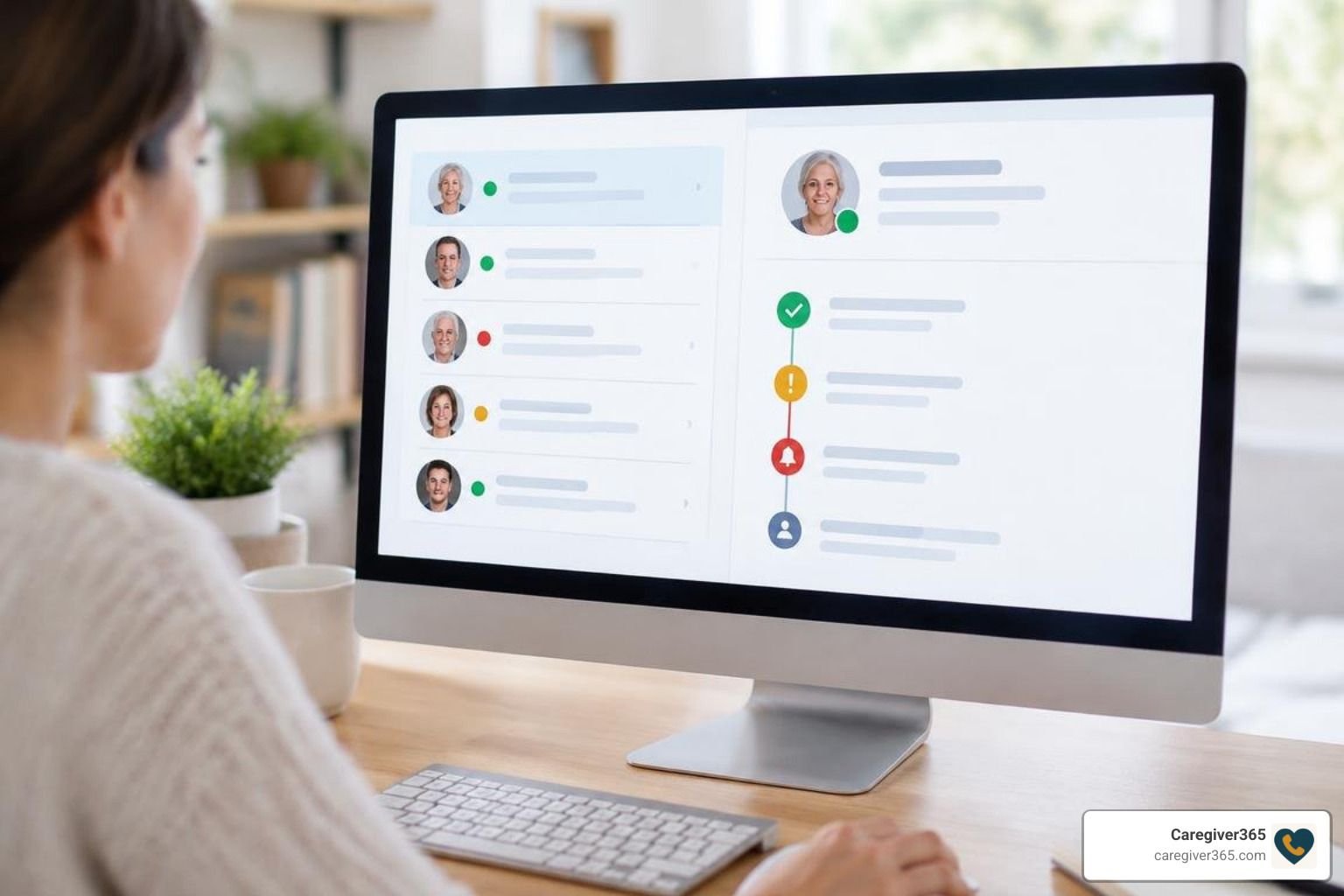
A high-quality service should offer automated scheduling, robust escalation paths, and multi-user notifications. If an older adult lives alone, a single point of failure—such as alerting only one busy relative—can cause unnecessary panic or dangerous delays.
Ease of Use and Accessibility Options
Many older adults face physical or cognitive hurdles when navigating modern interfaces. Touchscreens with tiny buttons, complex menu navigation, and frequent software updates can create friction and tech anxiety.
Key accessibility elements include:
- Large visual targets: High-contrast text and oversized buttons that accommodate visual impairments or tremors.
- Voice-first or one-touch interactions: Allowing users to confirm safety simply by answering a ring and speaking or pressing a single key on a standard dial pad.
- Cognitive simplicity: Workflows that require zero passwords, app switching, or complicated multi-step logins.
If a platform requires regular app updates or frequent re-authentication, it will likely be abandoned. Technology must adapt to the senior’s lifestyle, not the other way around.
Caregiver Monitoring and Alert Escalation
Effective check-in systems bridge the gap between solo living and family support. Rather than relying on a single caregiver who might be stuck in a meeting or driving, top-tier platforms notify an entire circle of support.

Evaluating automated daily check-in systems means looking closely at how they handle non-responses. A reliable system follows a structured escalation path:
- Scheduled prompt: The system prompts the senior via call, text, or notification at a preselected time.
- Automated retry window: If no answer is detected, the platform waits a short duration (such as 10 to 15 minutes) and attempts contact again.
- Primary alert broadcast: If the retry fails, real-time SMS alerts and automated calls go out simultaneously to the designated family network.
- Care circle coordination: Family members can view check-in status within their caregiver dashboard and confirm who is checking on the senior, preventing duplicate efforts.
Comparing Check-In Services with Traditional Monitoring Methods
Families often weigh automated check-ins against manual phone trees or informal drop-ins. While physical visits provide wonderful social connection, they cannot always provide the consistent daily structure needed to catch morning incidents promptly.
Evaluating check-in calls vs a medical alert button clarifies where automated systems excel: automated daily checks operate proactively, confirming wellness at scheduled intervals without requiring active emergency triggers.
| Feature / Method | Automated Daily Check-In Service | Manual Daily Family Phone Calls | In-Person Visits |
|---|---|---|---|
| Response Initiation | Proactive (alerts if user is inactive) | Proactive (manual effort required) | Proactive (in-person check) |
| Hardware Required | Any cell phone, landline, or smartphone | Any telephone | None |
| False Alarm Rate | Low (includes automated retries) | Low | None |
| Caregiver Burnout Risk | Very Low (fully automated routine) | High (daily schedule fatigue) | High (logistical strain) |
| Cost Profile | Low monthly subscription | Free (time-intensive) | Variable (travel/care costs) |
Evaluating the Cost of a Daily Check-In Service for Seniors
Cost is a major consideration for families managing household budgets and fixed retirement incomes. Check-in solutions fall across several pricing models:
- Free basic tools: Simple alarm apps or shared messaging groups that rely entirely on manual user action and lack automated multi-tier escalation.
- Subscription services: Modest monthly services that automate daily outreach across standard phone lines or smartphones, alerting up to eight family members without requiring extra hardware purchases.
Balancing costs against feature sets is a central part of exploring senior safety solutions. In most cases, lightweight automated software solutions provide maximum peace of mind without locking families into expensive long-term contracts.
Overcoming Adoption Barriers for Seniors with Cognitive or Physical Limitations
Resistance to new tools is common among independent older adults. Many worry that adopting a safety tool signals a loss of autonomy or implies they can no longer care for themselves. Others simply feel intimidated by modern digital screens.

When memory loss or mild cognitive impairment is a factor, simplicity is essential. Removing steps like unlocking screens, recalling passwords, or charging specialized equipment ensures long-term consistency. Pairing easy-to-use services with reliable caregiver support resources helps families build sustainable routines without unnecessary tension.
Privacy and Data Security Considerations
Privacy is a fundamental right that older adults value deeply. Intrusive setups can feel like unnecessary surveillance, causing resentment and distress.
A respectful check-in platform preserves dignity by focusing strictly on status confirmation rather than constant tracking:
- Minimal data footprint: Systems should only capture basic confirmation timestamps and emergency contact lists.
- Secure transmission: Notifications and caregiver portals should use modern encryption standards to protect contact details.
- Informed consent: Older adults should clearly understand what information is shared, who receives it, and how their privacy is maintained.
How to Introduce a Daily Check-In Service for Seniors Without Resistance
Introducing a check-in routine requires empathy and thoughtful framing. Rather than presenting the service as a response to declining capabilities, frame it as a mutual convenience that helps the entire family stay connected without constant hovering.
Effective steps include:
- Emphasize independence: Explain that a quick, predictable check-in prevents worried children from calling multiple times a day, giving the senior uninterrupted quiet time.
- Anchor to existing habits: Set the check-in window to match natural morning rituals, such as brewing coffee or picking up the morning paper.
- Involve them in the setup: Let your parent choose the time of day, the notification sound, and the order of family members in their support circle using established senior check-in best practices.
- Run a collaborative practice run: Spend a morning testing the confirmation process together so there are no surprises when the automated prompt arrives.
Integrating Daily Check-Ins into Everyday Routines
The most effective safety tool is one that seamlessly blends into daily life. When check-ins feel like a natural part of a morning schedule, adherence becomes second nature.
Building consistent daily check-in routines works best through habit stacking. Pair the check-in confirmation with an automatic daily trigger:
- Taking morning medication
- Turning on the kitchen kettle
- Feeding a pet
- Eating breakfast
By attaching the check-in event to an established habit, older adults can maintain daily consistency without feeling micromanaged.
Frequently Asked Questions About Senior Check-In Solutions
What happens if a senior misses a scheduled daily check-in?
When a check-in is missed, the platform initiates an automatic retry sequence after a brief waiting window to account for temporary distractions. If the user still does not respond, the system immediately dispatches simultaneous SMS alerts and phone calls to all designated members of the family Care Circle so someone can follow up directly.
Can check-in systems work without a smartphone or internet connection?
Yes. Dedicated senior check-in platforms can operate over traditional landlines and standard flip phones. The system places an automated voice call at the scheduled time, allowing the senior to simply answer the phone and press a number key (such as “1”) or speak a short confirmation phrase to verify their safety.
How do check-in services help older adults maintain their independence?
Automated check-ins act as an invisible safety net. By providing a dependable, automated daily wellness confirmation, they eliminate the need for overbearing supervision or frequent unscheduled drop-ins. This balance allows seniors to age comfortably in place on their own terms while providing families with reliable peace of mind.
Conclusion
Aging in place successfully requires the right balance of personal independence and practical safety. At Caregiver365, we believe protecting your loved ones should never feel complicated, invasive, or stressful. Our automated daily call service works across any landline or mobile device without requiring new hardware, alerting up to eight trusted contacts simultaneously if a check-in is missed.
To establish reliable, everyday peace of mind for your family, discover how daily check-in calls work to protect your loved one.