
Independent comparison site · Advertiser Disclosure Medical Alert: (877) 909-4209 | Lifeline: (877) 488-1101
Compare Options

How to Create a Family Emergency Contact Plan for an Aging Parent

How to Create a Family Emergency Contact Plan for an Aging Parent

When an aging parent lives alone, an unanswered call, sudden illness, or power outage can leave family members unsure who should respond. Even relatives who speak regularly may discover that no one has the same phone numbers, knows who has a spare key, or understands when to call for emergency help.

A family emergency contact plan puts these decisions in writing before they become urgent. It identifies the people who can help, the information they need, and the steps to take when a parent cannot be reached. The goal is to support an older adult’s independence while making the family’s response clearer and faster.

The best place to start is with your parent. Discuss what they want family members to do, whom they trust to contact, and what information they are comfortable sharing.

What Is a Family Emergency Contact Plan for an Elderly Parent?

A family emergency contact plan is a short, practical document that tells relatives, friends, and caregivers whom to contact and what to do when an older adult may need assistance. It is not the same as a medical care plan or an advance directive, although it can point to those documents when appropriate.

The plan should answer four questions: Who notices a possible problem? Who takes the first step? Who provides backup if that person is unavailable? And when should someone seek immediate help?

The Centers for Disease Control and Prevention (CDC) recommends making an emergency action plan with important phone numbers and several ways to communicate with family and caregivers. See the CDC’s guidance on staying connected during emergencies.

How Do You Create an Emergency Contact Plan for an Aging Parent?

Start with a simple document that everyone involved can understand and access. A shared digital copy can be useful, but your parent and nearby contacts should also have a printed version in case phones or internet service are unavailable.

Choose a Primary Contact and At Least One Backup

Select a primary contact who can reliably answer calls and coordinate the family’s response. This does not have to be the adult child who lives closest; it may be the person best able to communicate with everyone involved.

Then choose at least one backup contact. Consider including a trusted neighbor, nearby relative, or friend who could check on your parent in person. Ask each person for permission before listing them and confirm which responsibilities they are willing to accept.

Assign Specific Responsibilities

Avoid a vague instruction such as “someone should check on Mom.” Instead, identify who will call, who can visit, and who will update other family members. A practical division might look like this:

  • Primary contact: Makes the first follow-up call and coordinates next steps.
  • Local contact: Checks on the parent in person when it is safe and appropriate.
  • Backup contact: Takes over when the primary contact cannot respond.
  • Family communicator: Updates other relatives after the situation has been assessed.

One person can fill more than one role, but every important role should have a backup. If a local contact has a key or building access, document how that access will work without circulating sensitive entry codes unnecessarily.

Keep Essential Information in One Place

Your family’s contact list should be short enough to use quickly. Include:

  • Your parent’s full name, preferred name, home address, and primary telephone number.
  • Primary and backup contact names, phone numbers, and relationships.
  • A nearby friend or neighbor who has agreed to help.
  • Relevant doctors, pharmacy, and other care-provider contact information.
  • A note about mobility, communication, or accessibility needs that responders should know.
  • The location of the parent’s current medication list, allergies, insurance details, and important documents.

Keep sensitive medical information in a secure location and share it only with people who need it. The CDC also recommends keeping a current care plan with medications, providers, and emergency contacts. Review its care-planning guidance.

Set a Clear Response Plan for Missed Calls or Other Concerns

A list of names is useful only if family members know what happens next. Agree on a response sequence that fits your parent’s health, routine, and preferences. For example:

  • First, call your parent using their preferred phone number. Try an agreed-upon alternative contact method if available.
  • If there is no response, contact the primary family member and check whether someone has already spoken with your parent.
  • If concern remains, ask an agreed-upon local contact to check in, without entering the home unsafely or without permission.
  • If there are signs of immediate danger, such as a reported medical emergency, suspected serious injury, or other urgent threat, call 911 or the appropriate local emergency number right away. Do not wait through routine follow-up steps.

Families should decide in advance how quickly to escalate concerns, rather than assume every missed call means an emergency. The right response depends on the circumstances: a missed scheduled check-in is different from an active report of distress.

Make a Plan for Power Outages and Unavailable Caregivers

Emergencies may interrupt electricity, cellular service, transportation, or a caregiver’s availability. Include at least two ways to reach key contacts and one alternative arrangement if your parent needs to leave home.

For a parent who uses powered medical equipment, depends on refrigerated medications, or requires help with mobility, ask their clinician or equipment provider what specific preparations are needed. Know how to contact local emergency services and where your parent could go if remaining at home is unsafe.

The CDC advises people to plan around individual communication, equipment, medication, and transportation needs. See its emergency planning guidance.

How Can Daily Check-In Calls Support a Family Contact Plan?

A scheduled check-in can provide a routine signal that an older adult has responded on a given day. It can also help a family identify when a follow-up may be needed. However, check-in services do not replace an agreed-upon response plan: relatives still need to know who will act on a missed-call notification.

Caregiver365 compares daily check-in services for seniors, including options that call at a chosen time and notify designated family members after unsuccessful retries. Its featured comparison describes a Care Circle with up to eight contacts for certain services. Actual features and terms depend on the provider and plan. Learn how daily check-in calls work.

A daily check-in is a reassurance tool, not an emergency response or dispatch service. Families should not rely on it instead of calling 911 for an immediate emergency. A medical alert device may offer a separate way to request help when an urgent incident occurs. Read Caregiver365’s comparison of check-in calls and medical alert buttons.

How Often Should You Review the Emergency Contact Plan?

Review the plan whenever contact details, health needs, living arrangements, or caregiver availability change. A regular family check-in every few months can also help keep responsibilities current.

Ask your parent and the listed contacts to practice a simple scenario: Who responds if a scheduled call is missed while the primary contact is traveling? Who can check in if the local neighbor is away? A brief practice run often exposes gaps before an actual concern arises.

Finally, make sure everyone knows where to find the current version. Remove outdated copies when the plan changes so relatives do not act on conflicting information.

What Should Be on an Emergency Contact Plan Checklist?

Before considering the plan complete, confirm the following:

  • The parent has participated in the discussion and agrees with the plan where possible.
  • A primary contact and backup have accepted their responsibilities.
  • At least one trusted nearby contact can provide in-person assistance when appropriate.
  • Phone numbers, the home address, and essential provider details are accurate.
  • The response steps distinguish routine missed contact from immediate emergencies.
  • The family has an outage or evacuation communication backup.
  • Everyone can find the current plan, and a date for reviewing it is set.

Frequently Asked Questions About Family Emergency Contact Plans

Who Should Be Listed as an Emergency Contact for an Elderly Parent?

List at least one reliable primary contact and one backup who have agreed to help. A nearby neighbor or friend can be useful for situations when relatives live far away.

Does an Aging Parent Need to Share All Medical Information With Family?

No. The plan should respect their preferences and privacy. Include information that is necessary for appropriate assistance and note where more complete medical records are stored securely.

What If Family Members Live in Different States?

Assign one person to coordinate calls and another trusted person nearby to provide local help when appropriate. Confirm who will update the rest of the family and how quickly.

Can a Daily Check-In Service Replace an Emergency Contact Plan?

No. A missed-call notification can alert family members that they should follow up, but the family still needs clear responsibilities and escalation steps. These services are not substitutes for emergency medical response.

When Should You Update an Emergency Contact Plan?

Update it when a phone number, medical need, caregiver, residence, or emergency access arrangement changes. Periodically confirm that contacts remain willing and available.

Compare Daily Check-In Services With Caregiver365

An emergency contact plan helps the right people respond when an aging parent may need assistance. Scheduled check-in calls can complement that plan by establishing a regular contact routine and notifying selected family members when a check-in is missed.

Caregiver365 is an independent comparison resource that helps families evaluate daily check-in options, including phone-based services available through Lifeline and Medical Alert. Compare features such as family notifications, phone compatibility, contact-circle size, and the option to add a medical alert device.

Compare daily check-in services on Caregiver365.

Senior Safety Calls: Comparing Free and Paid Daily Check-in Programs

Daily Check-In Calls for Seniors Living Alone

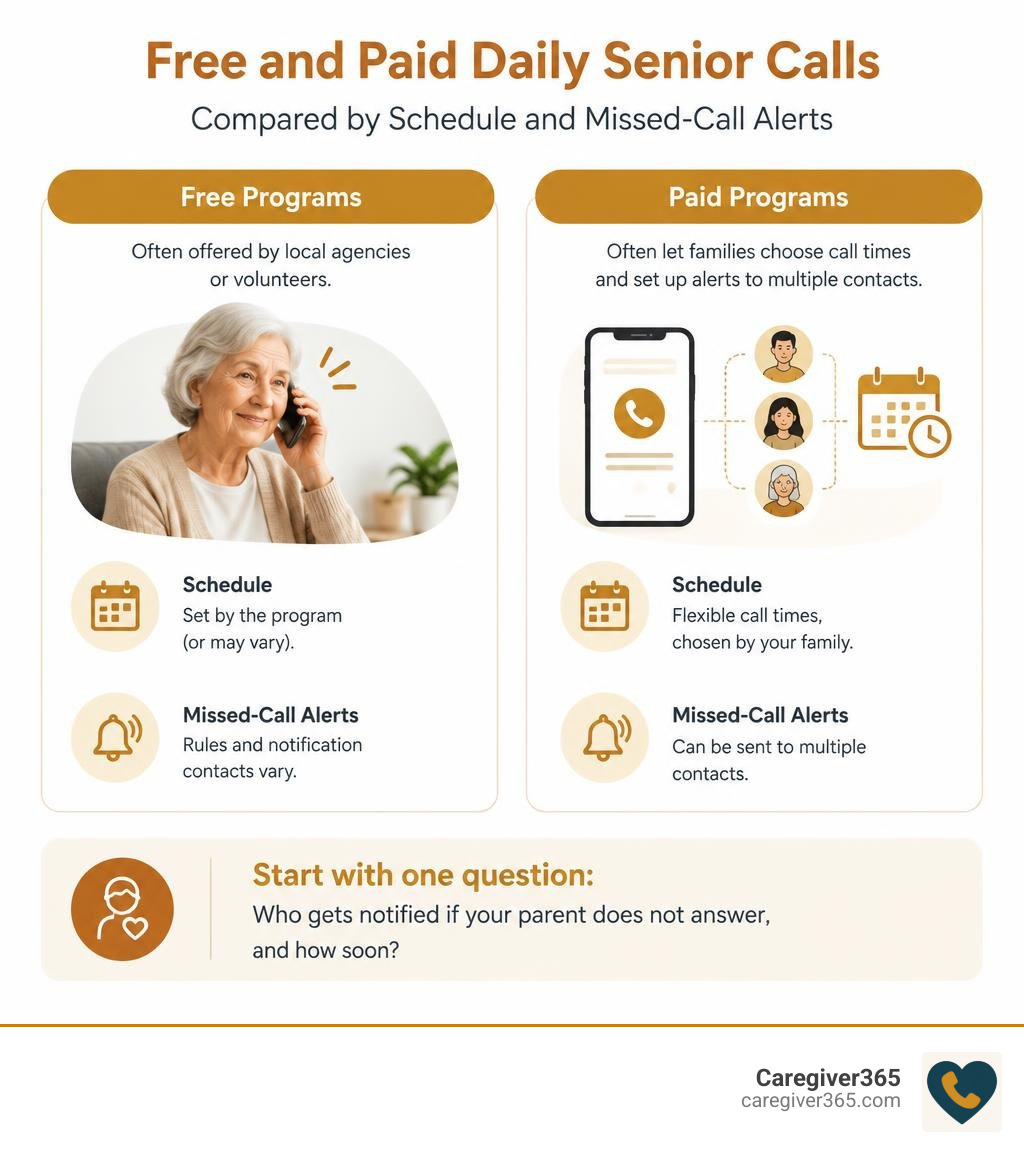
A daily check-in service for seniors calls at a set time and alerts someone if the call goes unanswered. Free programs may be offered by local agencies or volunteers, but schedules and alert rules vary. Paid programs often let families choose call times and set up alerts to multiple contacts.

Start by asking one question: Who gets notified if your parent does not answer, and how soon? The answer matters more than extra features, especially if your parent wants a simple phone call without a new device.

Free and paid daily senior calls compared by schedule and missed-call alerts infographic

Finding the right check in service for elderly family members often begins with understanding how a senior well being check can offer consistent reassurance for independent living.

Understanding How Check-in Programs Protect Independent Seniors

Aging in place is a primary goal for many older adults, yet living alone introduces genuine safety and wellness challenges. When an aging parent lives independently, family members often carry an unspoken worry throughout the workday: Did Mom wake up feeling well? Did Dad get out of bed safely?

Routine check-ins serve as an essential safety net that bridges independent living with family reassurance. Learning why checking in on aging parents is essential highlights the balance between autonomy and safety. Rather than waiting for a crisis to occur, regular contact establishes an early warning system.

family caregiver receiving daily status notification on a smartphone

A structured daily phone call accomplishes several vital safety goals:

  • Immediate emergency detection: If an accident occurs overnight, a morning check-in ensures that hours or days do not slip by before someone notices.
  • Support for cognitive routines: Regular calls provide daily structure, anchoring morning habits and medication schedules.
  • Combating isolation: Simple, predictable contact reminds seniors that someone is looking out for them every single day.
  • Family peace of mind: Caregivers can focus on work and personal responsibilities knowing they will receive an immediate alert if a call goes unconfirmed.

Daily calls fit naturally alongside comprehensive senior safety solutions, creating multiple layers of protection without compromising dignity or independence.

Comparing Free vs. Paid Options for a Check In Service for Elderly

When families explore the right check in service for elderly parents, they generally weigh free community resources against dedicated, paid automated systems. Both models provide essential support, but their operational structures, customization options, and emergency escalation protocols differ significantly.

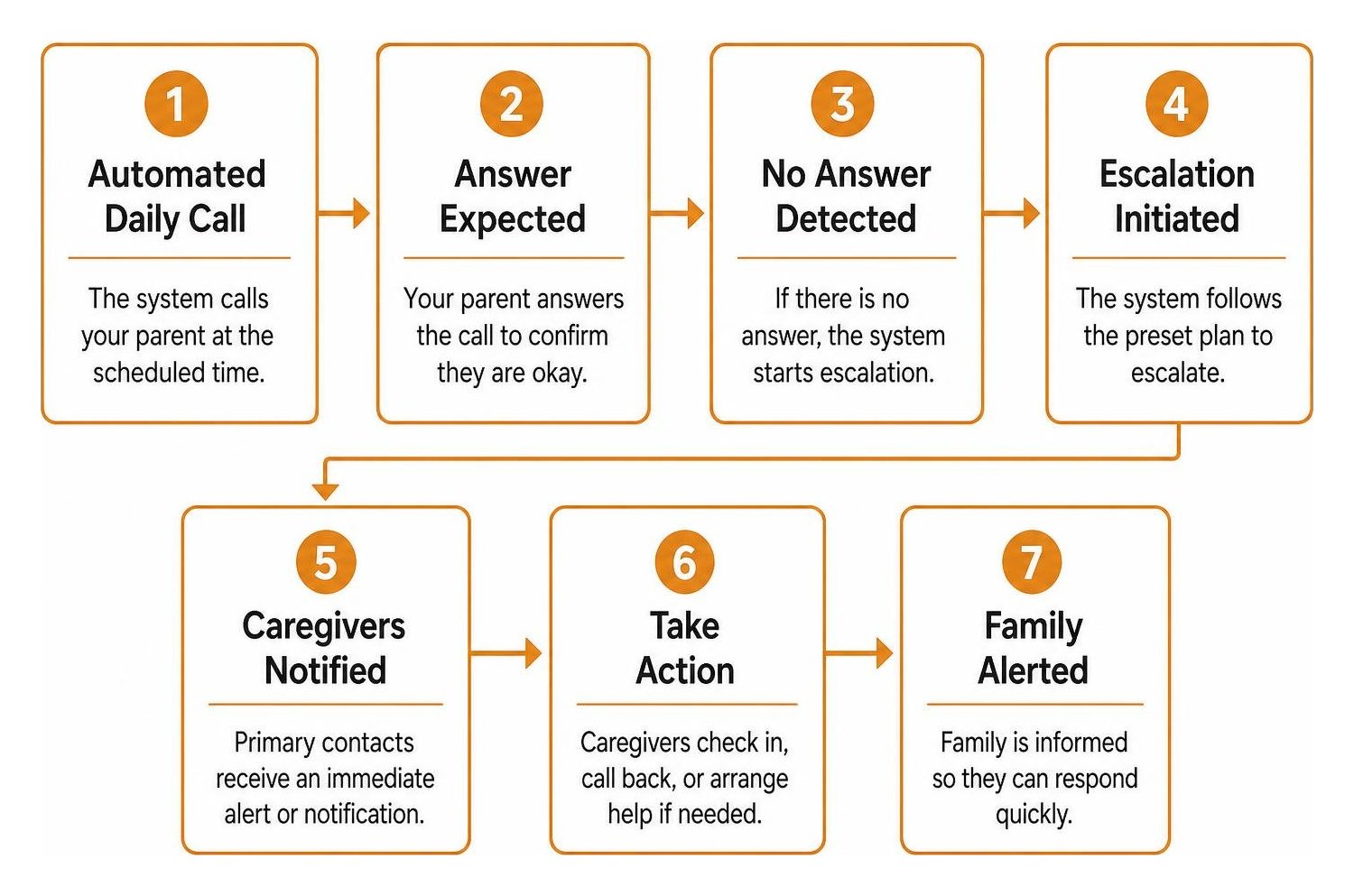
Step-by-step escalation process from automated call to family alert

To help you decide which path aligns best with your family’s routine and budget, here is a direct comparison of how free and paid services operate:

Feature / Capability Free Community & Volunteer Programs Paid Automated Check-In Services
Typical Cost $0 / Free (funded by grants, donations, or local taxes) Low monthly subscription (typically $10–$25/month)
Call Timing Fixed operating windows (e.g., weekdays only between 8:00 AM – 10:00 AM) Fully customizable (specific hours, 7 days a week, 365 days a year)
Escalation Protocol Often escalates to local non-emergency dispatch or a single designated contact Multi-tiered alerts to an entire family “Care Circle” via SMS, email, and phone
Missed Call Redials Limited redial attempts due to volunteer capacity Automated, systematic redials spaced at defined intervals
Hardware Needed Standard landline or basic cellular phone Any standard landline or mobile phone (zero equipment to install)
Weekend & Holiday Coverage Frequently paused on weekends, county holidays, and severe weather days Uninterrupted 365-day operation
Family Dashboard & History Rarely available; updates communicated informally Real-time status logs, app/web dashboards, and instant caregiver notifications

Choosing a Free Check In Service for Elderly Communities

Free telephone reassurance programs provide a valuable community service, often managed by Area Agencies on Aging (AAA), local police or sheriff departments (frequently branded as “Are You OK?” or “RUOK” programs), and volunteer-led senior organizations.

These programs offer distinct advantages:

  1. Zero Financial Barrier: They ensure that every senior, regardless of financial means, has access to basic welfare monitoring.
  2. Community Touchpoint: When calls are conducted by volunteers, they can offer a brief moment of neighborly warmth and social conversation.
  3. Local Authority Coordination: Police-sponsored programs can quickly coordinate with local emergency personnel if a senior fails to check in.

However, free options also have operational constraints:

  • Strict Scheduling Windows: Volunteer networks and municipal servers usually operate during fixed hours, leaving little flexibility if your loved one prefers an evening call or sleeps late.
  • Coverage Gaps: Many civic programs do not operate on weekends or regional holidays.
  • Single-Contact Escalation: If a call goes unanswered, these systems often notify only one emergency contact before dispatching emergency services. In cases where a parent simply stepped into the garden, this can result in an unnecessary emergency response. For situations requiring immediate municipal assistance, families can consult resources on requesting an official welfare check by phone.

Upgrading to a Paid Check In Service for Elderly Loved Ones

Paid daily check-in services use automated phone technology to provide reliability, flexibility, and complete family visibility. We built our Caregiver365 platform around these core needs, ensuring aging adults can maintain their normal daily routines without complex equipment.

Key benefits of an automated, subscription-based service include:

  • Customizable Schedules: Families choose the exact time call checks occur, adjusting for time zones, wake-up routines, or midday medication schedules.
  • Distributed Care Circle Alerts: When a call is missed, our system does not rely on a single person’s phone. It alerts an entire Care Circle of up to eight family members, neighbors, or trusted friends simultaneously via text message, email, or automated call.
  • Multi-Attempt Verification: Paid platforms use intelligent redial logic. If a line is busy or unanswered on the first attempt, the system retries several minutes later before escalating to the Care Circle.
  • Universal Compatibility: No broadband internet, wearables, smart home hubs, or mobile apps are required on the senior’s end. The service works seamlessly on any basic landline or mobile phone.

Understanding how automated daily check-in calls work gives families confidence that their loved one is protected every day of the year. For an overview of top options, explore the best automated daily check-in systems that connect seniors and families.

Evaluating Safety Calls for Senior Independence

Introducing safety measures can sometimes trigger resistance from aging parents who cherish their autonomy. Many seniors worry that accepting help signals a loss of independence or opens the door to invasive monitoring.

senior enjoying quiet time reading at home

Daily telephone check-ins offer a non-intrusive way to stay connected without constant supervision. A few qualities make this approach especially appealing for independent seniors:

  • No Stigma: Answering a ringing phone is an everyday habit, unlike wearing a device that constantly signals vulnerability.
  • Zero Charging or Maintenance: A phone check-in relies on the household phone your loved one already uses every day, so there is nothing new to charge or maintain.
  • Proactive vs. Reactive Safety: An automated call is proactive: if the senior cannot reach the phone due to a fall or sudden medical event, the missed call automatically initiates a family alert, rather than waiting for the senior to take action themselves.

For seniors who already utilize in-person support, daily phone calls serve as an affordable, daily complement between scheduled home visits.

Frequently Asked Questions About Senior Check-in Services

How do daily check-in calls handle missed answers?

When a senior does not answer their scheduled call, automated platforms initiate an escalation protocol:

  1. Immediate Retry: The system redials the number after a short window (e.g., 5 to 10 minutes) to account for brief delays, such as answering the door or using the restroom.
  2. Care Circle Notification: If the follow-up attempt fails, the platform sends alerts to designated family members and caregivers.
  3. Family Coordination: Care Circle members can quickly check in with one another, call a neighbor with a spare key, or visit the home directly.

This multi-step approach prevents false alarms while ensuring prompt action during a genuine emergency. Knowing when to request professional wellness checks helps families determine when to transition from a phone check to on-site municipal assistance.

Can daily check-in programs assist with home fall prevention?

While a phone call cannot physically stop a slip or trip, morning check-ins significantly reduce the dangerous “long lie”—the period a fallen senior spends immobilized on the floor before help arrives.

Long floor stays can lead to dehydration, pressure injuries, hypothermia, and severe psychological distress. By scheduling a daily check-in call shortly after a parent’s typical wake-up time, families ensure that an overnight fall is identified within hours rather than days. Pairing proactive calls with practical room-by-room senior fall prevention strategies creates a safe, sustainable home environment.

Do safety calls require special equipment or internet?

No. Automated daily check-in programs operate over standard public telephone networks. Your loved one can answer calls using:

  • A traditional copper landline
  • A digital VoIP home phone
  • A basic flip phone
  • A modern smartphone

There are no base stations to plug in, no Wi-Fi networks to configure, and no batteries for your parent to recharge. For families navigating aging care, exploring our broader collection of senior care articles provides actionable guidance for every stage of the journey.

Conclusion

Supporting an aging loved one’s desire to live independently should not require constant worry for long-distance caregivers. Daily safety calls deliver a simple, dignified solution: seniors continue their daily routines undisturbed, and families receive regular reassurance that all is well.

Whether you start with a free local reassurance program or choose the customizable reliability of an automated service, regular check-ins provide an essential layer of protection for aging in place.

Discover how Caregiver365 provides reliable, automated daily phone check-ins that work on any landline or mobile phone, alerting your entire Care Circle to keep your loved ones safe every single day.

Choosing the Best Daily Check-In App for Seniors Aging in Place

Choose a Daily Check-In App That Is Simple, Reliable, and Easy to Reach

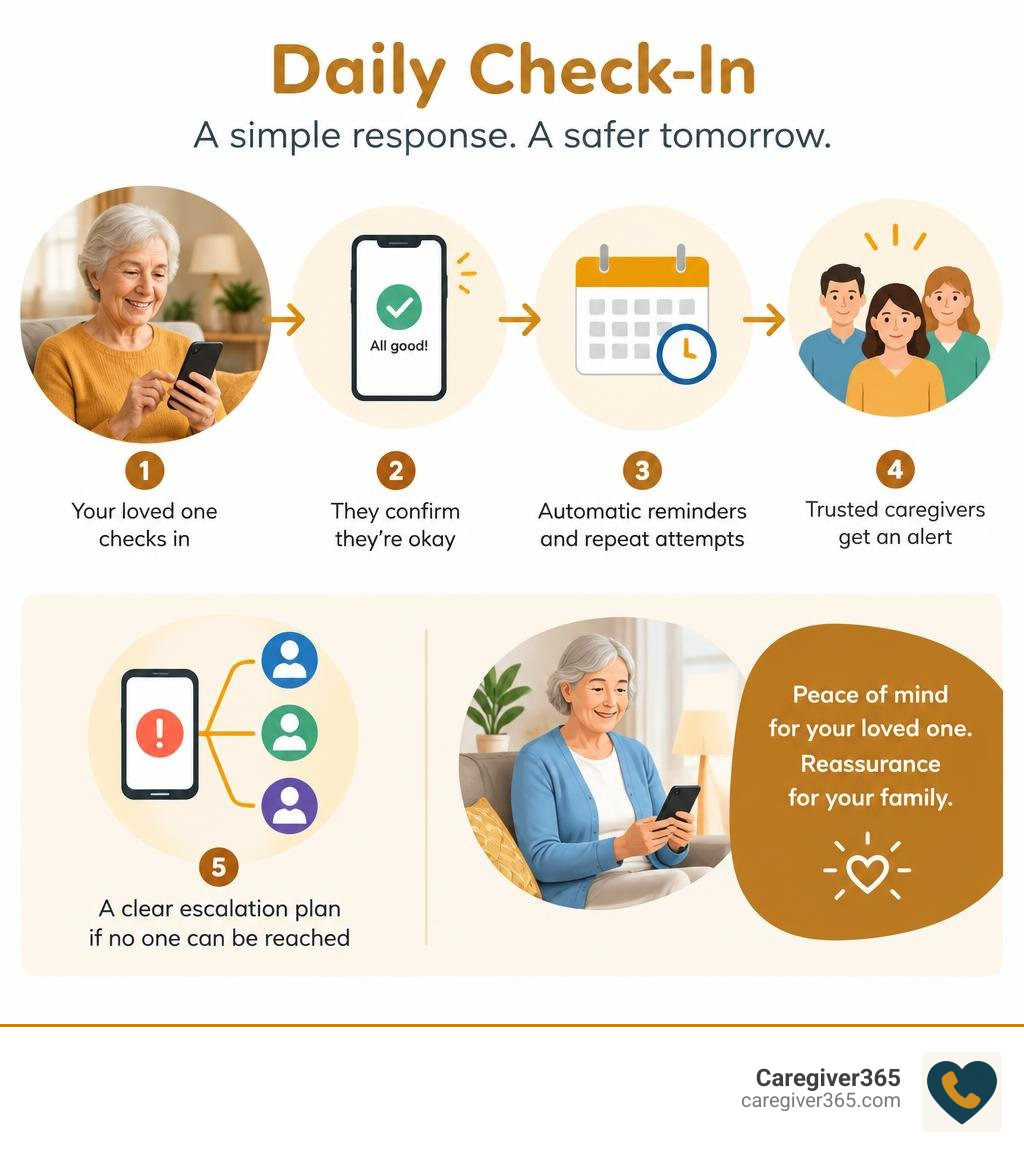
The best daily check-in app for seniors makes one task easy: your parent confirms they are okay at a set time, and the right family members get an alert if they do not respond. Look for a service with:

  1. A simple check-in method, such as a phone call, text, app tap, or voice prompt.
  2. Automatic reminders and repeat attempts after a missed check-in.
  3. Alerts that notify more than one trusted caregiver.
  4. A clear escalation plan for when no one can reach your loved one.
  5. Little or no extra hardware, especially if your parent prefers familiar technology.

For an older adult aging in place, daily check-ins can provide a safety net without turning every day into a series of worried phone calls. For family caregivers, they offer quick reassurance and a clear next step when something seems wrong.

The right option is not necessarily the app with the most features. It is the one your parent can and will use consistently, whether that means a smartphone check-in or an automated call to a landline. According to the National Institute on Aging, staying connected through regular contact can support older adults who live alone.

infographic showing senior daily check-in reminder response and caregiver alert steps infographic

Quick look at daily check-in app for seniors:

Key Features to Look for in a Daily Check-In Service for Seniors

When selecting a monitoring system, it is easy to get distracted by flashy features you will never use. The core mission of any daily check-in setup is straightforward: verifying daily wellness and mobilizing help when an expected response fails to arrive. Recognizing why it is important to check in on seniors helps us prioritize practical reliability over unnecessary technical complexity.

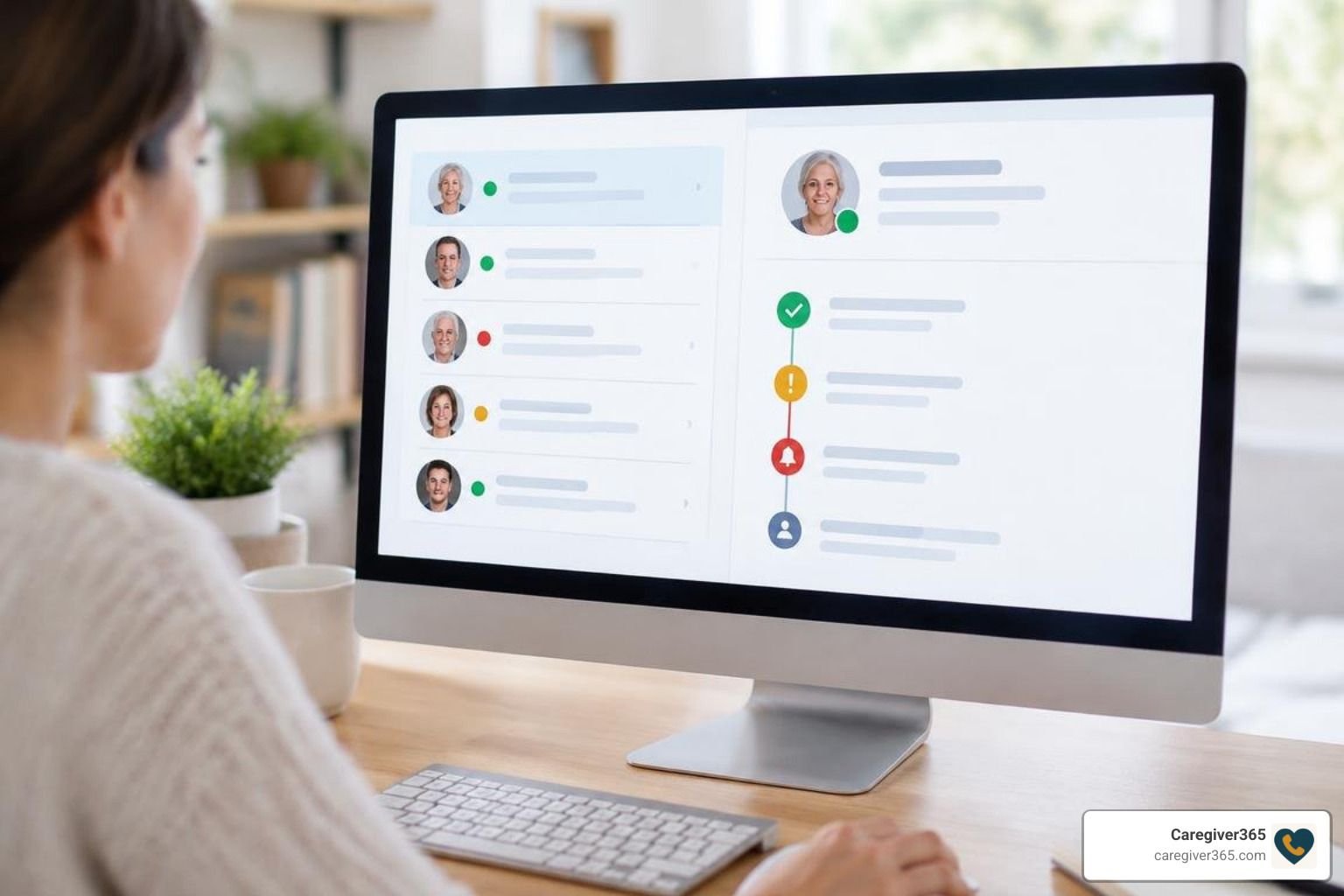
automated alert escalation dashboard interface

A high-quality service should offer automated scheduling, robust escalation paths, and multi-user notifications. If an older adult lives alone, a single point of failure—such as alerting only one busy relative—can cause unnecessary panic or dangerous delays.

Ease of Use and Accessibility Options

Many older adults face physical or cognitive hurdles when navigating modern interfaces. Touchscreens with tiny buttons, complex menu navigation, and frequent software updates can create friction and tech anxiety.

Key accessibility elements include:

  • Large visual targets: High-contrast text and oversized buttons that accommodate visual impairments or tremors.
  • Voice-first or one-touch interactions: Allowing users to confirm safety simply by answering a ring and speaking or pressing a single key on a standard dial pad.
  • Cognitive simplicity: Workflows that require zero passwords, app switching, or complicated multi-step logins.

If a platform requires regular app updates or frequent re-authentication, it will likely be abandoned. Technology must adapt to the senior’s lifestyle, not the other way around.

Caregiver Monitoring and Alert Escalation

Effective check-in systems bridge the gap between solo living and family support. Rather than relying on a single caregiver who might be stuck in a meeting or driving, top-tier platforms notify an entire circle of support.

automated alert escalation sequence diagram

Evaluating automated daily check-in systems means looking closely at how they handle non-responses. A reliable system follows a structured escalation path:

  1. Scheduled prompt: The system prompts the senior via call, text, or notification at a preselected time.
  2. Automated retry window: If no answer is detected, the platform waits a short duration (such as 10 to 15 minutes) and attempts contact again.
  3. Primary alert broadcast: If the retry fails, real-time SMS alerts and automated calls go out simultaneously to the designated family network.
  4. Care circle coordination: Family members can view check-in status within their caregiver dashboard and confirm who is checking on the senior, preventing duplicate efforts.

Comparing Check-In Services with Traditional Monitoring Methods

Families often weigh automated check-ins against manual phone trees or informal drop-ins. While physical visits provide wonderful social connection, they cannot always provide the consistent daily structure needed to catch morning incidents promptly.

Evaluating check-in calls vs a medical alert button clarifies where automated systems excel: automated daily checks operate proactively, confirming wellness at scheduled intervals without requiring active emergency triggers.

Feature / Method Automated Daily Check-In Service Manual Daily Family Phone Calls In-Person Visits
Response Initiation Proactive (alerts if user is inactive) Proactive (manual effort required) Proactive (in-person check)
Hardware Required Any cell phone, landline, or smartphone Any telephone None
False Alarm Rate Low (includes automated retries) Low None
Caregiver Burnout Risk Very Low (fully automated routine) High (daily schedule fatigue) High (logistical strain)
Cost Profile Low monthly subscription Free (time-intensive) Variable (travel/care costs)

Evaluating the Cost of a Daily Check-In Service for Seniors

Cost is a major consideration for families managing household budgets and fixed retirement incomes. Check-in solutions fall across several pricing models:

  • Free basic tools: Simple alarm apps or shared messaging groups that rely entirely on manual user action and lack automated multi-tier escalation.
  • Subscription services: Modest monthly services that automate daily outreach across standard phone lines or smartphones, alerting up to eight family members without requiring extra hardware purchases.

Balancing costs against feature sets is a central part of exploring senior safety solutions. In most cases, lightweight automated software solutions provide maximum peace of mind without locking families into expensive long-term contracts.

Overcoming Adoption Barriers for Seniors with Cognitive or Physical Limitations

Resistance to new tools is common among independent older adults. Many worry that adopting a safety tool signals a loss of autonomy or implies they can no longer care for themselves. Others simply feel intimidated by modern digital screens.

senior engaged in a predictable daily morning routine

When memory loss or mild cognitive impairment is a factor, simplicity is essential. Removing steps like unlocking screens, recalling passwords, or charging specialized equipment ensures long-term consistency. Pairing easy-to-use services with reliable caregiver support resources helps families build sustainable routines without unnecessary tension.

Privacy and Data Security Considerations

Privacy is a fundamental right that older adults value deeply. Intrusive setups can feel like unnecessary surveillance, causing resentment and distress.

A respectful check-in platform preserves dignity by focusing strictly on status confirmation rather than constant tracking:

  • Minimal data footprint: Systems should only capture basic confirmation timestamps and emergency contact lists.
  • Secure transmission: Notifications and caregiver portals should use modern encryption standards to protect contact details.
  • Informed consent: Older adults should clearly understand what information is shared, who receives it, and how their privacy is maintained.

How to Introduce a Daily Check-In Service for Seniors Without Resistance

Introducing a check-in routine requires empathy and thoughtful framing. Rather than presenting the service as a response to declining capabilities, frame it as a mutual convenience that helps the entire family stay connected without constant hovering.

Effective steps include:

  • Emphasize independence: Explain that a quick, predictable check-in prevents worried children from calling multiple times a day, giving the senior uninterrupted quiet time.
  • Anchor to existing habits: Set the check-in window to match natural morning rituals, such as brewing coffee or picking up the morning paper.
  • Involve them in the setup: Let your parent choose the time of day, the notification sound, and the order of family members in their support circle using established senior check-in best practices.
  • Run a collaborative practice run: Spend a morning testing the confirmation process together so there are no surprises when the automated prompt arrives.

Integrating Daily Check-Ins into Everyday Routines

The most effective safety tool is one that seamlessly blends into daily life. When check-ins feel like a natural part of a morning schedule, adherence becomes second nature.

Building consistent daily check-in routines works best through habit stacking. Pair the check-in confirmation with an automatic daily trigger:

  • Taking morning medication
  • Turning on the kitchen kettle
  • Feeding a pet
  • Eating breakfast

By attaching the check-in event to an established habit, older adults can maintain daily consistency without feeling micromanaged.

Frequently Asked Questions About Senior Check-In Solutions

What happens if a senior misses a scheduled daily check-in?

When a check-in is missed, the platform initiates an automatic retry sequence after a brief waiting window to account for temporary distractions. If the user still does not respond, the system immediately dispatches simultaneous SMS alerts and phone calls to all designated members of the family Care Circle so someone can follow up directly.

Can check-in systems work without a smartphone or internet connection?

Yes. Dedicated senior check-in platforms can operate over traditional landlines and standard flip phones. The system places an automated voice call at the scheduled time, allowing the senior to simply answer the phone and press a number key (such as “1”) or speak a short confirmation phrase to verify their safety.

How do check-in services help older adults maintain their independence?

Automated check-ins act as an invisible safety net. By providing a dependable, automated daily wellness confirmation, they eliminate the need for overbearing supervision or frequent unscheduled drop-ins. This balance allows seniors to age comfortably in place on their own terms while providing families with reliable peace of mind.

Conclusion

Aging in place successfully requires the right balance of personal independence and practical safety. At Caregiver365, we believe protecting your loved ones should never feel complicated, invasive, or stressful. Our automated daily call service works across any landline or mobile device without requiring new hardware, alerting up to eight trusted contacts simultaneously if a check-in is missed.

To establish reliable, everyday peace of mind for your family, discover how daily check-in calls work to protect your loved one.

Free Daily Check In Calls for Seniors and How Families Can Access Them

Find Free Daily Check In Calls for Seniors Near You


Free daily check in calls for seniors may be available through local police or sheriff’s departments, county aging offices, state programs, and community senior services. Start by calling your local police department’s non-emergency number or your Area Agency on Aging to ask whether they offer a telephone reassurance program.

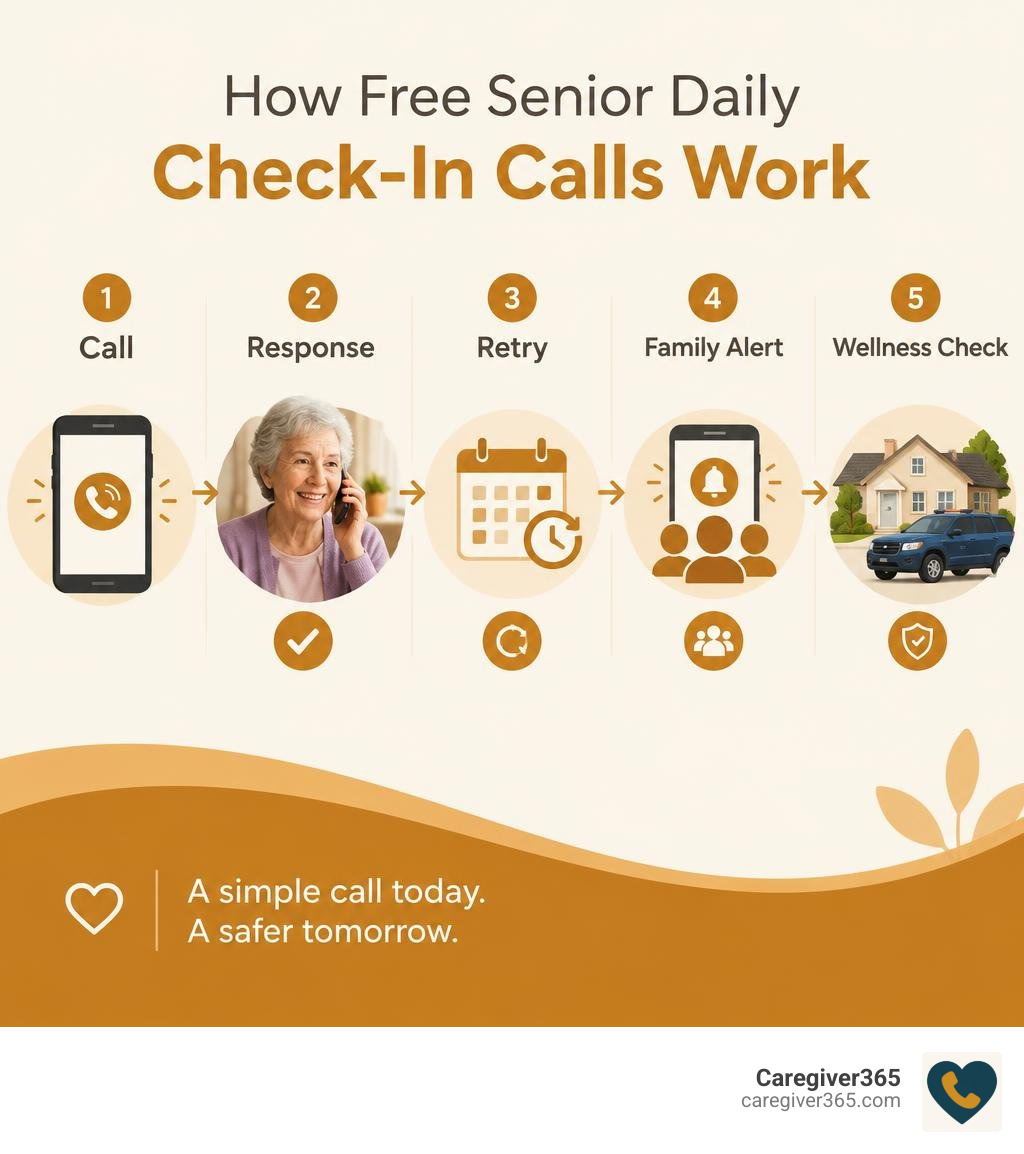
These programs usually place an automated call at a scheduled time. If your parent does not answer after the program’s retry process, the service may alert listed family contacts and, in some communities, arrange a wellness check.

For families, this can be a simple safety net for an older adult who lives alone, especially when everyone cannot call every day. It is not a replacement for 911 or a medical alert device during an active emergency. But it can help ensure a missed call does not go unnoticed for too long. According to the National Institute on Aging, regular social contact and safety monitoring can support older adults who wish to remain independent at home.

How free senior daily check-in calls work: call, response, retry, family alert, wellness check infographic

Handy free daily check in calls for seniors terms:

Types of Free Daily Check In Calls for Seniors Available Today

With approximately 14 million seniors living alone across the United States, maintaining a reliable daily connection is one of the most effective ways to preserve independence while protecting personal safety. It helps to understand why it is important to check in on seniors every single day: a quick morning confirmation bridges the gap between total independence and emergency isolation.

Not all phone programs operate the same way. Some prioritize emergency safety escalation, while others focus on easing loneliness through casual conversation.

Program Type Primary Goal Delivery Method Escalation Workflow Best Suited For
County Reassurance Programs Safety & rapid emergency response Automated phone calls Retries, alerts family, dispatches local police if needed Seniors living alone without nearby family
State Aging Initiatives Daily safety confirmation Automated interactive voice response Notifies designated family or community liaisons Solo agers in participating state regions
Volunteer Companionship Social connection & emotional wellness Live volunteer phone chats Reaches out to alternate contacts if calls go unanswered Older adults seeking conversation and friendship

Local Public Check-In Programs

Across hundreds of counties nationwide, municipal police departments and sheriff’s offices manage dedicated telephone reassurance initiatives. These municipal programs are specifically designed to confirm that an older adult is up and moving each morning.

Understanding how daily check-in calls work at the local level is straightforward. The department’s computerized calling system rings the senior’s landline or mobile phone at a predetermined time each morning. The senior answers and presses a designated key on their telephone keypad (such as “1”) to confirm they are safe. If the phone rings without an answer, the automated system enters a built-in retry window before escalating the alert to listed family contacts or dispatching a community officer for an in-person safety check.

State and Area Agency on Aging Programs

Several state governments and regional Area Agencies on Aging sponsor automated reassurance check-ins funded by public health grants. For example, states like Maryland and Ohio have established statewide telephone check-in programs tailored to independent seniors.

These programs deliver an automated check-in call every morning at a scheduled time selected by the participant. If the individual confirms their well-being, the call concludes in seconds. If the participant cannot be reached after several automated retry attempts, the program automatically alerts designated family members, neighbors, or local senior social workers.

Volunteer Social Call Services

Volunteer phone companion programs focus primarily on relieving social isolation rather than active emergency dispatch. Community organizations and non-profit groups pair older adults with trained volunteers who place friendly, regular phone calls to chat about daily routines, hobbies, and current events.

While these warm conversations provide immense emotional value and companionship, families should remember that volunteer lines generally do not feature automated multi-contact emergency escalation protocols. They serve as a wonderful layer of social support alongside a structured safety check-in routine.

How to Find and Set Up Free Check-In Call Programs

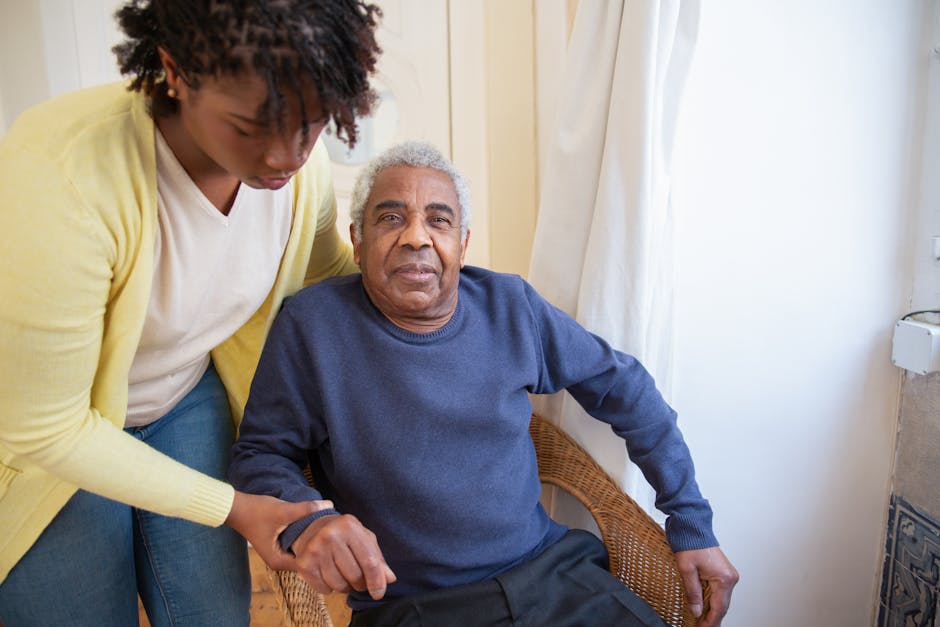
daughter helping senior parent set up emergency contacts

Locating a no-cost telephone reassurance program in your area takes just a few targeted inquiries. Because these services are organized locally, availability depends on your county, municipality, or state of residence.

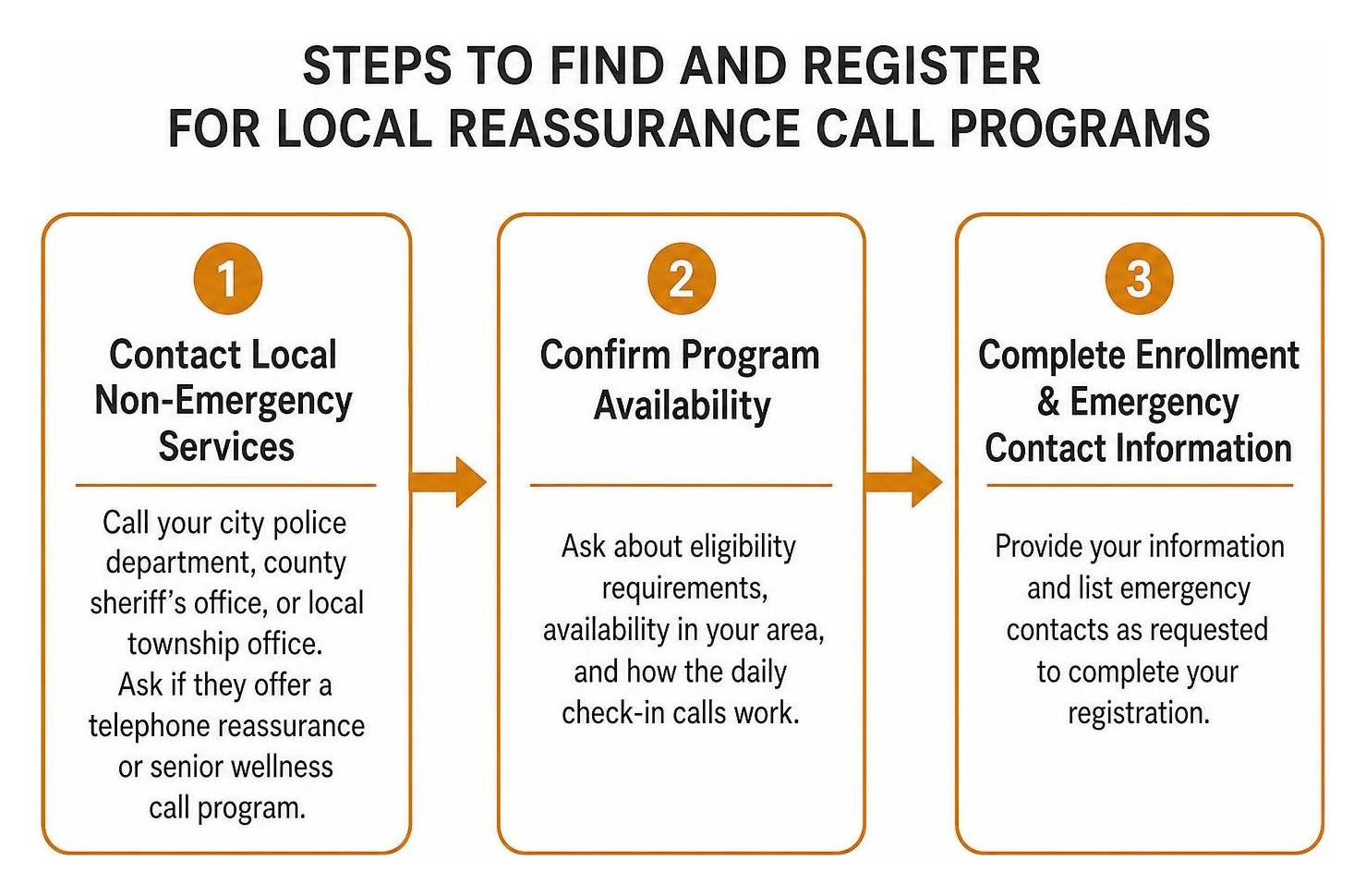
Steps to find and register for local reassurance call programs

How to Sign Up for Free Daily Check In Calls for Seniors via Local Services

To establish free reassurance calls through a local municipal agency, follow these practical steps:

  1. Contact Your Local Non-Emergency Services: Call the non-emergency administrative phone line of your city police department, county sheriff’s office, or local township office. Ask directly if they maintain a telephone reassurance or senior wellness call roster.
  2. Consult Your Area Agency on Aging: Call the Eldercare Locator at 1-800-677-1116 to connect with your regional Area Agency on Aging. Ask their resource coordinators for any government-funded daily check-in call initiatives active in your zip code.
  3. Complete the Intake Application: When registering, you will provide essential details, including preferred daily call times, primary phone numbers (landline or cell), medical conditions, lockbox codes, and emergency keyholder contact numbers. If an unreturned call ever requires an in-person follow-up, having this information on file helps first responders. Reviewing our practical guide to requesting a senior welfare check online or by phone will give your family clear insight into how local agencies carry out these safety visits.

Key Features to Configure for Maximum Senior Safety

When setting up any daily check-in routine, families should configure the alert system to minimize false alarms while maintaining a reliable safety net. As detailed in our definitive guide to senior safety solutions, a structured escalation plan prevents missed calls from spiraling into unnecessary panic.

  • Reasonable Call Retry Intervals: Make sure the system is configured to place 2 to 4 automated retry attempts across a 30-to-45-minute window before triggering emergency alerts. This gives your loved one time to finish a shower or step inside from watering the garden.
  • Tiered Family Care Circles: Establish an escalation sequence that contacts primary family caregivers first via automated calls or text notifications before alerting secondary neighbors or local authorities.
  • Consistent Scheduling: Align the daily check-in call with your parent’s natural morning routine, such as right after their morning coffee or breakfast.

Daily Check-In Calls and Emergency Response

senior answering a traditional home telephone

A frequent question families ask is whether daily check-in calls replace wearable emergency pendants or 24/7 medical alert buttons. While both tools protect independent seniors, they serve distinct and complementary roles in a comprehensive care plan.

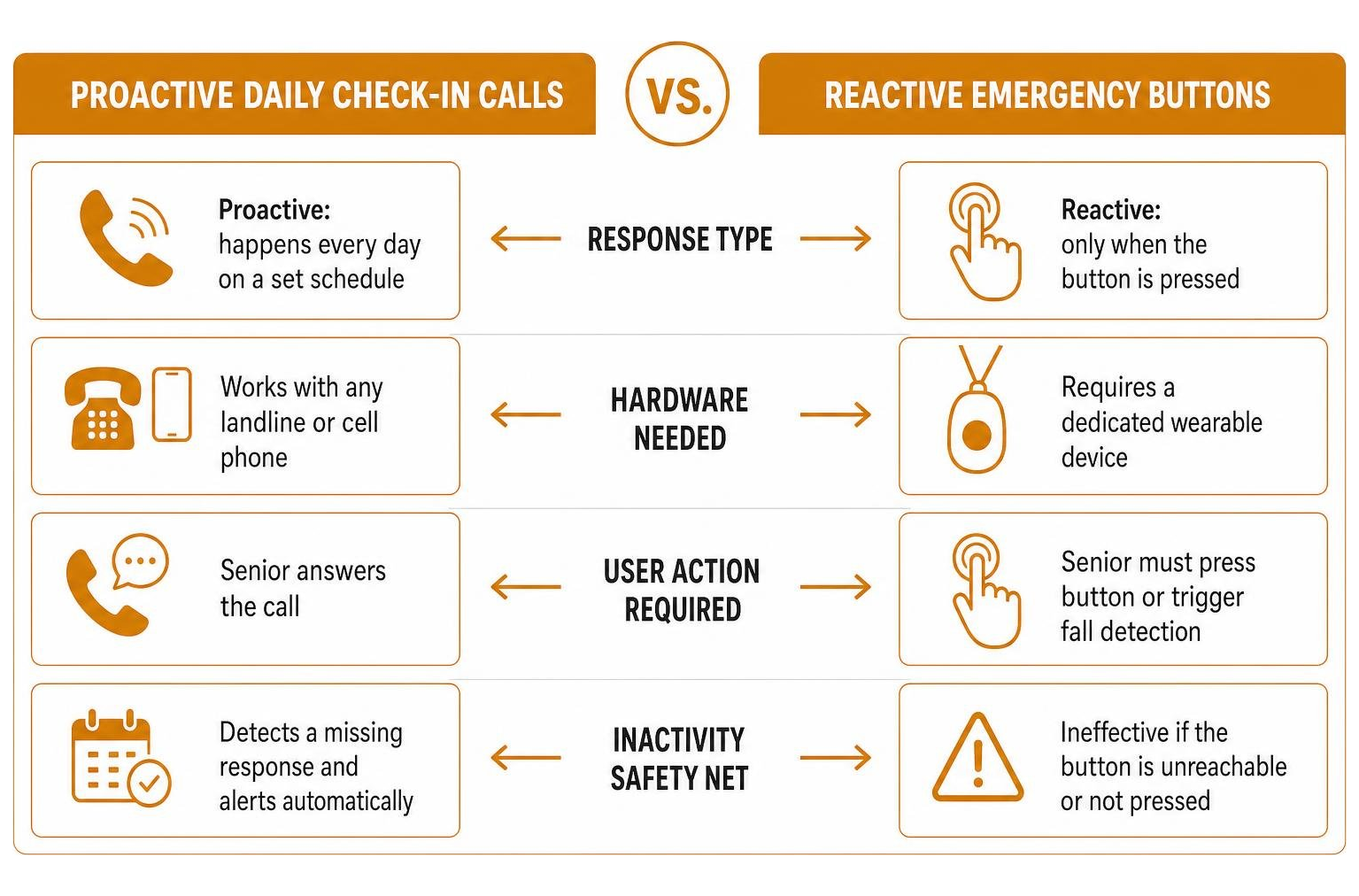
Comparison between proactive daily calls and reactive emergency buttons

Medical alert systems are reactive: they require the individual to manually push a button or depend on automatic fall-detection sensors that can sometimes fail or be left on a nightstand. Daily automated check-in calls are proactive. They verify wellness on a fixed schedule every single day without requiring the senior to wear special hardware or remember charging cables.

To review an in-depth breakdown of how these technologies work together, explore our comparison on check-in calls vs a medical alert button.

Exploring Caregiver365 Automated Daily Monitoring

While free public programs provide an essential service, municipal coverage is not available in every county or township. When local agencies do not offer a reassurance service, or when families want greater flexibility, customization, and control, automated daily monitoring services fill the gap seamlessly.

At Caregiver365, we provide an automated daily phone check-in service built specifically to support independent seniors and give remote families complete peace of mind:

  • Works on Any Phone: Our system works on standard landlines, flip phones, or smartphones with no hardware installation, Wi-Fi setups, or app downloads required for the senior.
  • Expanded Care Circle: We notify up to eight family members, trusted neighbors, or caregivers simultaneously via automated calls, SMS messages, or email the moment a morning check-in is successfully completed or missed.
  • Medical Alert Integration: Our platform integrates seamlessly alongside existing medical alert devices, providing an automated daily safety net that checks in even if a pendant is left on the dresser.
  • Effortless Senior Interaction: Seniors simply answer the phone at their chosen time, listen to our friendly automated greeting, and press “1” to confirm they are doing well.

Learn more about how it works and see how simple daily safety monitoring can be for your family.

What to Do When Free Daily Check In Calls for Seniors Are Unavailable in Your Area

If your local police department or Area Agency on Aging does not operate a free phone reassurance program, your family can implement a reliable daily check-in routine using several straightforward approaches:

  1. Establish a Family Check-In Rotation: Divide daily morning check-in duties among siblings or extended family members. Assign specific days of the week to each person to ensure your loved one receives a daily phone call or text confirmation at a consistent time.
  2. Coordinate with Trusted Neighbors: Arrange a daily visual signal with a nearby neighbor, such as opening the front window blinds by 9:00 AM or retrieving the morning newspaper. If the blinds remain closed, the neighbor checks in directly.
  3. Use an Automated Reassurance Service: If busy work schedules or time zones make daily manual calling difficult, an automated check-in service like Caregiver365 ensures your parent receives their safety call every single day without fail, instantly looping your entire family into the results.

Frequently Asked Questions About Senior Check-In Calls

What happens if a senior misses a scheduled daily check-in call?

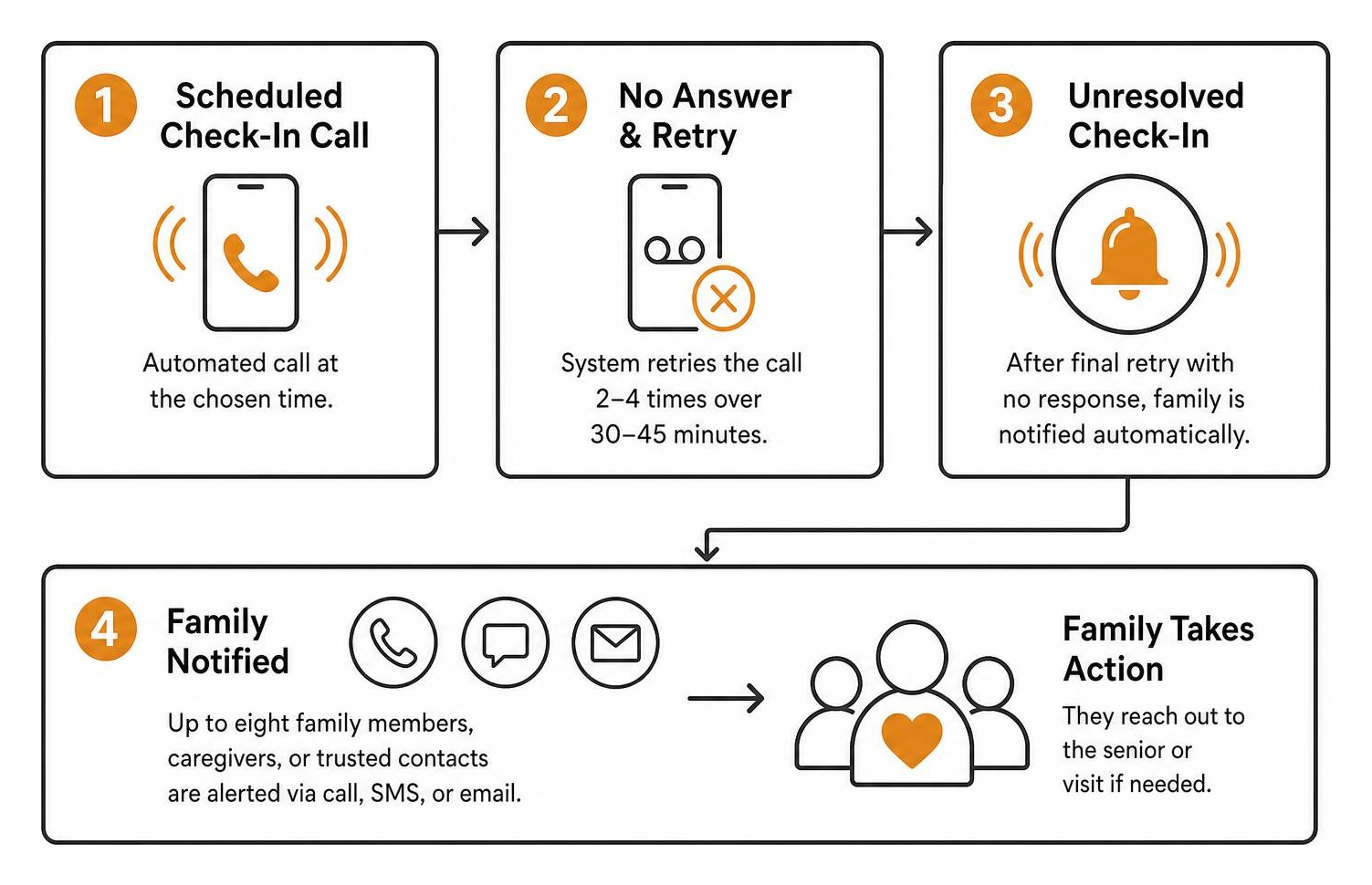
When an automated check-in call is not answered, the system does not immediately sound an alarm. Instead, it initiates a series of automatic retry calls over a set timeframe (usually 2 to 4 calls spaced 10 to 15 minutes apart). If the senior still does not answer after the final retry attempt, the system automatically alerts the designated family members in their Care Circle via phone call, text, or email so they can reach out directly.

Automated escalation flow from missed call to family notification

Can a senior use a free check-in call service on a traditional landline?

Yes. The vast majority of municipal telephone reassurance programs and automated services operate over standard landline telephone connections as well as cellular phones. The senior only needs to pick up the handset when the phone rings and press a single number on their telephone keypad to confirm they are safe.

How do free community calls differ from automated safety check-in calls?

Free volunteer companionship calls focus on social engagement, conversation, and combating senior loneliness. These calls are typically scheduled once or twice a week and last between 15 and 30 minutes. Automated safety check-in calls, by contrast, occur every day at a fixed time, take less than 15 seconds to complete, and feature structured escalation protocols that notify family caregivers if an individual does not respond.

Conclusion

Aging independently at home is a goal shared by millions of older adults, and maintaining a consistent daily connection is key to making that possible. Whether you enroll in a free telephone reassurance program through your local police department, participate in a state aging initiative, or set up an automated calling platform, establishing a dependable daily check-in brings reassurance to older adults and their families.

Take a moment today to explore the reassurance services available in your parent’s community, or explore how daily check-in calls work to discover how simple it is to build a reliable safety circle for your family.

Why It’s Important to Check in on Seniors

Checking In on Seniors: Why Daily Contact Matters

Quick answer: Checking in on seniors reduces isolation, helps catch health problems early, and gives families peace of mind. Daily contact does not have to mean daily phone calls from a busy adult child. Automated senior check-in services, like Caregiver365’s daily call, confirm a loved one is safe without requiring new devices, apps, or a change in routine.

For families with aging parents, a daily hello can mean the difference between catching a problem early and finding out too late. Yet many caregivers already juggle jobs, kids, and their own households, making a daily phone call harder to keep up than it sounds.

This is where Caregiver365’s automated check-in solutions come in. They offer a consistent way to confirm a senior is okay, without asking anyone to learn new technology or change their phone.

Why Regular Check-Ins Matter for Senior Wellness

Consistent contact with family does more than offer comfort. It plays a real role in a senior’s health and happiness.

  • Reduced isolation. Frequent contact helps seniors feel less alone, which supports better mental health.
  • Early detection. A missed check-in can be the first sign that something is wrong, giving family a chance to respond quickly.
  • Better quality of life. Seniors who feel connected to their families tend to report a stronger sense of well-being.

Senior check-ins are not just a courtesy. They are a proactive way to catch small problems before they become emergencies.

Why Is It Hard to Stay Connected With Aging Parents?

Adult children want to check in on their parents every day, but life gets in the way.

  • Work schedules, childcare, and daily responsibilities leave little room for a consistent call.
  • Seniors themselves may forget to reach out, especially if memory or routine has started to slip.
  • Manual check-in systems, like a family calendar of who calls when, are hard to maintain and easy to let slide.

The result is a gap between the intention to check in on seniors regularly and the reality of a busy household.

How Do Automated Daily Check-In Calls Work?

Caregiver365’s daily check-in service closes that gap without adding complexity.

  1. A call arrives at a time the family chooses.
  2. The senior answers and presses 1 to confirm they are okay.
  3. If the call goes unanswered, the service retries several times over the following hour.
  4. If there is still no response, the senior’s Care Circle is notified by phone, text, or email.

No smartphone, app, or extra device is required. The service works on any landline or cell phone the senior already uses.

What Are the Benefits of Automated Check-In Services?

  • Consistency. A daily confirmation replaces the guesswork of “did anyone hear from Mom today?”
  • Less caregiver stress. Families gain reassurance without needing to make the call themselves.
  • Independence for seniors. A senior can continue living on their own terms while staying connected.
  • Faster alerts. If something seems wrong, family members are notified right away instead of finding out hours or days later.

How Do You Get Started With a Check-In Service?

Setting up senior check-ins through Caregiver365 involves a few simple choices:

  1. Pick a time of day that fits the senior’s routine.
  2. Add up to eight family members or friends to the Care Circle.
  3. Add optional reminders, such as medication alerts, to the daily call.
  4. Use the existing phone line at home. No new devices are needed.

Frequently Asked Questions

What is a senior check-in service?

A senior check-in service places an automated daily call to confirm an older adult is safe. If the call is missed, the service retries and then alerts a designated Care Circle.

Does a check-in service require a smartphone?

No. Caregiver365’s daily check-in call works on any landline or cell phone. No app or additional device is required.

What happens if my loved one misses the check-in call?

The service calls back several times over the following hour. If there is still no answer, family members in the Care Circle are notified by phone, text, or email.

How is a check-in call different from a medical alert button?

A check-in call is proactive, confirming a senior is okay each day. A medical alert button is reactive, used the moment an emergency happens. Many families use both together.

How many people can be added to a Care Circle?

Up to eight family members or friends can be added to receive alerts if a check-in is missed.

Make Checking In on Seniors Part of the Routine

Checking in on seniors is one of the simplest, most meaningful things a family can do. It will not prevent every problem, but it builds a daily habit of connection and catches issues before they grow.

Automated check-in services take the pressure off busy schedules while keeping that daily thread of contact intact. Caregiver365’s daily check-in call gives families a reliable way to confirm a loved one is safe, without adding another task to an already full day.

Ready to make senior check-ins easier for your family? Visit Caregiver365 to learn how the daily check-in call works and start protecting the people you care about most.

How Caregiver Apps Keep Families in the Loop

How Caregiver Apps Keep Families in the Loop

Quick answer: Caregiver apps keep families connected by centralizing updates, medications, and schedules in one place. Instead of repeating the same news to five different relatives, a caregiver for the elderly can post once and reach everyone instantly. Paired with daily check-in calls, these tools reduce stress, prevent missed medications, and give families real-time peace of mind.

Caring for an aging parent or relative often means juggling phone calls, texts, and group chats just to keep everyone informed. One sibling wants a health update, another needs to know about an upcoming doctor’s appointment, and somewhere in the shuffle, an important detail gets lost. This fragmented communication adds unnecessary stress to an already demanding role.

Caregiver apps solve this problem by creating a single hub where every family member can see the same information at the same time. Combined with daily check-in services, these tools give families a reliable way to stay connected and catch problems early, without constant phone calls or guesswork.

What Are Caregiver Apps and Why Do They Matter?

Caregiver apps are digital platforms built to organize and simplify communication among the people involved in caring for a loved one. They typically include shared updates, medication tracking, and calendars, all in one place.

As more families take on the role of caregiver for the elderly, these apps have become increasingly important. Caregiver apps are designed to streamline communication and coordination among family members involved in caregiving, reducing the burden of repeating the same updates to multiple people.

Rather than sending five separate texts about a doctor’s visit, a primary caregiver can post one update that reaches the entire family circle. This saves time and reduces the mental load that so often falls on a single person.

What Features Keep Families Connected Through Caregiver Apps?

Most caregiver apps share a core set of tools designed to reduce miscommunication and confusion.

1. Single Update Posting

Apps like those recommended by Caregiver365 let caregivers post one update that reaches the whole family. No more retelling the same story five times over the phone.

2. Shared Timelines

A shared timeline gives family, friends, and care professionals visibility into what is happening, when it happened, and who responded. Everyone stays on the same page without needing a separate group chat.

3. Medication Management Tools

Apps such as Medisafe track medication schedules and send alerts for missed doses. This helps ensure a caregiver for the elderly, and everyone else involved, knows immediately if a dose was skipped.

4. Shared Calendars

Shared calendars keep appointments, errands, and caregiving tasks organized in one visible place, so nothing slips through the cracks.

5. Role-Based Permissions

Families can assign specific roles and responsibilities to different members and professionals. This clarifies who handles what, reducing overlap and confusion.

How Do Daily Check-In Services Complement Caregiver Apps?

While caregiver apps handle communication and coordination, daily check-in calls add another layer of protection between updates. Here is how the process typically works:

  1. Choose a time. Families select a time of day for the check-in call and add up to eight people to the Care Circle.
  2. Answer and confirm. The call comes through, and the loved one presses 1 to confirm they are okay.
  3. Missed calls trigger a retry. If the call goes unanswered, the service calls back several times over the following hour.
  4. Family gets alerted. If there is still no response, the Care Circle is notified by phone, text, or email.

This system fills the gaps between app updates, offering reassurance on the days when nothing is posted and everything seems quiet.

What Are the Real-World Benefits of Using Caregiver Apps?

Families who use caregiver apps alongside check-in services often notice meaningful improvements in daily life:

  • Less anxiety. Knowing a loved one is being monitored reduces the constant worry that comes with distance caregiving.
  • Better medication adherence. Alerts and tracking help ensure doses are not missed.
  • Fewer missed appointments. Shared calendars keep everyone aligned on what is coming up.
  • Improved coordination. Clear roles and shared timelines prevent tasks from falling through the cracks.
  • A lasting record. Update histories create a reference point for future care decisions.

Frequently Asked Questions

What is a caregiver app used for?

A caregiver app centralizes communication, medication tracking, and scheduling for families managing care for a loved one, reducing the need for repetitive updates.

Who benefits most from caregiver apps?

Families acting as caregivers for the elderly, especially those coordinating care across multiple relatives or long distances, benefit most from the centralized communication these apps provide.

Do caregiver apps replace daily check-in calls?

No. Caregiver apps handle communication and coordination, while daily check-in calls add a real-time safety layer between updates, alerting families quickly if something seems wrong.

What happens if a loved one misses a check-in call?

The service retries the call several times over the next hour. If there is still no answer, the Care Circle is notified by phone, text, or email.

Take the Next Step Toward Peace of Mind

Caregiving becomes easier when families have the right tools in place. If you have a loved one who is losing independence due to age or health, consider pairing a caregiver app with a daily check-in service recommended by Caregiver365. Together, these tools offer a simple, reliable way to stay connected and catch problems before they become emergencies.

Why It’s Important to Check in on Seniors

Checking In on Seniors: Why Daily Contact Matters

Quick answer: Checking in on seniors reduces isolation, helps catch health problems early, and gives families peace of mind. Daily contact does not have to mean daily phone calls from a busy adult child. Automated senior check-in services, like Caregiver365’s daily call, confirm a loved one is safe without requiring new devices, apps, or a change in routine.

For families with aging parents, a daily hello can mean the difference between catching a problem early and finding out too late. Yet many caregivers already juggle jobs, kids, and their own households, making a daily phone call harder to keep up than it sounds.

This is where Caregiver365’s automated check-in solutions come in. They offer a consistent way to confirm a senior is okay, without asking anyone to learn new technology or change their phone.

Why Regular Check-Ins Matter for Senior Wellness

Consistent contact with family does more than offer comfort. It plays a real role in a senior’s health and happiness.

  • Reduced isolation. Frequent contact helps seniors feel less alone, which supports better mental health.
  • Early detection. A missed check-in can be the first sign that something is wrong, giving family a chance to respond quickly.
  • Better quality of life. Seniors who feel connected to their families tend to report a stronger sense of well-being.

Senior check-ins are not just a courtesy. They are a proactive way to catch small problems before they become emergencies.

Why Is It Hard to Stay Connected With Aging Parents?

Adult children want to check in on their parents every day, but life gets in the way.

  • Work schedules, childcare, and daily responsibilities leave little room for a consistent call.
  • Seniors themselves may forget to reach out, especially if memory or routine has started to slip.
  • Manual check-in systems, like a family calendar of who calls when, are hard to maintain and easy to let slide.

The result is a gap between the intention to check in on seniors regularly and the reality of a busy household.

How Do Automated Daily Check-In Calls Work?

Caregiver365’s daily check-in service closes that gap without adding complexity.

  1. A call arrives at a time the family chooses.
  2. The senior answers and presses 1 to confirm they are okay.
  3. If the call goes unanswered, the service retries several times over the following hour.
  4. If there is still no response, the senior’s Care Circle is notified by phone, text, or email.

No smartphone, app, or extra device is required. The service works on any landline or cell phone the senior already uses.

What Are the Benefits of Automated Check-In Services?

  • Consistency. A daily confirmation replaces the guesswork of “did anyone hear from Mom today?”
  • Less caregiver stress. Families gain reassurance without needing to make the call themselves.
  • Independence for seniors. A senior can continue living on their own terms while staying connected.
  • Faster alerts. If something seems wrong, family members are notified right away instead of finding out hours or days later.

How Do You Get Started With a Check-In Service?

Setting up senior check-ins through Caregiver365 involves a few simple choices:

  1. Pick a time of day that fits the senior’s routine.
  2. Add up to eight family members or friends to the Care Circle.
  3. Add optional reminders, such as medication alerts, to the daily call.
  4. Use the existing phone line at home. No new devices are needed.

Frequently Asked Questions

What is a senior check-in service?

A senior check-in service places an automated daily call to confirm an older adult is safe. If the call is missed, the service retries and then alerts a designated Care Circle.

Does a check-in service require a smartphone?

No. Caregiver365’s daily check-in call works on any landline or cell phone. No app or additional device is required.

What happens if my loved one misses the check-in call?

The service calls back several times over the following hour. If there is still no answer, family members in the Care Circle are notified by phone, text, or email.

How is a check-in call different from a medical alert button?

A check-in call is proactive, confirming a senior is okay each day. A medical alert button is reactive, used the moment an emergency happens. Many families use both together.

How many people can be added to a Care Circle?

Up to eight family members or friends can be added to receive alerts if a check-in is missed.

Make Checking In on Seniors Part of the Routine

Checking in on seniors is one of the simplest, most meaningful things a family can do. It will not prevent every problem, but it builds a daily habit of connection and catches issues before they grow.

Automated check-in services take the pressure off busy schedules while keeping that daily thread of contact intact. Caregiver365’s daily check-in call gives families a reliable way to confirm a loved one is safe, without adding another task to an already full day.

Ready to make senior check-ins easier for your family? Visit Caregiver365 to learn how the daily check-in call works and start protecting the people you care about most.