
Independent comparison site · Advertiser Disclosure Medical Alert: (877) 909-4209 | Lifeline: (877) 488-1101
Compare Options

Never Lose a Lead with Automated Missed Call SMS Alerts

Turn Every Unanswered Call Into a Fast Family Alert

A miss call alert service helps you act when a call is not answered. Set up a dedicated number or call-forwarding rule, choose who should receive the alert, and trigger an automatic SMS or callback message. For an older adult living alone, this can give family members a simple, low-tech way to see that an important call was missed and follow up quickly.

For local service businesses, the same system stops leads from disappearing after hours. The platform captures the caller’s number, logs it, and can send an instant text such as, “Sorry we missed you. Reply BOOK to schedule.”

The key is speed. A missed call is often a short window of intent – whether it is a customer seeking help or a family member checking on a parent. Automated SMS alerts create a clear next step without requiring an app, smartphone skills, or someone watching the phone all day.

At Caregiver365, missed-call automation can support reliable family communication by turning an unanswered call into a prompt notification and follow-up workflow.
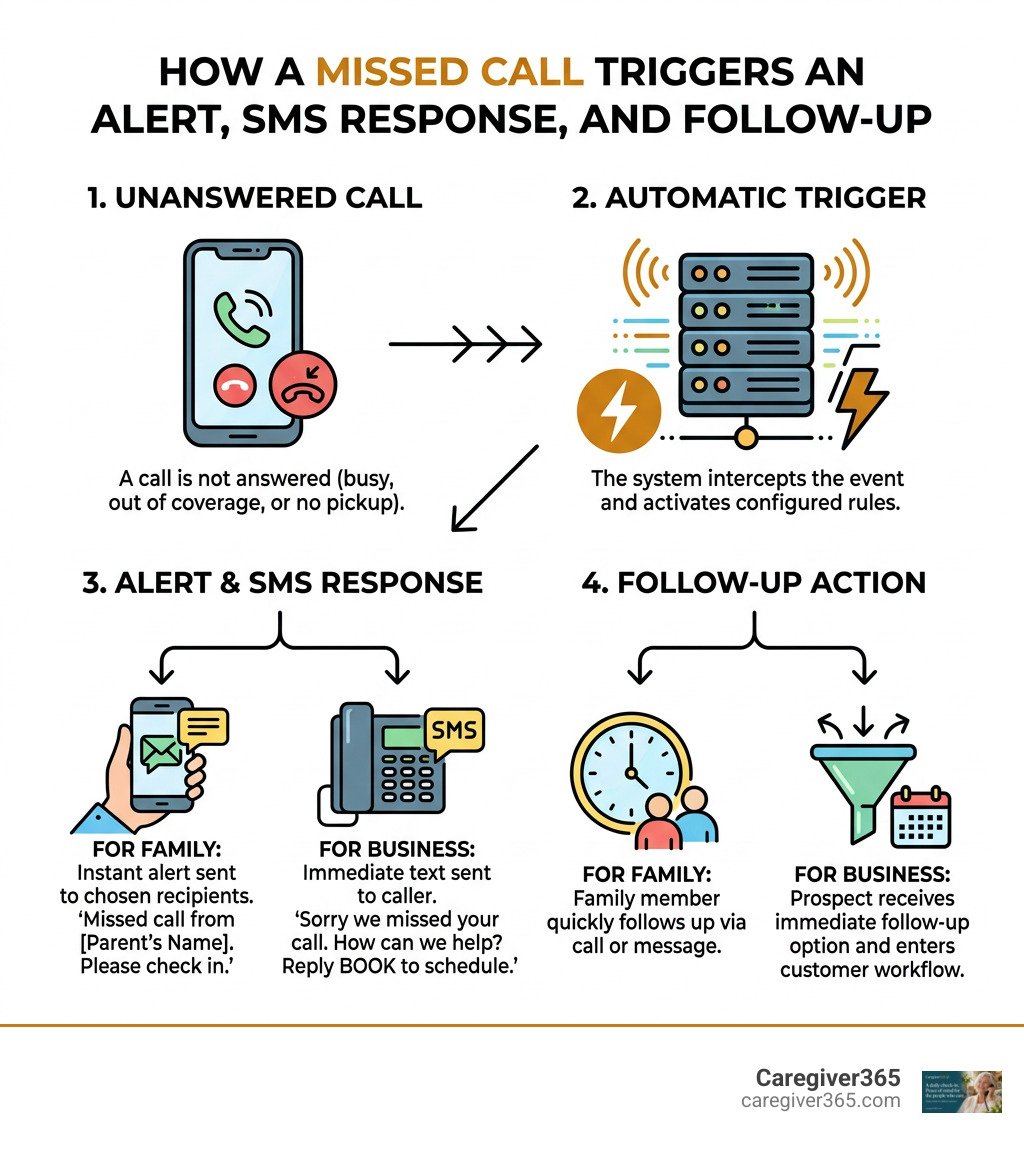
How a missed call triggers an alert, SMS response, and family or business follow-up infographic

What Is a Miss Call Alert Service and How Does It Work?

At its core, a missed call alert system bridges the gap between an unanswered phone call and an immediate follow-up. When someone dials a number and the call cannot connect—because the line is busy, the phone is switched off, the user is out of network coverage, or no one picks up—the system intercepts that event at the telecom level.

The underlying mechanics rely on cellular signaling and cloud telephony protocols. In traditional telecom setups, when a call goes unanswered, the carrier’s Home Location Register (HLR) and Mobile Switching Center (MSC) register the failed call attempt. Instead of letting that data vanish into the ether, an MCA (Missed Call Alert) framework captures the Caller Line Identification (CLI), timestamps the event, and stores it in an alert queue.

In modern business environments, cloud platforms take this a step further. When a caller dials a dedicated virtual number, the cloud telephony switch detects the incoming ring, captures the caller ID, and immediately drops the call before it connects (avoiding airtime charges). This instant event triggers an automated webhook, which sends an SMS, pushes data to a CRM, or notifies a team in real time.

Feature / Metric Carrier MCA Systems Mobile Alerting Apps Business Text-Back Automation
Primary Architecture Telecom switch / HLR-level signaling Device call log listener & call forwarding Cloud telephony virtual numbers & Webhooks
Hardware / App Required None (Network-native) Mobile app installed on device None (Cloud-hosted dashboard/API)
Hardware Compatibility Landlines & any mobile phone Smartphones only (Android/iOS) Works with all caller devices
Notification Method SMS when phone reconnects In-app push notification / local SMS Automated SMS, WhatsApp, Webhooks, CRM alerts
Primary Use Case Personal connectivity & network coverage Low-cost call tracking & call screening Lead generation, customer support & 2FA verification
User Friction Zero (Carrier-managed) Requires app installation & setup Zero (Caller just dials and disconnects)

Understanding the Core Architecture of a Miss Call Alert Service

The operational pipeline follows a reliable sequence designed for high-availability environments. Whether managing a local service business or coordinating wellness updates, how our communication systems operate illustrates that simplicity on the user end requires robust automation behind the scenes.
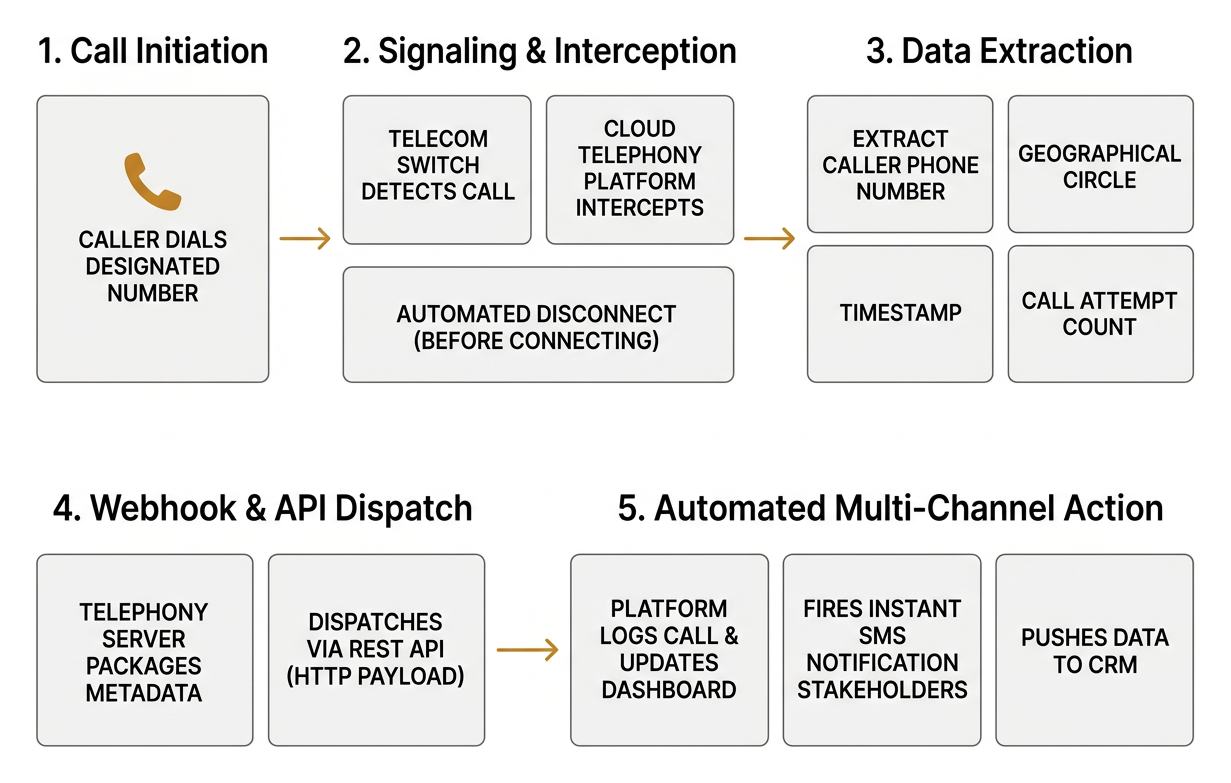
Step by step architecture from caller dial to webhook and automated SMS

  1. Call Initiation: The caller dials a designated standard, toll-free, or virtual number.
  2. Signaling & Interception: The telecom switch detects the call. If configured for automated verification or lead capture, the system triggers a disconnect before billing begins. If configured for network alerts, the carrier detects an unreachable status.
  3. Data Extraction: The system extracts the caller’s phone number, geographical circle, timestamp, and call attempt count.
  4. Webhook & API Dispatch: The telephony server packages this metadata into an HTTP payload and dispatches it via REST API.
  5. Automated Multi-Channel Action: The recipient platform logs the call, updates the central dashboard, and fires an instant SMS or app notification to the designated stakeholders.

Carrier Networks vs. Cloud-Based Call Forwarding

Carrier-level systems and cloud-based call forwarding serve distinct needs:

  • Carrier-Based MCA: Built directly into the telecom infrastructure. If your phone battery dies while running errands, your carrier queues the missed call data. Once your SIM card reconnects to a cellular tower, the carrier’s SMS center (SMSC) pushes a summary text listing all numbers that tried reaching you.
  • Cloud Forwarding & Conditional Divert: Operates independently of local SIM status. Users can set conditional rules (such as “Divert if Busy” or “Divert if Unreachable”) pointing to a central routing number. For example, Prepaid telecom call divert options route calls to designated platform numbers, allowing automated software to handle the notification flow without hardware dependencies.

Types of Missed Call Notification Solutions

Missed call notification tools fall into three distinct categories based on deployment, cost, and target audience.
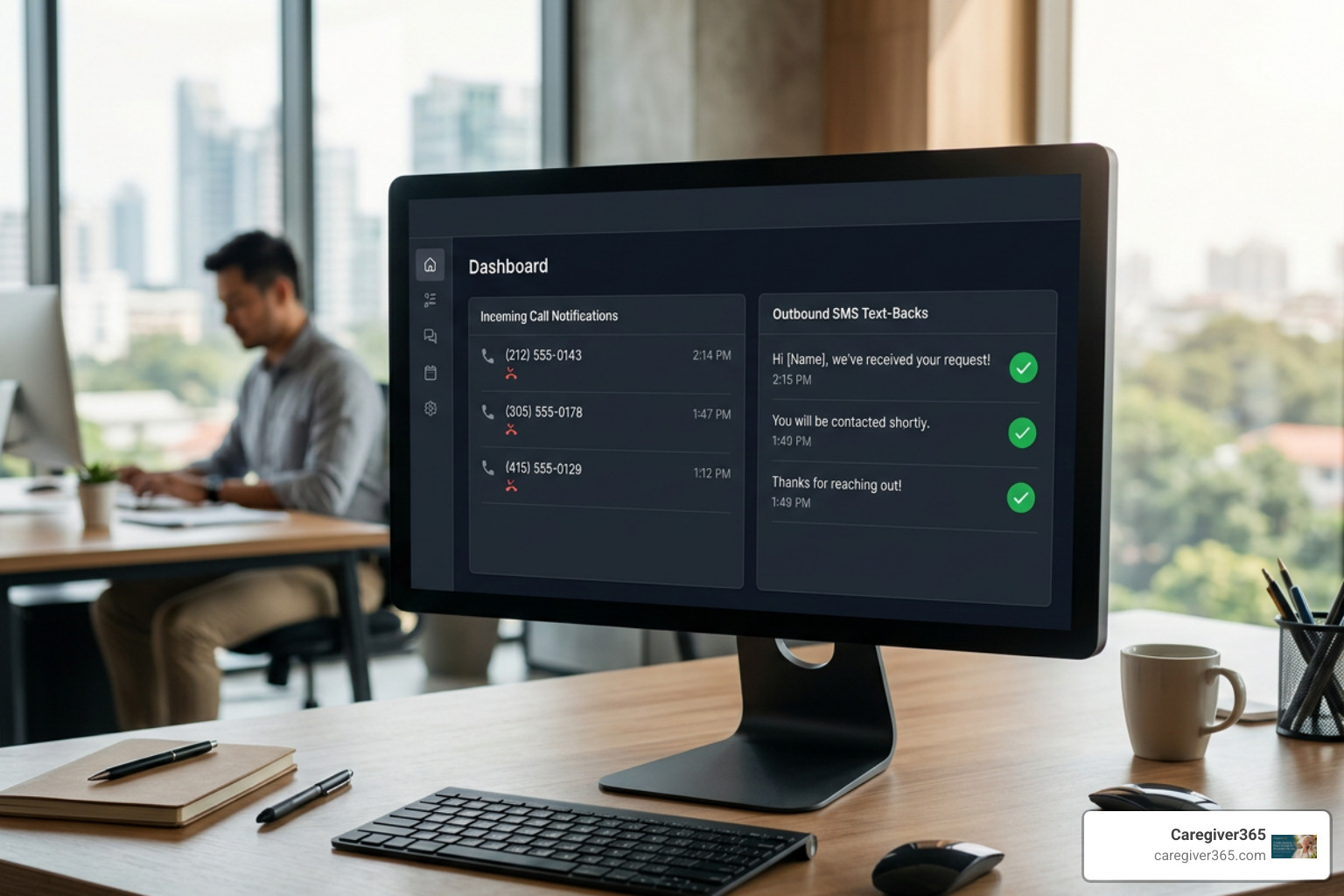
Modern dashboard tracking incoming missed calls and outbound SMS text-backs

Carrier-Provided MCA and USSD Alerts

Telecom operators across the globe offer native Missed Call Alerts as a core value-added service. These solutions operate entirely on the carrier’s network:

  • USSD Management: Users activate or deactivate services using short codes (e.g., dialing *612#, *1400#, or *121#).
  • Zero App Dependency: Works on basic 2G feature phones, modern smartphones, and landline routing setups.
  • Reconnection Broadcasts: Delivers a consolidated SMS summary once a subscriber re-enters coverage or powers on their device.

Mobile Apps and Automated Text-Back Software

For individual users seeking customized alerts on their personal devices, app-based utilities offer direct smartphone integration. Tools such as the Missed call notification utility on Google Play track incoming call states and dispatch local push alerts.

Leading software solutions prioritize user privacy by processing call logs locally and utilizing SHA-224 cryptographic hashing, ensuring phone records are not stored on unencrypted third-party servers.

Choosing the Right Miss Call Alert Service for Business Growth

For growing organizations, choosing a notification tool comes down to integration depth, speed, and reliability. When evaluating providers, compare reliable alert setups to ensure your infrastructure supports high-volume spikes, multi-channel messaging (SMS, WhatsApp, voice call-backs), and enterprise CRM synchronization.

Business Lead Capture and Verification Capabilities

For local service businesses, missed calls represent lost revenue. When an interested customer calls an HVAC technician, plumber, or medical clinic and gets voicemail, they rarely leave a message—they hang up and call the next business on the search results page.

Instant SMS Text-Back and After-Hours Lead Routing

Implementing a sub-5-second automated text-back system captures prospects before they contact a competitor. Platforms like Missed Call Text Back Automation for Local Service Businesses show that responding within seconds keeps prospective buyers engaged.

Key components of modern text-back systems include:

  • Sub-5-Second Response Times: Instantly acknowledging the caller’s request via automated SMS while their purchase intent is highest.
  • A2P 10DLC Compliance: Registering Application-to-Person messaging campaigns with telecom carriers to ensure high deliverability and avoid spam filters.
  • Interactive Keywords: Allowing prospects to reply with simple words like “BOOK” or “HELP” to receive automated calendar links or service menus.
  • Smart Rep Routing: Automatically forwarding the captured lead data to the on-duty staff member’s mobile phone for immediate personal follow-up.

Missed-Call Verification as an Alternative to OTP

Beyond lead capture, missed calls provide a frictionless alternative to SMS-based One-Time Passwords (OTP) for user authentication and two-factor authentication (2FA). Providers like Missed Call Service Delhi NCR and cloud platforms like Miss Call, Miss Call API, MCA, CBS deploy this technology across major global markets.
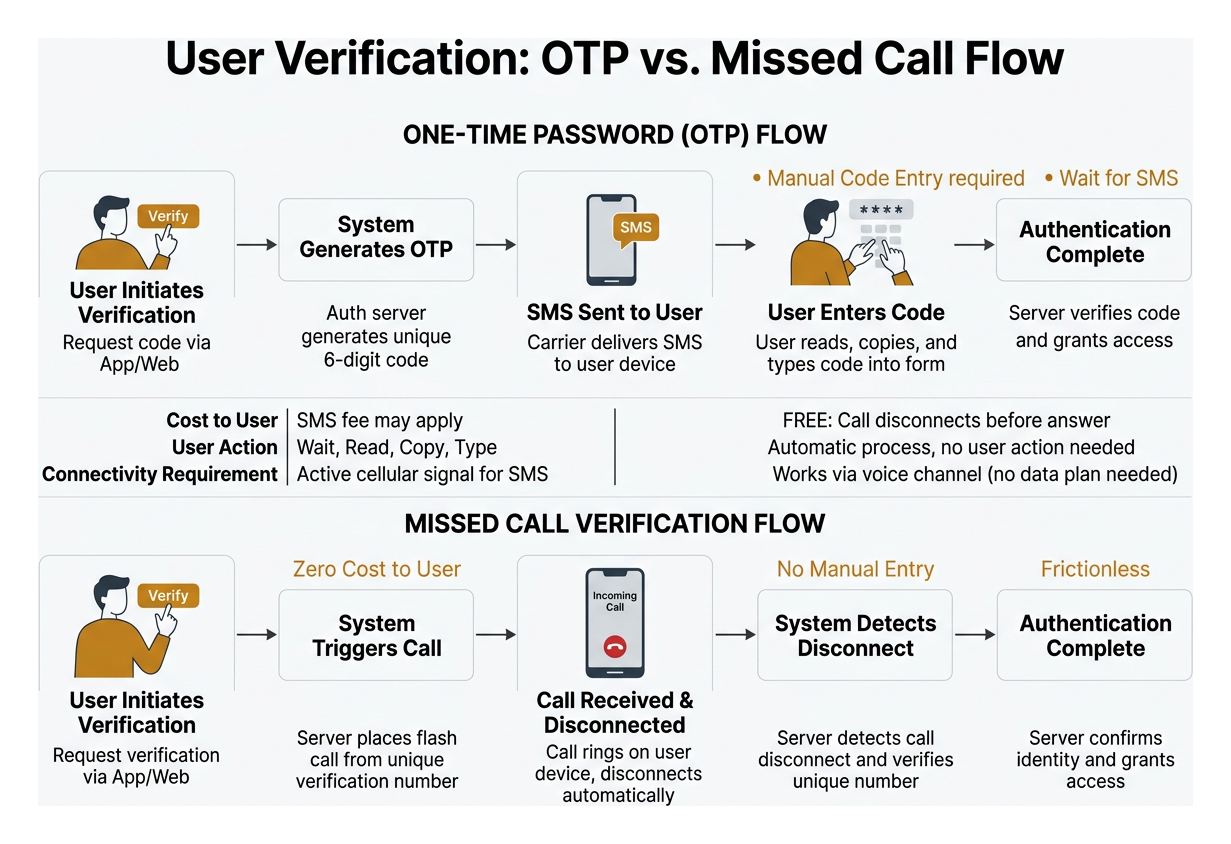
Comparison diagram showing OTP flow versus Missed Call Verification flow

  • Zero Cost to the User: Because the call disconnects before answering, the user incurs no airtime or SMS fees.
  • No Manual Code Entry: The user does not need to wait for an SMS code to arrive, copy it, and type it into a form. The system authenticates the user automatically upon detecting the disconnect.
  • High Reliability in Low-Bandwidth Areas: Missed-call verification functions over voice channels without requiring an active mobile data plan, making it effective in emerging markets and rural areas.

Technical Setup, Pricing Models, and Practical Limitations

Deploying a missed call alert framework requires balancing budget considerations against telecom network constraints.

Cost Breakdown: From Free Carrier Add-Ons to SaaS Subscriptions

Pricing varies significantly depending on whether the service is carrier-native, consumer-app-based, or enterprise cloud software:

  • Free Carrier Services: Many mobile operators (including MTN Nigeria, Nepal Telecom, and my.t Mauritius) provide MCA free of charge to all prepaid and postpaid subscribers.
  • Nominal Carrier Fees: Some operators charge a small daily or monthly fee (for instance, Jazz Pakistan charges Rs. 3.20/day, while Grameenphone charges BDT 10/month for prepaid users).
  • Consumer Utility Apps: Typically available as free downloads, with ad-free premium tiers available for a nominal annual subscription (around $0.99/year).
  • Business Cloud Telephony: Pricing models typically include a dedicated virtual number rental fee ($5 to $25/month) combined with pay-as-you-go SMS and API trigger fees ($0.01 to $0.03 per automated text-back).

Overcoming Limitations: DND, Roaming, and Private Numbers

While missed call alert systems are robust, they operate under specific telecommunications rules:

  • Private & Hidden Numbers: If a caller disables their caller ID or dials using an unlisted private number, the system cannot capture the CLI, preventing automated SMS alerts.
  • Do Not Disturb (DND) Registries: Regulatory bodies enforce strict DND lists. Automated marketing text-backs cannot be delivered to registered numbers without prior transactional opt-in compliance.
  • International Roaming Blocks: Traditional carrier-level MCA notifications often fail when a subscriber is roaming on foreign networks due to signaling incompatibilities between international MSCs.
  • Line Suspension: If a subscriber’s SIM card is barred, suspended, or has insufficient prepaid validity, carrier-level MCA features will stop functioning until account standing is restored.

Frequently Asked Questions About Missed Call Alerts

Will a caller be charged when triggering a missed call alert?

No. In dedicated cloud-based missed call systems, the telephony switch disconnects the incoming call during the signaling phase before a voice channel is opened. Because the call is never technically answered, telecom operators do not bill the caller.

How fast does an automated missed call text-back system engage prospects?

Cloud-based systems process incoming call events and trigger outbound SMS webhooks within 2 to 5 seconds. This near-instant engagement reaches the customer while they still have their phone in hand, preventing them from calling a competing service provider.

What permissions and privacy settings are required for alert apps?

Mobile apps installed on personal smartphones require permissions to read call logs and state changes (READ_CALL_LOG and READ_PHONE_STATE). Reputable utilities do not upload personal contacts to cloud servers; they process the numbers locally on the device using encryption and SHA hashing to safeguard user data.

Conclusion

Whether preventing business lead loss or staying connected with loved ones, automated missed call alerts turn an unanswered ring into an immediate, reliable next step. By removing the need for manual monitoring and working seamlessly across standard landlines and mobile phones, missed call automation provides a dependable communication safety net.

At Caregiver365, we use automated communication loops to give families peace of mind. Discover how daily check in calls work to keep loved ones safe, connected, and supported every single day without complicated hardware.
Set Up Instant Missed Call Reminders in Under Two Minutes

How to Set Up a Miss Call Reminder Using Built-In Phone Settings

To set up a miss call reminder, you can enable recurring alert options directly in your native dialer or accessibility settings, configure persistent banner and LED alerts on iOS, or install a lightweight third-party utility to trigger periodic chimes and vibrations until you check your phone.

Taking advantage of your device’s native capabilities ensures that you do not have to rely on external software unless necessary. Built-in tools integrate seamlessly with your operating system, consuming virtually zero extra battery while keeping your private call logs entirely on your device.

Enabling a Native Miss Call Reminder on Android

Certain Android manufacturers include recurring alert functions directly within the stock dialer app. These settings let your phone chime or vibrate periodically after a call goes unanswered.

To check for and configure this feature on a supported Android device:

  1. Open the Phone App: Launch the default dialer app on your home screen.
  2. Access Menu Settings: Tap the three vertical dots located in the upper-right corner and select Settings.
  3. Navigate Calling Accounts: Tap on Calling accounts (or Advanced settings depending on your phone model).
  4. Locate Missed Call Reminders: Tap Missed call reminders to view available repetition options.
  5. Set the Frequency: Choose your preferred number of repeated alerts. On many native dialers, these reminders repeat at 5-minute intervals until acknowledged.

If your specific Android build lacks this sub-menu, you can also check your system-wide accessibility settings. Many Android versions include a Notification reminders toggle under Settings > Accessibility > Advanced settings, allowing you to set repeating acoustic or vibration cues for selected applications.

Setting Up Repeat Alerts and Banners on iOS

Apple handles missed notifications through structured lock-screen banners, repeat message alerts, and accessibility cues. While iOS does not offer an infinite periodic chime specifically for missed cellular calls out of the box, you can configure several native features to ensure unanswered calls do not go unnoticed:

  • Persistent Banner Alerts: Navigate to Settings > Notifications > Phone and select Banners. Switch the banner style from Temporary to Persistent. When you receive a call notification, it will remain fixed on your screen until manually dismissed.
  • Repeat Alerts for Messages: If someone leaves a text after a missed call, you can set the alert to repeat up to 10 times. Go to Settings > Notifications > Messages > Customize Notifications > Repeat Alerts, and select how many times you want the alert to sound at two-minute intervals.
  • LED Flash Alerts: For a strong visual cue, head to Settings > Accessibility > Audio & Visual > LED Flash for Alerts. Toggling this on will flash the camera light whenever a notification or call arrives, making it easy to spot even across a quiet room.

Top Third-Party Apps for Periodic Call and SMS Alerts

When built-in tools fall short of providing continuous acoustic reminders, specialized utilities fill the gap. These apps monitor system notifications and trigger recurring sounds, custom vibrations, or lock-screen overlays until you open your device.

App Name Platform Key Highlight Custom Intervals Best For
Missed Notifications Reminder Android Lightweight background service, zero polling Yes (1 min – hours) Full audio customization
Missed Call &Text Notification Android Lock-screen overlay & calendar sync Yes (1 to 120 mins) Visual pop-ups & persistent alerts
Missed Call Alert Plus Android Flash-on-call & VIP filters Yes (Adjustable start delays) High-priority contact tracking
Missed Call Alert Android Automated SMS alerts for missed calls Yes (Configurable time window) SMS-based call tracking
Missed calls Android Cloud call-forwarding notifications Fixed push intervals Multi-line and landline support
Missed Call Reminder Android (APK) LED, vibration, and screen wake cues Yes (Interval & duration) Older devices & no-polling needs

Selecting the Best Miss Call Reminder App for Custom Intervals

For users who want straightforward periodic audio reminders, Missed Notifications Reminder – Apps on Google Play is one of the most reliable tools available. With over 100,000 downloads and a 2.2K review track record, it operates as an event-driven background service rather than constantly draining your battery with continuous polling.

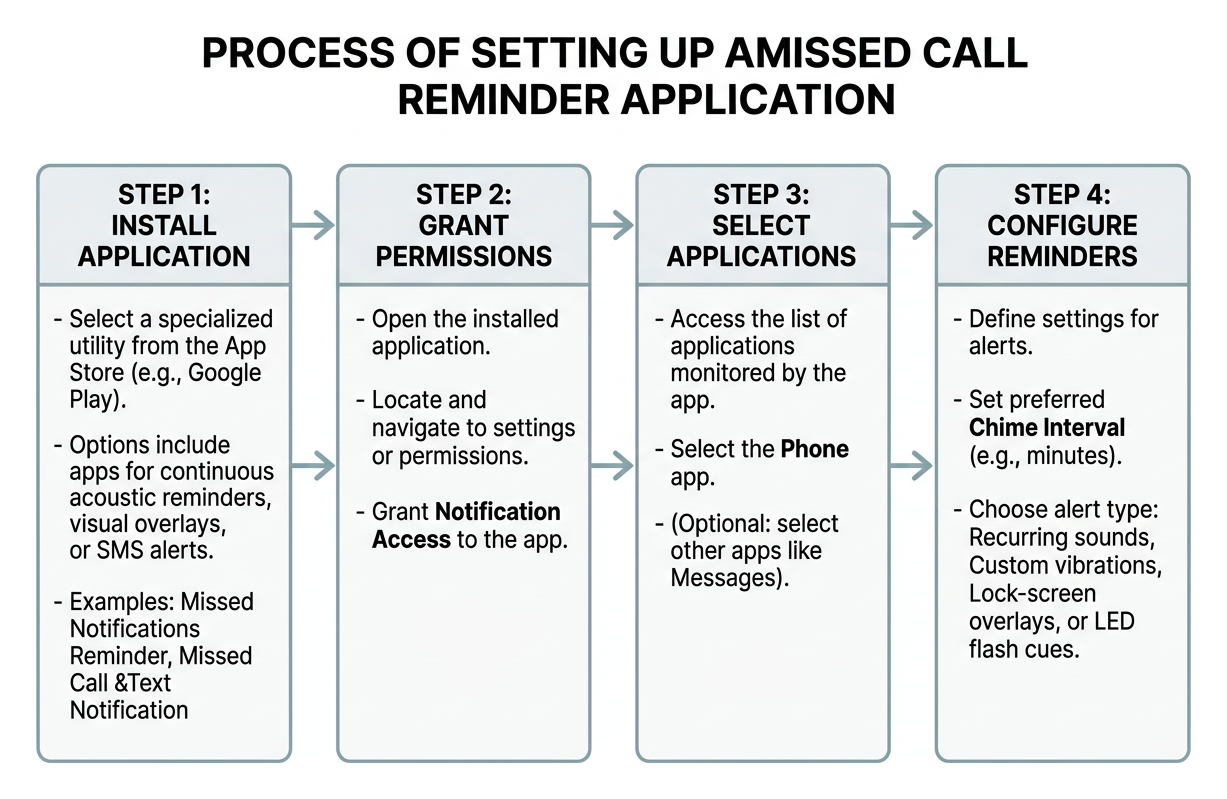
Once installed, you simply grant notification access, select the Phone app from your application list, and configure your preferred chime interval.

Process of setting up a missed call reminder application

If you prefer prominent visual alerts rather than just sound, Missed Call &Text Notification provides full-screen lock-screen overlay banners. With over 100,000 downloads and a 4.2-star rating across 987 reviews, it allows you to customize reminder intervals anywhere from 1 to 120 minutes. It also offers calendar integration to ensure you are never interrupted during scheduled appointments.

Advanced Features: Flash Alerts, SMS Forwarding, and VIP Filters

If you need more than standard audio reminders, several tools offer advanced capabilities:

  • Camera Flash & Proximity Pauses: Missed Call Alert Plus – Apps on Google Play (over 10,000 downloads) features an on-call flash utility that triggers visual signals while ringing. It also includes an intuitive “service pause” function—simply flipping your phone face-down suspends lower-priority alerts.
  • VIP Contact Filtering: Rather than chiming for every telemarketer, you can configure VIP keyword and sender filters to ensure you only receive repeat alerts when immediate family or doctors reach out.
  • Automated SMS Notifications: If you are often away from internet access, tools like Missed Call Alert (50,000+ downloads) can automatically log missed calls and route SMS notifications across your carrier network.

customizable reminder interval and alert settings

Troubleshooting and Optimizing Alert Reliability

Third-party reminder tools must run in the background to detect missed events. However, modern mobile operating systems aggressively shut down background apps to conserve battery life, which can cause reminders to stop working unexpectedly.

Fixing Notification Delays and Battery Killer Settings

If your reminder app suddenly goes silent after a few hours of inactivity, the issue is almost certainly an aggressive operating system power manager.

To ensure continuous operation:

  1. Disable Battery Optimization: Navigate to Settings > Apps > [Your Reminder App] > Battery and select Unrestricted (or “Don’t optimize”).
  2. Enable Autostart (Xiaomi / MIUI): Open Security > Permissions > Autostart and enable the toggle next to your reminder app.
  3. Configure App Launch Settings (Huawei / EMUI): Go to Settings > Battery > App Launch, find your app, switch it to Manage Manually, and make sure Auto-launch, Secondary launch, and Run in background are all enabled.
  4. Grant Overlay Permissions: If using an app with lock-screen pop-ups, ensure Display over other apps is toggled on under your system settings.

Protecting Privacy and Securing Notification Data

Because reminder apps require access to notifications, call logs, or SMS events, privacy is a natural concern. When choosing a tool, prioritize developers who adhere to strict data minimization practices.

Review the app’s Google Play Data Safety section to verify that no personal data is collected or shared with third parties. High-quality utilities process notification events entirely in local, hashed memory and require only the specific permissions needed to play a sound or light an LED.

Beyond Device Notifications: Automated Check-Ins for Family Safety

While a phone alert helps you remember to return a call, it still relies on the other person noticing the phone in the first place. For older adults living independently, an unanswered call can signal a serious concern—such as a fall, sudden illness, or a misplaced handset.

senior answering a scheduled phone check-in

When keeping vulnerable loved ones safe, it is helpful to look at our buying guide to evaluate proactive safety strategies. Many families find that pairing automated routines alongside standard devices creates the ultimate safety net.

Instead of waiting and worrying after a missed call, automated daily check-in services place structured calls directly to a senior’s home phone or mobile. If the call goes unanswered after multiple attempts, the system automatically alerts a designated family “Care Circle” to step in. Learning about check-in calls vs a medical alert button can help families determine the right balance of passive and active safety measures.

Frequently Asked Questions About Missed Call Reminders

Why did my missed call reminder app stop sending audible alerts?

This almost always happens when your operating system’s power management or “Doze” mode puts the app into deep sleep. To resolve this, open your phone’s application settings, locate the app, and set its battery usage to “Unrestricted.” For devices made by Xiaomi, Huawei, or Samsung, ensure that autostart permissions and background execution locks are explicitly granted.

Can I set separate reminder intervals for missed calls and text messages?

Yes. Dedicated tools like Missed Call Reminder – Download APK allow users to independently configure alert types (sound, vibration, LED, or screen wake) and timings for incoming calls, SMS, and MMS. This ensures you can apply an urgent 2-minute chime for missed calls while keeping standard text reminders on a relaxed 15-minute interval.

What should I do if my phone has no built-in repeat notification setting?

If your device lacks native settings, download a verified third-party utility such as Missed Notifications Reminder from Google Play. Alternatively, you can use accessibility features like LED flash alerts on iOS. Families seeking reliable, automated oversight without installing complicated mobile apps can explore how our service operates by reading how it works or comparing communication support options designed for independent living.

Conclusion

Managing unanswered communications does not have to be stressful. Whether you configure your phone’s built-in dialer settings, turn on accessibility flash cues, or install a dedicated reminder utility, setting up repeated alerts takes less than two minutes and ensures critical messages are never lost in the daily rush.

When caring for an aging relative, missed calls carry higher stakes. At Caregiver365, we provide automated daily phone check-in calls that confirm your loved one’s well-being without requiring new hardware, wearable pendants, or complex setups. Our service works on any landline or mobile phone, seamlessly alerting a Care Circle of up to eight family members if a daily check-in goes unanswered.

Discover how daily check-in calls work to give your entire family total peace of mind every single day.

Why It’s Important to Check in on Seniors

Checking In on Seniors: Why Daily Contact Matters

Quick answer: Checking in on seniors reduces isolation, helps catch health problems early, and gives families peace of mind. Daily contact does not have to mean daily phone calls from a busy adult child. Automated senior check-in services, like Caregiver365’s daily call, confirm a loved one is safe without requiring new devices, apps, or a change in routine.

For families with aging parents, a daily hello can mean the difference between catching a problem early and finding out too late. Yet many caregivers already juggle jobs, kids, and their own households, making a daily phone call harder to keep up than it sounds.

This is where Caregiver365’s automated check-in solutions come in. They offer a consistent way to confirm a senior is okay, without asking anyone to learn new technology or change their phone.

Why Regular Check-Ins Matter for Senior Wellness

Consistent contact with family does more than offer comfort. It plays a real role in a senior’s health and happiness.

  • Reduced isolation. Frequent contact helps seniors feel less alone, which supports better mental health.
  • Early detection. A missed check-in can be the first sign that something is wrong, giving family a chance to respond quickly.
  • Better quality of life. Seniors who feel connected to their families tend to report a stronger sense of well-being.

Senior check-ins are not just a courtesy. They are a proactive way to catch small problems before they become emergencies.

Why Is It Hard to Stay Connected With Aging Parents?

Adult children want to check in on their parents every day, but life gets in the way.

  • Work schedules, childcare, and daily responsibilities leave little room for a consistent call.
  • Seniors themselves may forget to reach out, especially if memory or routine has started to slip.
  • Manual check-in systems, like a family calendar of who calls when, are hard to maintain and easy to let slide.

The result is a gap between the intention to check in on seniors regularly and the reality of a busy household.

How Do Automated Daily Check-In Calls Work?

Caregiver365’s daily check-in service closes that gap without adding complexity.

  1. A call arrives at a time the family chooses.
  2. The senior answers and presses 1 to confirm they are okay.
  3. If the call goes unanswered, the service retries several times over the following hour.
  4. If there is still no response, the senior’s Care Circle is notified by phone, text, or email.

No smartphone, app, or extra device is required. The service works on any landline or cell phone the senior already uses.

What Are the Benefits of Automated Check-In Services?

  • Consistency. A daily confirmation replaces the guesswork of “did anyone hear from Mom today?”
  • Less caregiver stress. Families gain reassurance without needing to make the call themselves.
  • Independence for seniors. A senior can continue living on their own terms while staying connected.
  • Faster alerts. If something seems wrong, family members are notified right away instead of finding out hours or days later.

How Do You Get Started With a Check-In Service?

Setting up senior check-ins through Caregiver365 involves a few simple choices:

  1. Pick a time of day that fits the senior’s routine.
  2. Add up to eight family members or friends to the Care Circle.
  3. Add optional reminders, such as medication alerts, to the daily call.
  4. Use the existing phone line at home. No new devices are needed.

Frequently Asked Questions

What is a senior check-in service?

A senior check-in service places an automated daily call to confirm an older adult is safe. If the call is missed, the service retries and then alerts a designated Care Circle.

Does a check-in service require a smartphone?

No. Caregiver365’s daily check-in call works on any landline or cell phone. No app or additional device is required.

What happens if my loved one misses the check-in call?

The service calls back several times over the following hour. If there is still no answer, family members in the Care Circle are notified by phone, text, or email.

How is a check-in call different from a medical alert button?

A check-in call is proactive, confirming a senior is okay each day. A medical alert button is reactive, used the moment an emergency happens. Many families use both together.

How many people can be added to a Care Circle?

Up to eight family members or friends can be added to receive alerts if a check-in is missed.

Make Checking In on Seniors Part of the Routine

Checking in on seniors is one of the simplest, most meaningful things a family can do. It will not prevent every problem, but it builds a daily habit of connection and catches issues before they grow.

Automated check-in services take the pressure off busy schedules while keeping that daily thread of contact intact. Caregiver365’s daily check-in call gives families a reliable way to confirm a loved one is safe, without adding another task to an already full day.

Ready to make senior check-ins easier for your family? Visit Caregiver365 to learn how the daily check-in call works and start protecting the people you care about most.